Want to learn How To Start a Blog and Make Money Online? Keep reading! I’m taking you under my wing.
Blogging 101 super EASY step by step How To Start a Blog and Make Money Online – Complete Guide.
Perfect for beginners.
Come fly with me! Let’s make money and have fun blogging!
Everyone is an expert at something or has a passion that they’re excited to share.
Put that passion and expertise to work for you and start making money today.
I have personally sat down and talked 101 with close friends and showed them how to get started. I have also had some speaking engagements presenting my own amazing personal blogging success story. I do a great job inspiring people about starting their own blog. I do have some close success stories of people I’ve personally helped, however, many start and quickly stop. Ugh! WHY? Because they have some personal traits that sabotages their success.
I think it’s very important to understand which traits these people have before you start your own successful blog.
I’m not sugar coating anything and telling you the honest truths you need to hear before you dive in and get discouraged or fail.
I don’t want to sound rude, but I’m very blunt.
I WANT you to succeed. I WANT everyone to succeed and make money by blogging what they’re passionate about.
I’ve sat down with people 101 and showed them step by step how to start a blog and making money online and unfortunately the majority get lazy and don’t go 100% with the steps. Why?
They’re lazy
Don’t MAKE the time
Not Passionate
Unrealistic Expectations
Get overwhelmed
Don’t want to keep learning about blogging tips
Give up too soon
It’s like they expect me to blog for them. It kinda pisses me off when I take time out of my schedule to genuinely help someone and they don’t make the effort back. That’s why thanks to them, I’m making this blog post instead, that you can just read and follow along.
These are the same steps I take when I create a new blog from scratch and want to monetize it fast. If I can make money from my blogs, do can you.
You really can blog for money, it’s a fact.
Anyone can become a blogger but not everyone knows how to make money being a blogger.
Comments / Excuses I often hear:
“Do people actually make a living from a blog?!”
“Bloggers just sit in coffee shops all day.”
“Who do you have to know to get famous blogging?”
“Why can’t I just quit my job and blog if it’s so easy?”
“I don’t have the time to blog…”
“I wish I had time like you… you’re lucky.”
“Blogger?.. so you don’t have a real job?”
It sounds too good to be true but it’s really happening.
I still don’t think people take bloggers seriously. Yet, there’s bloggers out there right now making 100K a month.
If you actually follow these steps and make the time, you’ll make money blogging and become a great blogger
If you skip the steps and try to take short cuts or get lazy, don’t even bother continuing reading this article. You’re not meant to be a blogger. Go keep complaining how unfair life is and all that jazz…peace.
Still reading? I didn’t upset you?! SWEET!
Let me tell you the BIG secret How people are becoming bloggers and making money
The big secret is that they don’t stop blogging. Why? Because successful bloggers of this caliber blog with passion. I like to refer to them as blogger unicorns. They’re the real deal and take the time going above and beyond to create a high quality blog post.
10 $ Successful Blogger characteristics:
Writes useful information
Includes details and secret tips
Comments back and answers questions
Interacts on social media
Able to take criticism
Includes helpful sharable images
Blogs with passion
Regularly blogs with passion
Has a nice WordPress design
Has SEO knowledge
When you have a passion, you genuinely want to learn and experience everything about it. When you have a passion, don’t you MAKE time for it? Am I right or what?!
There’s nothing more amazing than talking to someone that’s passionate about something, you can see this mysterious and contagious sparkle in their eyes. Have you witnessed this before? It’s mesmerizing.
You live, eat, breath it. You’re active on your blog not only blogging, but actively responding to comments – connecting with others.
It’s the secret sauce that makes a blog rich with delicious honey, that attracts bees to… sometimes even bears. LOL You want that buzz! It’s called traffic.
Good traffic generates:
An audience
Social media shares
Authority
Making money $
Brands wanting to work with you
Email newsletter signups
Comments
Are you ready to get started blogging and making income?
Ready to get serious and not look back?
Let’s get started.
Here’s the steps to become a Blogger and Make Money Online
1. Identify your passion and expertise!
What are you always eager to learn more about? What gets you excited? When you have passion and expertise, you have the ability to write a large amount of helpful content. The more original and helpful content you create, the bigger your site. The more pages you have ranking in Google, the more related ads you can sprinkled on you site. With more people able to visit so many pages, the more likely users will click on ads and generate monthly blog income. I want to also mention that the more trust you build, the more likely people are to make purchases from your site or click on Amazon Associate links of items you recommend.RELATED POST How to Make Money Blogging
2. Choose a name for your blog
(have your category in your domain name for SEO) This should be primarily what you’re going to be blogging about, your passion!
Need help deciding a blog name?Leave a comment below, what’s the majority of your blog posts going to be about?
Install WordPress (the blogging platform onto your hosting account) You’ll install this onto the root of your website -so leave the directory field empty.
Blogging Platform I highly recommend
I highly recommend you use WordPress as your blogging platform. It has the best usability and use of built-in SEO features that will help optimize your post. In other words, WordPress will handle all the HTML and SEO (search engine optimization) for you.
6. Purchase a Professional WordPress Theme
I recommend you purchase a high quality wordpress them if you want to be serious and monetize your blog. A nice responsive theme that has a clean design. This way you can always contact the theme’s support if you have a problem with your blog. I highly recommend using a theme from elegantthemes.com I’m not being paid to recommend this company! They just released Divi 3.0. It’s a phenomenal WordPress theme that you can use to easily design your blog. It has a WYSIWYG. “what you see is what you get.” You don’t have to know HTML, CSS, or even PHP.
7. Install these FREE helpful plug-ins that set you up for success
Using these plug-ins will help you start blogging the right way from scratch. The better foundation your blog starts with, the more traffic you’ll receive. I’m sharing my holy grail of plug-in you NEED.
So just how do bloggers make money from blogging is the mystery I’m sharing today. I hope you get inspired and make the effort needed to become successful. I’m also sharing with you my secret formula I use everyday to create blog posts for other companies that gain them first page rankings. (And if not the first page, the second…)
Even if you already have a blog that’s not earning money, I’ll let you know what you can start doing today and how to make money from your blog. You might have made some mistakes that beginners often make. It could be as simple as installing a wordpress plug-in.
9. Craft your First Blog Post with an Excellent Headline
Your success relies on using a catchy headline. Heck, sometimes on twitter, people see a cool headline and just share the tweet regardless! Amazing powerful stuff right?
People click on headlines that tease, build curiosity, sound super helpful, and excite.
Get ideas for sensational headlines by using headline generators.
You can also Google your topic and see what similar successful blogs are doing, just make yours better!
Blog as much as you want. Go on, let it all out. Blog blog blog! Scream, shout and type it all out. Keep it organized. Be specific. Be weird. Be REAL. Write from your unique perspective. Write useful content!
You WILL be a Great and Successful Blogger if You want to write and share Useful Information
Contribute to the free wealth of knowledge online. Perhaps you figured something out on your own when you couldn’t find any help online yourself.
Chances are, there’s someone else out there like you that’s searching Google for the same problem. There’s moments when you’re dealing with software and you run into a problem, Google it and there’s nothing to help, nothing on a community forum, you even contact the company support with little or no helpful response. Then you somehow after an hour of frustration figure it out on your own. You think…this would really help someone if I just blogged about it with screen shots.RELATED POST 70+ Ad Networks to Join – Make Money Blogging Today
You’re just what the internet needs.
It’s not just about how to blog for money, it’s how to add quality online too. Never forget that.
Count all the times the internet has helped you. The internet has SAVED me so many times with random things. You know what I mean…
11. Pump up the SEO
Get yourself a nice long tail keyword and work it into your headline.
Wait, what’s a long tail keyword?
They’re the search term people type into Google’s search bar. For example, a keyword could be “Computer repair San Diego” lots of competition for this popular keyword if you’re an IT shop in San Diego. So you should use a long tail keyword that’s less popular and more specific. An example would be “Lenovo laptop repair San Diego” or even longer “Lenovo laptop keyboard repair San Diego” Now we’re targeting a brand of laptops and location for laptop repair. This is an easier search term to rank for.
When you’re using the Yoast SEO plug-in, be sure to place this long tail keyword onto your title tag as well as url. See my example below:
This ranked the page #1 in the organic search results.
Work this keyword and variations of the keyword naturally into the content. Make sure you name the images this long tail keyword and also the alt tags.
12. Submit your blog post to Google
Using Yoast SEO plugin will help you with your SEO.
Share your new blog post on your favorite social media platforms. I highly recommend that you unleash the magic of Pinterest. Make a sharable image you’d like to see on Pinterest. I recommend http://www.idpinthat.com for newbies that want to use free images combined with a free image editor online. Using the free SumoMe will allow your website visitors to hover over the image on a desktop computer or click on the image on their mobile device to share on Facebook, twitter, and pinterest.
When you self promote and you’re new… you should do the 80/20 rule. Promote your posts only 20% of the time and promote similar high quality content 80% of the time. This will help give your audience helpful information.
If you’re new and don’t have established social media accounts, create them now and join http://viralcontentbuzz.com
This is a site where you can submit your blog post and people will share it on their social media posts in exchange for points. You earn points when you share someone’s post. It costs you points to get your article shared. Get it? It’s a win win.
Email your blog post to your friends and family. Why not? Maybe you have some friends that are natural influencers.
You can even put your social media accounts on auto pilot using Meet Edgar.com (paid) or Buffer.com (free)
I prefer Meet Edgar (I’m not paid for promoting this)
Have you read it a few times and think you forgot something? Maybe more helpful graphics? Share updated information that can make the content even more relevant. Perhaps adding more related images can help make the content less boring.
15. Internal Linking
Sprinkle links of related blog posts you’ve written into your new blog posts. Mix the fresh with old. This can help the click through rate of you site and keep your visitors on your site. This helps your page rank. Google will see your site as more valuable and want to rank it higher in search results. You want a site that keeps visitors engaged reading, learning, commenting.
16. Rinse and Repeat
Wow, you just went on a trip and a journey with me. Did you learn anything new? (I hope) Perhaps you already have a blog and you learned some new tips that can help you earn more money with your blog. Great! Which tips will you use on your own journey now?
Thank you for reading. I honestly hope you will get inspired to start a blog and make money starting today!
17. Your blog needs Patience, Persistence, Passion!
Congrats!!! You know how to get your blog started, monetized, and promoted. NOW you need to use your passion and keep motivated to blog!
This is how you need to picture blogging success
Starting a blog is like planting a seed.
Developing your brand, domain name, topic, installing your blogging platform, this is like planting a seed. Soon, your blog sprouts and it’s a new seedling, it needs water.
Blogging makes content and that content is your water. Without water, your seedling will dry up and wither away.
Soon you develop lots of content and a healthy young tree. Lots of time passes and your tree begins to produce fruit and shade. Branches – backlinks from other websites. The shade attracts life.RELATED POST How to Promote a Jewelry Business on Social Media
Your blog gets bigger and attracts visitors. The fruit is your revenue. Keeping your tree plentiful of juicy fruit requires lots of watering.
18. Keep the momentum going
Once you become this unstoppable blogging machine that blogs their heart out with passion. You become an authority of your topic. People become interested in your opinion. You’re eager to share new things you’ve learned and share what works and what does not. You’re sharing that passion with others. There’s no magic number of blog posts you need to start making money.
Your content has these key factors
Original
Good photos
Has helped people solve a problem
Has helped people make a purchase based on your unbiased review
Has long tail keywords and phrases that people have searched into Google
High quality – valuable information
Other blogs have linked to -backlinks
Has been interesting enough to get shares on social media
Creates buzz
19. Don’t be a cry baby blogger
What the hell does that mean? It means, once you start a blog you don’t just blog ten articles and call it a blog and stop. Don’t wimp out. Keep going. It can take a year before you see thousands of daily visitors.
It took me about one year to start making BIG money from one of my blogs. I started seeing 7k website hits per day. It took time to build an audience, trust, and useful content. Because I blog with passion and it’s a rewarding process in itself, making money from my blog is a bonus.
However, when making money from a blog, people lack patience!
Most people wimp out too early and never make a successful blog.
These are always their cry baby reasons why they stop:
“Blogging takes too long…” – If it takes too long you probably don’t have the passion
“I just wrote a new blog post and it’s not making money… this doesn’t work, you lied…” – It takes a long time to start seeing massive daily traffic.
“I have five blog posts, they’re good but they’re not getting traffic…” -However your blog posts are less than 400 words and it’s low quality
You don’t just wake up one morning and say… “uh… I’m bored blogging about cooking…” “I’m gonna blog about dogs instead…””
You also don’t wine that you’re not getting traffic or making money
Blogging should never be solely for the sake of just quitting your job, that’s just the benefit of a successful blog
Blogging should ALWAYS be for sharing useful quality information
Blog as often as you can make high quality content! Websites that have fresh content receive more traffic. However… never blog when you’re not feeling into it. Your readers can tell when a blog post feels forced. Google loves fresh content and as an incentive, Google rewards you with frequently sending google bots to your site to check for new content. You also gain an increase on your search rankings, (SERPS).
Ideally, the longer the post, the higher it will tend to rank. It’s seen as having more valuable content. Try looking at the top ranking blog posts for a random search in Google. If you can go 2500 words, do it!
How to keep your blog posts ranking high?
Once you get a highly successful blog post that ranks on the first page, you want to keep its place.
Frequently publish more high quality blog posts
Update the content of the aging blog post
Add internal links to old posts within your new posts
Continue to promote the old blog posts on Social media
The number one fault I see on blogs that causes their rankings to slowly drop
Many bloggers don’t make improvements or keep up with Google’s algorithm changes. For example, Google had a responsive website update. Google rewarded websites that used a responsive website design. This is one of Google’s many quality content guidelines.
Here’s a comprehensive guide on how to improve your ranking in Google Maps in 2021, supported by a case study below.
Whether you run a physical business or provide services to a specific geographic area, you can position yourself to appear in Google Map search results.
Given that Google Maps often takes the top spot in local search results, optimizing your presence on this platform is an excellent strategy for securing a place on the first page of search results.
I rely on this Google Map checklist for all my clients, and it has proven to be highly effective in enhancing their visibility and local search rankings.
After all, it’s above the majority of search results!
Make sure you create a Google My Business Account if you haven’t already. Also, claim your business in Google My Business if you see it there.
However, you will need the following to Rank higher in google maps (2021):
– Properly set-up Google My Business page – correct info. You don’t want another business to claim your listing or goof your information with a bad phone number, (I’ve seen this before)
– The searcher must be within your service area – the more closer the better.
– Verify your listing – verified by entering the code Google sends you
– You need to be listed in the right category ( Google has limited categories – select the closest match
– Have your business category in your business listing name may help
– Add your business hours / phone number / URL
– Add a business description – include your category keyword and city – add similar helpful keywords, Add photos, and update your photos once in a while. Really the more information you add, the better!
– GEO-Tag your photos! This will help give you extra points for your location. (name your images your biz name and city too!) https://www.geoimgr.com
– Add posts often for fresh offers / news to show you’re active – lasts for 7 days
– Install the app to chat with your customers
– You need as many 5-star ⭐️ reviews – not a huge ranking factor but you don’t want to be in the top listing without reviews – it will look weird…
– Make sure your website is mobile-friendly! https://search.google.com/test/mobile-friendly
– Make sure your website has your city and address
– Include your keywords in other areas of your webpage too!
– Include a YouTube video with your keyword (may slow down your website)
– Embed your google my business map into location pages and web properties. This is a little advanced for some.
– Gain backlinks to your Google My Business share link.
– Respond to questions
– Respond to Google My Business Reviews – flag spam reviews to maintain your star listing
– Include the Google Map pin in your footer (may slow down your website) You can include a driving directions link.
– Add schema to your website to exactly speak to Google where you’re located. Get the Local Business Schema Lite WordPress Plugin.
– Having articles on your site that mention your city helps a lot!
– Make sure your NAP is consistent online! (Name, Address, Phone number.) For example. Always use Rd. vs Road consistently. Listings on sites like HotFrog, CitySearch, Yelp!, YP, etc. Use MOZ to check: https://moz.com/checkout/local/check
– Add more citations once your NAP is consistent – Get citations from directories that apply to your city and business. Visit for local listings: https://whitespark.ca/best-citations-by-city/ Visit for category listings: https://whitespark.ca/best-citations-by-category/
Best case scenario, you rank in google maps and below in the SERPS. (Search engine results page)
So basically, ranking high in google maps is another way to get on the first page of google!
Don’t want to read? I highly recommend you listen/watch Wes McDowell’s video: (below)
– Super serious about results in Google Maps and want to invest? Get a paid-membership to the BBB. You get a Do-follow BBB backlink, it’s a huge power punch backlink. Expensive…
It gets even better…
You can rank in the top listings above the fold. (basically right under the paid Google AdWords!)
How AMAZING is that? It’s true.
You’re welcome, you can give me a high-five later! This should only take you about ten minutes assuming you already have a Google business listed and verified.
Don’t worry, everything is covered below:
This is a major advantage if you’ve been trying to organically rank your website on the first page of Google with no luck.
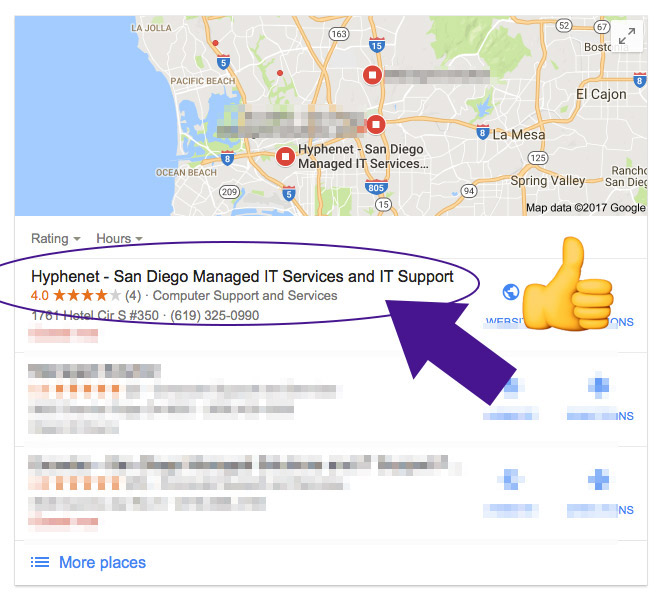
I was finally able to rank a very saturated and competitive phrase in Google Maps in less than an hour.
Keep in mind I had been trying to beat local organic search results for over year. So, instead of ranking the website down below on the first page, I was able to “beat the system” and rank the business #2 in Google maps! This is an amazing accomplishment because Google search only lists the top 3 Google map results. The order of Google’s first page is: (usually) Four Google ad listings, Three Google Map listings, ten organic Google search results, and finally Three Google ad listings on the bottom. It’s a lot of competition to get on Google’s first page, holy smokes!
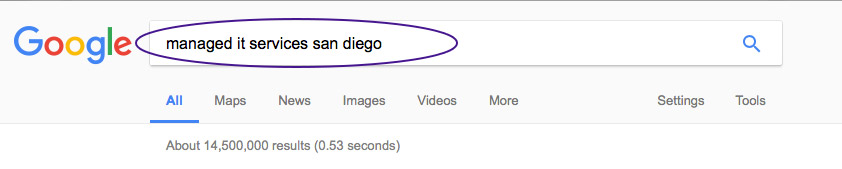
how to rank higher in google maps – Here’s my proof
Hopefully you’ve already claimed your Google+ listing and verified it with Google sending you a postcard in the mail and you entered the verification code. It’s easy. Just do it already…
Step 2: Select the Right Keyword
This is crucial. This is the title that appears in the search listing. People tend to search for the service they need + the city they live.
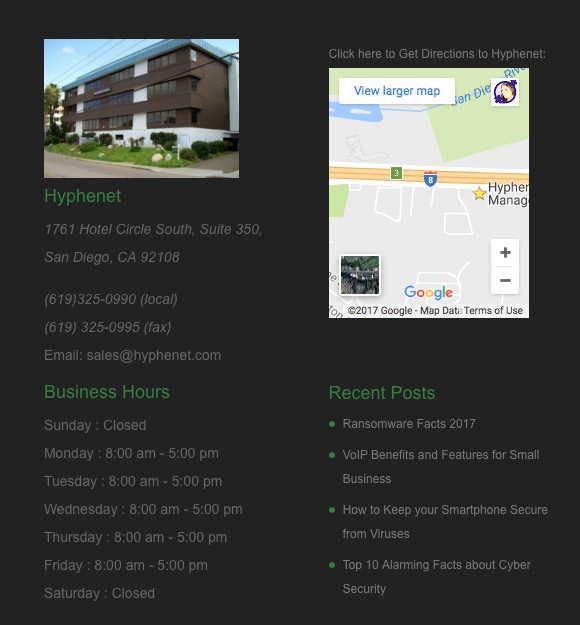
For example: I added my target keywords to the company listed as Hyphenet. Hyphenet – San Diego Managed IT Services and IT Support This step is the secret sauce that ranked me fastest. However, this step only works when you make sure all your other information below is correct:
Step 3: Complete your business details
Enter your business hours
Make sure your website is listed
Make sure your correct address is listed
Make sure you’re using a phone number with a local area code
Make sure you’re listed in the correct category. For example, Hyphenet is listed as “Computer support and services.”
Step 4: Keyword rich reviews
You’ll want to ask your customers for a Google review. Ideally upon completion of services you provide; be sure to give your customer a “customer satisfaction survey.” It can be as simple as checking a box with the service you completed and mention you’d appreciate valuable feedback on their choice of Google or Yelp. Your form might say, Mention the service we provided + your experience working with (your company). This helps guide the customer to using your keywords in their review. You want your customers to mention your services. This helps add valuable keywords to the search results.
Step 5: Add useful images
Customers appreciate seeing useful photos such as:
Photo of the front of the building
Photo that show where they can park
Photo of inside of office
Photo of products
Logo
Extra credit – photo of employees
Step 6: Embed the Google Map on your website’s home page (removed because it made the site slow)
This adds a backlink to google maps and confirms your listing is accurate and useful on your website.
Thank you for reading.
-Jen
Please leave any questions in the comments below.
Need help getting this done? ✅
Please don’t forget that I’m a San Diego SEO expert and happy to help. Contact me today for a quote!
Benefits of Blogging for Business are listed here.
Backlinks and traffic.
From an SEO perspective, producing evergreen content, like blog posts, serves as a valuable and link-worthy resource. The acquisition of high-quality backlinks through your blog can significantly boost your website’s traffic. When you consider it, a business blog stands as one of the most advantageous assets you can establish to enhance your online presence and attract more visitors to your website.
It’s proven that blogs can 10X your website traffic!
It’s powerful, valuable, and so many benefits… it’s worth it!
It’s like having a 24-hour sales person working for you.
You still don’t have a blog for your business? Say Whaaaaat?! No worries! Let’s make it happen!
The benefits of blogging for your business have never been better! If you don’t have a business blog, now’s a great time to hop on the blogger expressway. Let’s go… (I saved you a seat)
There’s so many NEW tools such as plug-ins, and exclusive SEO advantages that only blogging can accomplish. By the time you’re done reading about all these benefits, you’re going to start blogging up a storm. (I promise)
https://www.youtube.com/watch?v=DrAew-AyRDg
1. Helps Convert Blog Traffic into Customers
Business is all about gaining good leads and blogging casts a net of opportunity. Let’s use fishing as an example. The bigger a fishing net you cast out to sea, the better chance you have catching more fish. The more content your blog has, the better chance you have gaining leads.
Every blog post is another opportunity to gain a new customer. Place a “Call to action” on the bottom of your blog post. For example If you have a blog post: “10 Signs Your Computer Has Spyware” Have a call to action on the bottom offering computer support or sell a solution to the problem such as anti-spyware software.
Pro tip: You should blog often, to create more content that your potential customers find useful and sharable.
2. Helps Establish Your Business as An Industry Expert
You know what experts get? Business! When you share helpful content, people see you as an expert. It’s ok to give away your “secret ingredients” Too many business bloggers keep the good stuff a secret… You shouldn’t – just about everyone has access to the internet and they’ll find it somewhere else… so why not you?!
This is true, your content may help answer someone’s question. They’ll see you as an expert, you may have a helpful blog post and see all the steps involved. They may not feel confident about fixing their problem but they would love to hire your business to fix it for them!
3. Creates Sharable Content for Social Media & Newsletters
Blogging gives you the perfect sharable content for twitter, Facebook, pinterest… you name it! Also, if you’re building an email list (you better be) it’s another way to gain traffic from your subscribers. They already like you so they’re most likely going to check to see what’s new on your business blog and website. For example, if you’re a clothing company…. share your latest blog post titled “30 Trending Fall Outfits to Wear Now” This is another great example of an irresistible heading to write for your blog post. Your blog post can talk about how fashionable it is right now to wear boots, neutral colors, etc.
Pro tip: You’ll want to have many pinnable images of people modeling these looks. Because you’re a clothing store, people will want to purchase from you! Plug-in recommendation: I use sumome for collecting email addresses etc. https://sumome.com You may have noticed it on this site, try hilighting some text on this page, a social share box comes up! Hover your cursor over an image, share buttons pop up. It’s also great for collecting email addresses and so much more! Blogging benefits your business with backlinks and shares on social media. The share you receive on pinterest help boost your SEO. You may start seeing tons of traffic coming directly from Pinterest!
I have blog posts that I’ve written years ago that maintain healthy website traffic. It amazes me how creating one high quality blog post can be turned into a marketing machine. Once you create content, it’s there to stay on the web as long as you maintain your domain and web hosting. It really pays to create great useful content. over time, you’ll receive a ton of shares on all different social media platforms. Heck! I have an old pinterest image that has over 100k shares…
Pro tip: Always place a sharable pinterest graphic on your website.
5. Frequently Blogging Boosts Your Website’s SEO
This is HUGE. Blogging regularly can be your ticket to help improve your website’s overall search engine rankings. When you blog often, Google’s bots visit your website more often. Every fresh new page added to Google’s index gives you another chance to show up in search results. When you blog consistently about a topic, Google sees you a high quality expert.
6. Internal links in Blog Posts to Service Pages also Boost SEO
You can “power-up” traffic to your service pages by placing natural links to the related content. I go in-depth about this internal link SEO method here.
Pro tip: Pump up the jam by sprinkling some internal links to your other related useful posts and really see a gain of traffic. See my own example below.
Many business owners are finally seeing the importance and benefits of blogging for your business. Take a look at your competition. I bet they have a blog… study their blog posts that have the most shares. What works for them can work for you, just make sure your content is more helpful and has sharable features. There’s so many benefits of blogging, but I’ve kept it to the top 5 most important.
Thanks for reading, I hope this gets you excited about blogging for your business! If you have any questions or want to add some of your favorite benefits, please list them in the comment. Go for it!
Start your own business blog. Get ready for website traffic! Need help starting your business blog? I can help. I’m a San Diego SEO expert. Contact me today for a quote. Jen
Here’s my guide for listing higher in Yelp search rankings. 17-step checklist Yelp Strategy for 2023.
Updated: 6-12-2023
Whether you’re new to Yelp or you have a business that’s been on Yelp for years, this guide will help you.
I also wrote a guide below to increase your Yelp search rankings if they dropped and you need to rank higher.
Yes, it’s possible to rank higher in Yelp search results!
My success in ranking my clients higher on Yelp gives me consistent referrals for this monthly service. One of my clients heavily relies on Yelp for his local print shop. Thanks to my Yelp SEO, he’s ranking in the top position for multiple keywords! 🙂 🥇
Topics covered:
How to log into your yelp business account
How to rank higher in yelp step by step 2021 checklist
Yelp horror stories
Case study 1
Example Yelp template to ask for reviews
Case study 2
Yelp ranking FAQ
Yelp ranking slip? How to refresh and maintain top rankings
Yelp SEO services I offer
New to Yelp?
Follow these instructions:
Can I rank higher in Yelp?
Yes. Just like Google, Yelp has its own algorithms and updates them from time to time to give their users the most trusted and high quality experience. Ranking higher in Yelp takes a lot of work. Did you get a bunch of bad reviews? Not to worry, it is possible to rank high again if you’ve received some horrible reviews. Please remember this is just the SEO part, you as a business owner need to do your part by creating a great 5 Star customer experience. Now let’s get to the Yelp SEO tips! Yay!
Here’s my 2023 Yelp SEO Checklist:
1: Log into your Yelp business owner account here: https://biz.yelp.com 2: Make a list of keywords you want to rank for in Yelp (use them in step 4) 3: Make sure you’re listed in the appropriate business category / correct business address / Business name 4: Naturally write these keywords into your Specialties Section, Image descriptions ( Keywords + City) 5: Constantly ask happy customers for Yelp Reviews regarding the service you provided (keyword) 6: Respond to each Yelp review you receive – (include a keyword) 7: “Thank” each review (thank box) 8: Update your Yelp page at least monthly with a new photo or updated text (use larger images) 9: Add your Yelp button / Link in your email signature and include it on your other social media mentions 10: Encourage Yelp reviews in your store with signage 11: Download the Yelp app to respond quickly to reviews or questions, the faster, the better! 12: Name your images / describe them with keywords 13: Offer a special check-in coupon code 14: Make sure you write a professional “about the owner” description with a real photo 15: Geotag some images 16: Have an image uploaded for each section: the exterior, the interior… 17: hidden (I provide to my clients only as a service) 18: BONUS – Upload a video! Nobody does this, take advantage.
Bonus paid feature that helps your Yelp rankings: Custom profile image selection. If you upgrade your Yelp business account, you can choose your business profile image. This can be your most highest quality image that represents your business services. Sometimes it will change in the free version which can be annoying, especially if it’s an image you don’t like. People tend to click on the Yelp listing that has a very visually appealing profile image!
Yelp SEO Services I Provide
I enjoy keeping Yelp businesses ranking high in Yelp and responding as the business owner to my clients’ accounts. I also do Yelp SEO on a weekly schedule. Contact me today for Yelp SEO services! I provide the client a list of keywords and a bi-weekly report of the keywords. The usual turn around to start seeing results is around one month. I assume you already claimed your Yelp business listing. So make sure you have that done before doing this checklist.
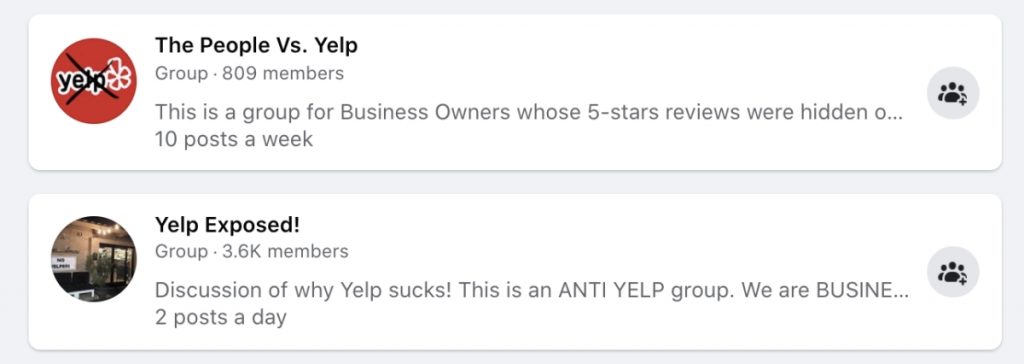
Do you have a Yelp horror story? There’s a lot of business owners that claim Yelp has done them wrong. So many business owners that there’s Yelp support groups on Facebook. As seen in the screenshot below, many business owners are upset Yelp hides many 5-star reviews. I have looked into this matter just by talking to many business owners. They all seem to have one scary element in common. The story goes:
“Once you stop advertising on Yelp paying around $400 / month the majority of your 5-star reviews disappear.”
Yelp’s sales reps are relentless
Many business owners complain how often Yelp calls them to advertise! It’s true. A company I worked for years ago constantly received sales calls.
Yelp Case Study Hyphent
Hyphenet currently ranks #1 for managed IT services for San Diego, CA. It wasn’t easy.
I was able to follow steps 1-15 mentioned above.
Here’s a look at some keywords I went after:
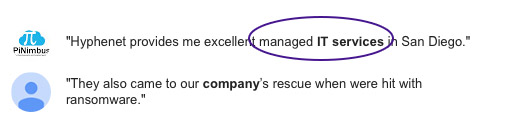
For example, my client is a Managed IT service provider in San Diego. They rank in yelp for “managed IT services” in the San Diego, CA location. I included that keyword and other “techie” keywords that are services they offer. The results took time, but they were worth it.
I Naturally wrote these keywords into the Specialties Section
It’s all about the Specialties section. That’s where the magic happens for organic yelp page rank. Write a helpful description sprinkling your keywords throughout the paragraph(s). Try to sound like a human and not a robot lol. Do NOT just make a long list of the keywords. That can flag your account. After many tests, I learned that whatever keywords you write into the specialties section is what gets crawled for SEO. Don’t bother focusing them in the “History” or “About the Owner” section.
I asked the business owner to underline / circle / list the services on the customer invoices = 44% more yelp reviews with keywords.
If your customer says… “Jim did an awesome job…” that’s too short of a review and there’s no keywords.
Now, if your customer says “Jim did an awesome job helping me with computer support and gaining PCI compliance for my business…” that’s 100% better!
Those keywords can help identify to Yelp the services you’re providing and recommend them in future searches.
Sometimes your customer has no idea what the technical services are called and needs to know those keywords. That’s where you can also gently guide them by making sure you provide them with an email letting them know what services were provided. Email / print it to them in a bulleted list so it’s obvious.
Example Yelp template asking for Yelp reviews:
Hey (customer name), thank you so much for allowing (your company name) provide you the following services today:
Computer Support
PCI Compliance
Server Support
Add New Printer to Network for Accounting Department
We’d LOVE to assist you again soon! Can you do us a favor? We’d greatly appreciate it if you share your experience on Yelp.
My client does not want to have their business name shared because it’s a highly competitive industry. They were once ranking high in Yelp and then all of a sudden they dropped from page 1 to page 40! Luckily, the business owner saw this post and contacted me. I was able to analyze the keywords that people are using and did steps 1-17.
Within 30 days, there was an upward spike in traffic and leads. Some of his keywords are now ranking #1 and some competitive keywords have ranked to page 3. If I keep repeating my steps, I’m sure to see a huge improvement. My client is already happy to have this small boost of Yelp SEO.
(still a work in progress) But I thought I’d share some current results:
Customer contacted me in April 2020 – improved rankings in the progress!
Have Your Yelp! Rankings Slipped?
If your Yelp listing was on page 1 and now it’s on page 2 or 3 you may want to refresh your YELP search rankings. An easy way to do this yourself is by uploading a lot of new high-quality photos and rewriting your Yelp content. I would delete old low-quality photos and keep only the good photo you added to your business. For example, has the front of your store’s appearance changed? Take a new photo. New products? Take a photo!
How to Refresh your Yelp Search Rankings:
1. You need Consistent Reviews!
It’s important to have Yelp reviews but it’s more important to have consistent Yelp reviews. You can have 100 Yelp reviews and have someone outrank your Yelp listing with only 30 Yelp reviews. I’ve seen this happen! You need to have a prominent Yelp sign in your business, coupons, email marketing, and on your website to encourage reviews.
2. You need More Photos!
Your Yelp SEO is a lot like website SEO, you need to increase your dwell time (time users are spending on your listing) By adding more engaging photos. Customers also need to share more photos of their results / photos of your business. So, upload higher quality photos of your business and your team. Refresh your Yelp listing! This also needs to be done consistently.
You can also delete old photos and update them with the new photos.
One weird thing I’ve noticed that Yelp ranking and a correlation to image sizes
Accounts with larger sized photos rank better!
A creative Idea: Entice your customers to take a photo! Have a backsplash with your logo where customers can take a selfie at your business. Here’s me saying “Yes to the dress” when I went wedding dress shopping…
Have a sign that says something snazzy like… “Prove you were here…” or “Please share your experience”…
PRO TIP: This will also help prove your geo-location to Yelp, thus making your reviews MORE credible and LESS likely to be taken down.
3. Customers need to Check-In/call
Nothing proves to Yelp more that actual humans visit your business than a “check-in”
4. Offering a Promotion or Check-in coupon helps!
If your business is actively offering coupons, it may help boost your presence on Yelp listings. It’s another way Yelp sees you’re an active business. Even if it’s a tiny discount, it’s something to entice a use to drum up business!
It should take as little as 1 month to see improvements. These Yelp SEO tips will defiantly make an impact on your Yelp SEO and you should start seeing results in about one month. If you rinse and repeat steps 4-7 each month, you should see more gradual improvement.
Why are some reviews not showing up in Yelp?
Yelp’s algorithms can cause your reviews to not appear in Yelp. The user’s Yelp account may look fake having the following red flags such as: No profile photo, no friends, only one review, international IP, etc.
How should I respond to a bad Yelp review?
You should respond with class and professionalism. Remember, other potential customers will see your reply and judge how you handle unhappy customers. Never be in an emotional state when replying to a bad yelp review. If their review is angry and very reactive, thank them for their feedback and ask them to private message you to provide the solution. This helps prevent a “SCREAMING” argument from them in response. If there’s a simple solution, politely talk to them in the reply offering a solution. Many times, a Yelp reviewer will update or delete their bad review when it’s been answered immediately. In other words, keep your cool! If they delete or update their review, it can have a positive effect on your SEO.
How do you get a high rank on yelp?
Just like any web page, I believe freshness and overall user experience is an overall ranking factor. Quality images that are helpful for the user to make a decision. It’s always obvious whether or not the business owner takes the time to respond and thank Yelp users for leaving reviews. If your Yelp account is receiving a lot of buzz such as check-ins, dwell time on the page, clicks to your website, it can also be a ranking factor. You can achieve this easily by providing a great customer experience, being helpful, professional. and updating your Yelp page with fresh content. Sometimes your Yelp profile photo will change and give you more attention. Follow my 17 point checklist!
Why are my Yelp reviews “not recommended?”
Yelp’s algorithms. flagged the review for several reasons. Yelp receives many fake reviews and wants to put a stop to this since they want to be a trusted platform. Even if the review is from a real legitimate customer, it can become flagged. The user does not have enough friends, reviews, inactive, posting from a flagged IP, user hasn’t posted enough photos, their nor long enough review. This is most common with new accounts. Sometimes Yelp will allow the review to stay for a few days and then remove it. I’ve seen hidden yelp reviews appear again “resurrect”. Another weird Yelp flag is sometimes a review is “too positive” or “too negative” or violates Yelp’s terms. Odd I know!
I hope my How to Rank Higher on Yelp tutorial helps your business as much as my client’s.
Please let me know in the comments section down below or if you have an awesome Yelp page rank tip you’d like to share.
Thanks for reading,
Jen Ruhman
Would you like to hire me to optimize your Yelp listing? Contact me today for a quote! Don’t forget, I’m an SEO expert in San Diego, CA. I can optimize your website to rank higher in Google.
I LOVE Ranking Small Businesses Higher in Google Search Results! My favorite moment is when my clients call me saying… “Jen, whatever you did to our website, we’re finally getting more calls and emails…THANK YOU!!!”