Blogging has become an integral part of digital marketing for businesses of all sizes. It’s a powerful tool for driving traffic to your website and building your brand. But, one question that often arises is, how often should you blog for SEO success?
Is there a magic number or a formula that can guarantee success? The truth is, there is no one-size-fits-all answer to this question. The frequency of your blog posts depends on various factors, including your business goals, target audience, and the type of content you produce. In this ultimate guide, we’ll explore the importance of blogging for SEO, the benefits of regular blogging, and the ideal frequency for publishing blog posts. We’ll also provide some tips and tricks to help you create high-quality blog content that will engage your readers and boost your search engine ranking. So, sit back, grab a cup of coffee, and let’s dive into the world of blogging for SEO success!
The Importance of Blogging for SEO
When it comes to SEO, content is king. Your website’s ranking on search engines like Google is heavily influenced by the quality and relevance of your content. That’s where blogging comes in. By regularly publishing blog posts that are informative, engaging, and relevant to your target audience, you can boost your website’s search engine ranking and drive more traffic to your site.
Blogging also helps you to establish your brand as an authority in your industry. When you share valuable insights, tips, and information with your audience, they begin to see you as an expert in your field. This can lead to increased trust and credibility, which can ultimately lead to more conversions and sales.
Finally, blogging is a great way to keep your website fresh and up-to-date. Search engines love websites that are regularly updated with new content. By regularly publishing blog posts, you signal to search engines that your website is active and relevant. This can help to improve your search engine ranking and attract more traffic to your site.
Now that we’ve established the importance of blogging for SEO, let’s dive into the question of how often you should blog. The truth is, there is no one-size-fits-all answer to this question. The frequency of your blog posts depends on several factors, including your business goals, target audience, and the type of content you produce.
For some businesses, publishing blog posts once a week may be sufficient. For others, publishing multiple blog posts per day may be necessary. Ultimately, the key is to find a frequency that works for your business and your audience.
Why I now prefer updating my old content to posting new blog posts
You put a lot of time writing your blog posts and not all, but many are your bread and butter for getting traffic on your website! These top ranking blog posts slowly lose their appeal in google search results.
Perhaps you’ve had a blog post that was getting a thousand views a day from google search results, but now it only receives less than thirty! You can refreshen these blog posts and make them great again!
It’s actually easier than thinking 🤔 of new content for a new blog post.
A word from the wise. Make sure you’re not bogging the same content.
Beware of keyword cannibalization!
What’s keyword cannibalization? When you’re writing multiple blog posts/pages that are competing against each other. If you have too many pages that are cannibalized, it will slowly poison your website. Google does not know what to rank and your site gets “watered down” for the authority of the topic. I had a client that hired someone to blog for their website and after years of duplicate content, the entire website fell from search rankings from the first page to the fifth etc. I took a look at his site and saw that the person that was blogging for them was lazy and just copying old posts from years ago and publishing them as new. Very sneaky, lazy, and unethical! However, the client confronted the blogger and she promised to stop duplicating old content. I checked on the site in the near future and the blogger was still doing it!
Besides, the blog posts that were getting a lot of traffic were from posts you put a lot of effort into and probably enjoyed writing,
Factors to Consider When Determining Blog Frequency
When determining how often to blog, there are several factors you should consider:
Business Goals
What are your business goals? Are you looking to drive more traffic to your website? Generate leads? Increase sales? Your blogging frequency should align with your business goals. If your goal is to drive more traffic to your website, you may need to publish more blog posts than if your goal is to generate leads.
Target Audience
Who is your target audience? What are their interests and needs? How often do they consume content? Your blogging frequency should align with the preferences and needs of your target audience. If your target audience is highly engaged and consumes a lot of content, you may need to publish more blog posts than if your target audience is less engaged.
Type of Content
What type of content do you produce? Some types of content, such as news and current events, may require more frequent updates than evergreen content. Your blogging frequency should align with the type of content you produce.
The Benefits of Consistent Blogging
Regardless of how often you choose to blog, the key is to be consistent. Consistent blogging has several benefits:
Improved Search Engine Ranking
As we’ve already established, search engines love websites that are regularly updated with fresh content. By consistently publishing blog posts, you can improve your search engine ranking and attract more traffic to your site.
Increased Engagement
Consistent blogging also helps to increase engagement with your audience. When your audience knows that they can expect new content from you on a regular basis, they are more likely to engage with your brand and share your content with others.
Establishing Your Brand
Consistent blogging also helps you to establish your brand as an authority in your industry. When you consistently share valuable insights, tips, and information with your audience, they begin to see you as an expert in your field. This can lead to increased trust and credibility, which can ultimately lead to more conversions and sales.
How to Create a Blog Schedule
Now that you understand the importance of consistent blogging, let’s discuss how to create a blog schedule. Here are some steps you can take to create a blog schedule that works for your business:
Set Your Goals
The first step in creating a blog schedule is to set your goals. What do you hope to achieve through blogging? Is it increased traffic to your site? More leads? More sales? Once you’ve identified your goals, you can work backwards to determine how often you need to publish blog posts to achieve those goals.
Determine Your Frequency
Based on your goals and the factors we discussed earlier, determine how often you need to publish blog posts. Be realistic, and consider your resources and bandwidth. It’s better to publish fewer high-quality blog posts than to publish more low-quality posts.
Create a Content Calendar
Once you’ve determined your blogging frequency, create a content calendar. This should outline the topics and titles of your upcoming blog posts, as well as the expected publish date. A content calendar can help you stay organized and ensure that you’re consistently publishing high-quality content.
Strategies for Maintaining a Consistent Blogging Schedule
Maintaining a consistent blogging schedule can be challenging, especially if you’re a small business with limited resources. Here are some strategies you can use to maintain a consistent blogging schedule:
Outsource Your Content Creation
Consider outsourcing your content creation to a professional copywriter or content marketer. This can help to ensure that you’re consistently publishing high-quality content, without overburdening your in-house team.
Repurpose Your Content
Repurposing your existing content can help to save time and ensure that you’re consistently publishing new content. For example, you can turn a blog post into a video, infographic, or social media post.
Batch Your Content Creation
Batching your content creation can help to save time and ensure that you’re consistently publishing new content. Set aside a block of time each week or month to create several blog posts at once.
Tips for Creating High-Quality Blog Content
Regardless of how often you choose to blog, the key is to create high-quality content that engages your audience and boosts your search engine ranking. Here are some tips for creating high-quality blog content:
Know Your Audience
Before you start writing, make sure you understand your target audience. What are their pain points? What questions do they have? What topics are they interested in? Use this information to create content that is relevant and valuable to your audience.
Use Keywords
Using keywords in your blog posts can help to improve your search engine ranking. Make sure to use keywords in your post title, meta description, and throughout your post.
Write High-Quality Content
When writing blog posts, focus on creating high-quality content that is informative, engaging, and well-written. Use subheadings, bullet points, and images to break up text and make your content more readable.
Use a Call to Action
Include a call to action in each blog post, encouraging your readers to take a specific action, such as signing up for your newsletter or downloading a free resource.
Tracking and Measuring the Success of Your Blogging Efforts
Finally, it’s important to track and measure the success of your blogging efforts. Use tools like Google Analytics to track your website traffic, bounce rate, and time on site. Monitor your search engine ranking for relevant keywords. Use social media analytics to track engagement with your content. Use this information to refine your blogging strategy and improve your results.
Here’s my analogy of blog freshness
Did you know your blog freshness and SEO go hand in hand?
You need lots of great high quality content and it needs to be pruned like a rosebush 🌹 by updating the content, adding new information, not just creating new blog posts.
Don’t let your rosebush become overgrown and uncared for 🥀 .
(Did you like my analogy? Hopefully if you do have rosebushes and a green thumb, you go out and tackle that chore today too. – wear gloves🧤)
If you want to drive traffic to your site I’ll tell you the trick for combining blogging frequency for SEO benefits. (below) 😃
It’s true, blog posts that rank well in Google have these five traits in common:
Blog updated often
High-quality content
Sharable content
Fast loading
Mobile friendly
In-depth content
Great user experience
If your blog has all 7 of these characteristics, your blog is going to be booming with traffic! Unfortunately, these 7 traits take a lot of work to make happen.
Just getting “into the mood for blogging” can sometimes be your biggest obstacle!
Just dive in there 🏊♀️ already!
Content to add to old blog posts:
Just adding new content is great. 👍 Adding updated content that’s newsworthy is even better! The recommendations below not only update your content but also enrich it for a better user experience. I recommend you add some of the following that may apply to your blog post or page:
Images – maybe an update on your progress using a product
FAQ Schema – Adding new related questions with answers
In-depth content – Naturally sprinkle in related keywords
Videos – Embed your Youtube Videos into the related content
Add a story – If appropriate write why you wrote this post
Add related links to higher authority sources
Add bullet points – such as what you’re reading 😉
Add H2, H3, H4, tags to break up your text and add readability
You need to blog as often as you can (keeping quality in mind)
Don’t blog for the sake of having a new post
As a matter of fact, STOP publishing short blog posts. Google calls short blog posts “thin content”. There’s not much text for google to “grab on to” and analyze. Adding more text creates a more in-depth blog post, making you look like an expert! Not only that, but your content also becomes more trustworthy too!
When someone finds your blog post that answers their question and many more related questions, they may actually bookmark and share your page.
If your blog post does not have all five traits, you’re just going to be wasting your time and your dedicated reader’s time. Your blog post most likely won’t rank well in google either.
When you take the time to write a new blog post, you want to make sure it lands on google’s first page. Taking your time to write a well-written blog post that someone will actually learn something from and want to share – that’s your best bet. If you can make this happen, run wild and update daily! If you can’t, take your time with your blog post, even work on it throughout the week to develop the blog post into that high-quality slam dunk.
The trick for combining frequent blog post updates For SEO benefits
It can be overwhelming cranking out a fresh new blog post every day, so don’t! Just rewrite/update the old ones. I have some tips on how you can combine a frequent blog post strategy for maximum SEO benefits.
Blog about one main keyword and naturally add long-tail keywords – Let your blog post have one specific question and answer it from all aspects. This helps you concentrate on one topic rather than getting overwhelmed about sub topics.
Go “in depth” on one topic – As you see on this blog I have many posts about instagram, this casts a wider net for SEO. The more content I have about the topic, gives me my website authoritative points for being a social media maven.
Websites that update often, (once a week) sends a ranking factor to Google to come back and crawl your content regularly. This can help your other blog posts gain momentum and boost their ranks. I have also experimented by slightly rewriting an old blog post and republishing it – changing the time stamp. The blog post that was once old was new again and gaining lots of blog traffic like it once did.
Stale content?
Yuck! 🤢 Who left that blog post in the refrigerator for two years?
Ya, it’s kinda like that. Joking. Ok I admit that analogy was lame.
You need to take those blog posts out of the refrigerator and make meals out of them or throw them away (delete them if they’re outdated and not helpful)
Blogs that have not updated in a long time (1 year or more) usually see a decline in blog ranks. However, this is not the case if your content is being shared on social media! If you’re constantly promoting your content, you might even see an increase in traffic.
I hope I helped answer how often you should blog for your business. Remember, the more high quality content you have, the better chances you have receiving organic google traffic to your website. Having a blog that has hundreds of high quality posts also ensures you gain a boost in website traffic. Overall, a good rule of thumb is to publish/update at least one high quality blog post a week.
There are many set blogs that recommend publishing new posts daily. Sure it seems amazing, but may not fit with your website. If you have a news website such as a health news site, yes you should update often. However, if you’re a small mom and pop donut shop, you’re probably not going to update daily.
“But I don’t have time to be blogging or updating old content.”
Well guess what? I do have the time to update your blog posts… hire me already! (I’m an SEO expert in San Diego.)
In conclusion, blogging is an important tool for SEO success. The frequency of your blog posts depends on various factors, including your business goals, target audience, and the type of content you produce. Regardless of how often you choose to blog, the key is to be consistent and create high-quality content that engages your audience and boosts your search engine ranking. By following the tips and strategies outlined in this guide, you can create a successful blogging strategy that helps to drive traffic to your website and build your brand.
How to Find Long Tail Keywords for Free: Boost Your Website Traffic
As experts in the field of search engine optimization (SEO) and copywriting, we understand the importance of finding long tail keywords that can help your website outrank competitors on Google. In this comprehensive guide, we will show you effective strategies to discover valuable long tail keywords without spending a dime. By incorporating these keywords into your content, you can drive targeted traffic to your website and enhance your online visibility. So, let’s dive into the world of long tail keywords and unlock the potential for success!
What Are Long Tail Keywords?
Long tail keywords are specific keyword phrases that typically consist of three or more words. Unlike generic keywords, which are broad and highly competitive, long tail keywords are more precise and targeted. They help you attract visitors who are searching for exactly what you offer, increasing the chances of conversion. For instance, while the keyword “shoes” is highly competitive, a long tail keyword like “comfortable running shoes for women” narrows down the search intent and brings in more qualified traffic.
The Benefits of Long Tail Keywords
Lower Competition: As mentioned earlier, long tail keywords are less competitive compared to generic keywords. This means you have a better chance of ranking higher in search engine results pages (SERPs) for long tail keywords, as the competition for those specific phrases is lower.
Higher Conversion Rate: When users search with long tail keywords, they often have a clear idea of what they are looking for. By optimizing your content for these targeted phrases, you attract visitors who are more likely to convert into customers or take desired actions on your website.
Improved Relevance: Long tail keywords allow you to align your content with the specific needs and interests of your target audience. By addressing their unique queries or concerns, you establish your website as a reliable source of information, earning their trust and loyalty.
Strategies to Find Long Tail Keywords for Free
Now that we understand the importance of long tail keywords, let’s explore some effective strategies to find them without spending a penny. These methods will provide you with valuable insights into what your audience is searching for, helping you create content that resonates with their needs.
1. Google Autocomplete
One of the simplest ways to discover long tail keywords is by utilizing Google’s autocomplete feature. When you start typing a query into Google’s search bar, it suggests popular search terms based on real user searches. These suggestions often include long tail keyword variations that can inspire your content creation.
To leverage this feature, begin by typing a relevant keyword related to your industry or niche. Take note of the suggestions that appear in the dropdown menu. These suggestions are based on actual user queries and can give you valuable insights into what your audience is searching for.
2. Related Searches
At the bottom of a Google search results page, you’ll find a section titled “Searches related to…” This section provides you with additional keyword ideas related to your initial query. These related searches can help you uncover long tail keyword variations that are relevant to your content.
Take the time to analyze these related searches and identify keywords that align with your website’s topic or offerings. By incorporating these variations into your content, you can attract more targeted traffic and potentially outrank competing websites.
3. Online Tools and Resources
In addition to utilizing Google’s built-in features, there are various online tools and resources that can assist you in finding long tail keywords for free. These tools provide valuable data and insights to help you optimize your content and improve your search rankings.
Some popular free tools include:
Google Keyword Planner: This tool allows you to explore keyword ideas, search volume, and competition levels. It provides valuable information to help you refine your keyword strategy.
Answer the Public: By entering a keyword, this tool generates a visual map of popular questions and phrases related to your query. It’s a great resource for identifying long tail keywords based on user intent.
Ubersuggest: Ubersuggest offers keyword suggestions, search volume, and difficulty scores. It helps you uncover long tail keywords and assess their potential for ranking.
By leveraging these free tools and resources, you can uncover a treasure trove of long tail keywords that will strengthen your content strategy and boost your website traffic.
Implementing Long Tail Keywords for Success
Finding long tail keywords is just the first step; implementing them strategically in your content is equally important. Here are some best practices to ensure you maximize the benefits of incorporating long tail keywords into your website:
Quality Content: Always prioritize creating high-quality, informative, and engaging content that aligns with the search intent behind your targeted long tail keywords. Ensure your content provides value to your audience and answers their queries effectively.
Keyword Placement: Incorporate long tail keywords naturally throughout your content, including in headings, subheadings, meta tags, and within the body text. However, avoid keyword stuffing, as it can negatively impact the user experience and your search rankings.
Diverse Keyword Variations: Don’t limit yourself to a single long tail keyword. Identify related variations and synonyms that can enhance your content’s relevance and visibility. This strategy allows you to capture a broader range of search queries.
Monitor Performance: Regularly analyze the performance of your content and the long tail keywords you’ve targeted. Identify which keywords are driving the most traffic and conversions, and make adjustments as needed to further optimize your strategy.
Conclusion
By understanding the power of long tail keywords and implementing them strategically into your content, you can unlock significant potential for outranking competitors and boosting your website’s traffic. Remember to conduct thorough research, leverage free tools and resources, and optimize your content based on the long tail keywords you discover. With consistent effort and a data-driven approach, you can rise above the competition and establish your website as a trusted authority in your industry.
What are the best FREE online keyword generators?
These 3 links are my favorite / best free longtail keyword generators:
How to Find Long Tail Keywords for SEO. Fast free and easy. Quickly increase your website’s traffic by using the right long tail keywords for your site.
Today I’m showing you some FREE ways to generate long tail keywords.
Find the perfect long tail keywords for SEO and YOUR Website
Your website probably already has lots of helpful content and great quality photos.
BUT, you’re not getting the traffic you deserve. Take advantage of long tail keywords today! Keep reading step by step how to find long tail keywords for SEO. (search engine optimization) or what I like to also call (search experience optimization -great article via Forbes)
Where to place the long tail keywords on your site
Best of all you can modify your old blog posts and start creating new blog posts using this SEO method.
Stop trying to rank for competitive keywords, start competing for easier to rank keywords instead.
What’s the quick fix to get more website traffic? Long tail Keywords!
You’re probably heard the term “keywords” a million times by now…
But let’s be honest… simply typing in “keywords” into your meta description will not do anything….
Those days of SEO are long gone.
Google’s algorithms have evolved into providing the user a high quality experience. The average user is now more detailed in their searches. People want immediate content gratification.
Long tail keywords take advantage of very specific search traffic. Instead of trying to rank for a broad range keyword like “laptop repair” you’re targeting a more unique search phrase that has more keywords. It’s essentially a longer phrase typed into Google search. This is beneficial for your website traffic because there’s less competition for long tail keyword phrases.
Instead of using these short BASIC keywords “Laptop Repair”
Use this LONG-TAIL keyword instead “Toshiba laptop repair San Diego”
Long tail keywords examples:
“laptop screen repair San Diego”
“Sony laptop repair San Diego”
“HP laptop repair San Diego”
Alienware laptop repair San Diego”
Same day laptop repair San Diego”
How to create long tail keywords – the EASY quick way how to find the PERFECT long-tail keywords for YOUR WEBSITE!
Here’s how to choose long tail keywords for your website. Let’s say you have a local business that offers laptop repair in San Diego, CA. On your website, don’t just make a “laptop repair page” Make more specific pages using the long tail keyword method. Forget using the Google keyword planner… look for organic long-tail keywords in Google search yourself. This is great for both local long-tail keyword research too.
Go to Google.com and type in the basic / general keyword your potential customers would type for example: laptop repair San Diego
Scroll to the bottom of the page and look at the related search terms. These are long-tail keywords! For example: laptop screen repair San Diego
OK, Now Where Do I place these Long Tail Keywords?!
Now that you know How to Find Long Tail Keywords for SEO, it’s time to place them throughout the code and content. You can also use a free SEO plug-in such as Yoast SEO. The plug-in will actually guide you where to place the long tail keyword. If you don’t want to use the plug-in, the general instructions are below.
You’re going to want to incorporate this long tail keyword in specific places of your website to see it go into effect. Copy/paste it into the following:
Select 1 main long tail keyword such as “Toshiba Laptop Repair San Diego” and make this the Title of your page/blog post.
the URL of the page: www.yourwebsite.com/Toshiba-Laptop-Repair-San Diego
In the Meta description
The <H1> tag of your content
The image ALT tags
The name of the images
First sentence of the blog post
Naturally occurring a few times in the copy with related text around it
Is there still too much competition for this long tail keyword? It can happen… try modifying the long tail keyword.
For example: “Toshiba laptop screen repair San Diego”
This is a perfect example of a long-tail keyword that is extremely catered to the user. This is guaranteed to have little traffic/competition. Best of all you will more likely get an increase of website traffic.
You’re reading: How to Find Long Tail Keywords for SEO. -You may also enjoy reading:
You might already be getting long tail search traffic to your website – now optimize it and rank on the first page
You might already receive small doses of long tail search traffic but you’re not optimizing it enough. You should also experient. Perhaps you’re ranking on the third or fifth page of Google for a long tail search. Perhaps you have a blog post titled “Benefits of Responsive Web Design” However, it’s ranking on the fifth page of Google search. If you check your search traffic, you can see all the keywords people used to find your site. See them for free using the free plug-in JetPack by WordPress. Or of course by using Google analytics.
Let’s make the long tail keyword even LONGER
You may notice you’re ranking better for “Advantages of Responsive Web Design” Try changing your title to something more specific such as “Business Advantages of Responsive Web Design“. Optimize your blog post more about the business benefits and now you’re ranking #1! You’re welcome.
Modify Low Ranking Blog Posts with Targeted Long Tail Keywords!
You can generate tons of high quality content focused on long tail keywords. You can also modify your old general blog posts into more razor sharp focused content. This content will more likely receive more traffic and rank higher for a targeted phrase.
BONUS BENEFIT: Here’s where the MAGIC happens
You probably already have a page “Laptop Repair San Diego” Now you can link all this content together.
Now when someone does land on the “Toshiba laptop screen repair San Diego” You can have breadcrumbs or links to your “Toshiba Laptop Repair San Diego” This will help both pages rank higher in Google. Best of all it will also help your basic keyword “Laptop repair San Diego”
Once you have a high ranking blog post, you can place internal links to some of you hard to rank pages. 🙂 “Related content” (just like how I included an internal link to my “How to Rank Higher on Yelp SEO article above)
Hopefully after reading these examples, you will now know how to create long tail keywords and put them into good use – gaining traffic.
Thanks for reading How to Find Long Tail Keywords for SEO. The Fastest and easiest way how to increase your website’s traffic.
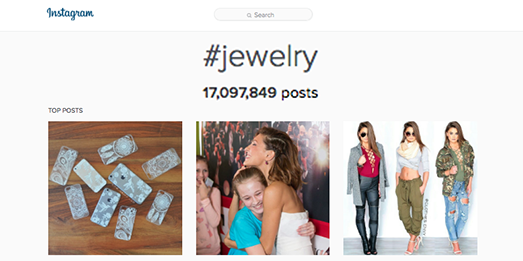
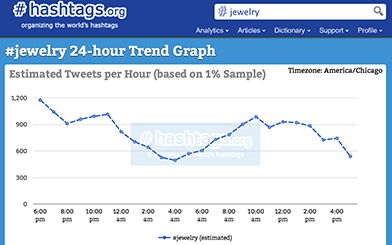
Hashtags for Jewelry that will get your jewelry noticed on Instagram, Twitter, Facebook, TikTok, and Tumblr in 2022.
Hashtags for Jewelry Instagram Business (2025 Edition)
Updated for 2025 | SEO Tips
Hashtags for Jewelry That Will Get You Noticed on Instagram and Beyond If you’re a jewelry designer or marketer, leveraging the right hashtags on Instagram, TikTok, Facebook, Twitter (X), and Tumblr can boost your visibility, likes, and ultimately, sales.
Whether you’re selling handmade earrings, engagement rings, or luxury watches, hashtags are your secret weapon to reach an engaged audience looking for your products.
Why Are Hashtags Essential for Jewelry Businesses? Hashtags act as keywords on social media, helping potential customers discover your posts. By using a combination of trending, niche, and evergreen hashtags, you can compete with larger brands, regardless of your follower count.
In 2025, hashtags continue to play a crucial role in social media marketing, so staying updated is essential. Let’s explore the best jewelry hashtags for different categories and how to use them effectively.
The BEST Handmade Jewelry Hashtags (2025)
For handmade jewelry creators, these hashtags will help you attract customers who value craftsmanship and uniqueness:
Stay Trendy: Keep up with current trends by researching hashtags regularly. Platforms like Instagram suggest related hashtags, so use them to your advantage.
Mix It Up: Combine high-volume hashtags (e.g., #Jewelry) with niche ones (e.g., #EcoFriendlyJewelry) for a balanced reach.
Customize: Adjust these hashtags based on your brand’s voice, product, and audience.
Experiment: Track the performance of hashtags to find what resonates most with your followers.
How Social Media Can Boost Your Jewelry Business in 2025
Social media is your virtual showroom. With hashtags, stunning product photos, and engaging captions, you can:
Drive traffic to your online store.
Build a loyal customer base.
Compete with established brands.
Bonus Tip: Place your website link or Etsy store in your Instagram bio to convert profile visitors into customers.
Final Thoughts: Using Hashtags Effectively
Remember, hashtags alone aren’t enough. Pair them with high-quality photos, reels, or stories to captivate your audience. If you’re a beginner, start by copying and pasting the sets above and experiment until you find the perfect mix for your brand.
Are you ready to take your jewelry business to the next level? Bookmark this page and revisit it for the latest trends. Success is just a hashtag away!
Share This Post: Know someone running a jewelry business? Share these hashtags with them and help their business shine!
This is true no matter how many followers you have. You might have noticed how important hashtags have become lately for every industry and using specific jewelry hashtags will work by finding customers that are actually interested in jewelry or shopping for jewelry.
I have helped small and large businesses start marketing their jewelry online by providing them a list of the best hashtags for jewelry and top instagrams for jewelry.
Using the BEST Hashtags for Jewelry
I have a list of the best hashtags for jewelry you can copy and paste into your instagram account. Bookmark this page.
On instagram, you can use up to 30 hashtags per post. I recommend you take full advantage of using all 30. You can experiment using these and make them your own by changing some and seeing what works for your jewelry business.
Using your phone: Touch and hold to copy jewelry hashtags | Paste into Instagram
First of all, hashtags are the “keywords” for social media platforms such as instagram, twitter, Facebook, and Tumblr. Using the best hashtags for jewelry will level the playing field for your small business! You can literally compete with large jewelry stores this way no matter how many followers you have.RELATED POST How to Get Your Business Started on Instagram
Using Jewelry hashtags on your instagram posts are perfect for anyone selling jewelry. If you have an Etsy store, online retail store, or even a local jewelry shop, you should be using these specific jewelry hashtags. BTW, make sure you place your online store’s website or Etsy page in your instagram profile.
Top Instagrams For Jewelry:
using Hashtags for Jewelry Effectively
Take a look at these people on instagram. Their instagram accounts are properly set up using hashtags geared to their specific type of jewelry they’re marketing on instagram. Study their photos and hashtags because they’re doing a great job.
If you know someone that sells jewelry online, please share these hashtags with them. Or if you know someone successful selling handmade jewelry by marketing on instagram, I’d love to feature them.
How to get Started Using Instagram for your Local Business
Instagram isn’t going anywhere and just keeps on getting better and bigger. If you haven’t started your local business on instagram yet, there’s no better time than now to start enjoying the latest instagram upgrades and benefits. And if you are using instagram already, these advanced local business tips for your company’s instagram will give you a competitive edge.
This guide is tailored to getting your local business started on instagram, If you’d like a broader audience, check out my ultimate guide how to get your business started on instagram.
How would you like your small local business to gain global traffic?
Sure, you can target just local business and I’ll show you how, but it’s also possible to gain global traffic! Instagram constantly impresses me with its capabilities to level the playing field for both small local business and large global businesses. That’s right, you’re competing with big brands using the same app. I have seen small local businesses succeed in marketing a service or product on instagram that literally sells out overnight! I have witnessed small business’ beauty salons services become overbooked and apparel becoming out of stock after instagram posts are published.
Today you can literally grow a small business by networking on instagram. It really is exciting to think of all the possibilities and witnessing people becoming “quit your daytime job” successful from instagram.
I’m going to let you in on some instagram hacks for local business
These local business instagram tips will help you get started on the right foot and ahead of competitors. realistically, you will gain local followers, global followers, brand exposure, and revenue. And with this recipe, if If you’re really lucky , you could have an instagram image go viral and gain overnight stardom.
That’s right, instagram – the free social media app for sharing photo rich content, descriptions, and hashtags.
Take your pick! Instagram is capable of delivering large truckloads of consumer traffic to your brick and mortar business or to your online retail store
Let’s make sure your instagram is optimized correctly from the start
Setting up a Local Business Instagram Account
Be sure to use your company’s name as your instagram user name. Do not use a cute or sexy username, keep it professional. If you run into the unfortunate event seeing your business’ name taken already on instagram, don’t worry follow this user guide to take action. If your local business is not your username, I suggest you change your instagram username. Once your instagram username is setup properly, let’s set up your profile correctly.RELATED POST How to Rank Higher on Yelp FREE
Instagram Profile Page Optimization
Link your website: The instagram profile page is essential for properly optimizing your business page. This is the only place you can place a link to your website or website landing page to drive targeted traffic. It’s crucial that your website is responsive. A responsive website adapts perfectly to your mobile device. The user should not have to struggle zooming in and out of your content. It always amazes me how many small businesses don’t list their website on their profile page or even worse they don’t have a website.
Profile picture: Make sure you have a high quality profile photo of your logo. Meaning, make sure it’s not blurry or pixelated. Make sure the photo looks good with both rounded corner and squared corners because your profile photo will be displayed squared on the web and rounded on mobile devices. Your profile photo cannot be more than 110×110 pixels. Your photo updates cannot be larger than 612×612 pixels. I recommend that you don’t alternate profile photos. People will slowly but surely recognize your profile photo and company name. Changing one of them could cause you to lose followers.
Build your local instagram powerhouse
You will need to be self disciplined when it comes down to what to post, when to post, and how to engage.
Only post high quality photos you’re proud of
Post consistently
Find the best time to update. What time did you post your most liked content?
Repost your fan’s photos and give them credit
Answer your audience’s questions
Get to know your fans
Post some local photos of your surroundings
Use your city as a hashtag
Follow local people that use your city’s hashtag
Have contests
Recycle your instagram content
It can be a chore to create amazing posts sometimes when you’re not inspired. Study what’s receiving likes for you business’ instagram page, go that direction. Give your fans more of what they want. You can even upload photos you already posted but apply a different filter.
You can take at least thirty minutes a week and plan your instagram posts ahead of time. Plan a weeks worth of high quality photos that will get your audience intrigued. Perhaps pick a theme of posts for the week. Having a saved library of stored photos ready to post at anytime is a smart idea. This way you can use these saved photos when you don’t have time to photograph or you’re stuck in the office all day or doing business errands. You can mix it up, take fresh photos and weave in your saved photos.RELATED POST How to Get Your Business Started on Instagram
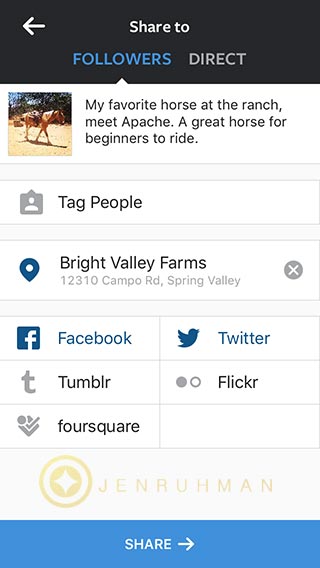
Using Instagram for your Local Business is done best when you geotag your photos. This will help you gain local instagram followers and attract local instagram users walking into your local business. Do this with every photo you post when you’re at your local business.
How to geotag instagram photos
Make sure your location settings are turned on
Click Add to Photo Map
Find your business location
Click on your location
Now all your instagram followers can see what else customers have tagged in the location, simplify by clicking on your location link.
Follow Local, Gain Local
You should follow local instagram users that geotag their location at your business. Get creative, find local followers by searching your city’s hashtag. Have a nearby local competitor? Follow their followers. When they see who’s following them, they may thank you and learn about your competitive services on your page.
Include instagram on your current marketing channels
You should include your social media usernames on all your marketing material. Everything from in store signage, flyers, postcards, coupons, email marketing, on your website, and mention your instagram account on your twitter and Facebook page.
Creative Ideas Using Instagram for your Local Business
Model your product at your local landmarks
Geotag your local photos
Repost your local followers photos
Network Locally
Do you have any local followers that have a HUGE following? Contact them, offer them free services or products in return for promotion on their instagram account and social media feeds. These people are also known as influencers. Find a few that you think will do a high quality job and watch for an increase of followers and foot traffic. Nearby local business owners will most likely like to network and boost foot traffic in the area too. Collaborate and ask them to share your business on their page and vice versa. Perhaps they can promote your products or services. It’s usually a win win situation.RELATED POST How to Get Local Instagram Followers
Have an instagram contest/giveaway
Contests can run like wildfire when you have something amazing you’re giving away for free! Free products or services will engage and attract a large amount of attention. Word of mouth about the contest generates brand exposure like nothing else I’ve seen on instagram. Instagram users LOVE a good contest. Don’t forget to promote the winner of your contest to gain more credibility. You will also want to select a winner that has a huge list of followers because they will share the news about their win. You will usually want to have a custom graphic made that shows everything the contest is offering, include your logo, and include the word contest or giveaway. When you post the photo, be sure to geotag, ass some has tags such as #contest #giveaway #free #freebies etc. Give instructions on your description by having users repost the photo and “tag 3 friends” for extra points. Users will most limey be glued to your page waiting to find out who won the prize.
Interact
Use instagram to communicate and engage your customers. Talk to them, like their photos. Have fun on instagram! Don’t limit yourself by only talking to local instagram users, talk to everyone you follow.
Local Hashtags
Don’t forget to use local hashtags. When you update, be sure to use your city or state.
Any ideas or suggestions? Please let me know in the comments.
And there you have it some hacks for using instagram for your local business.
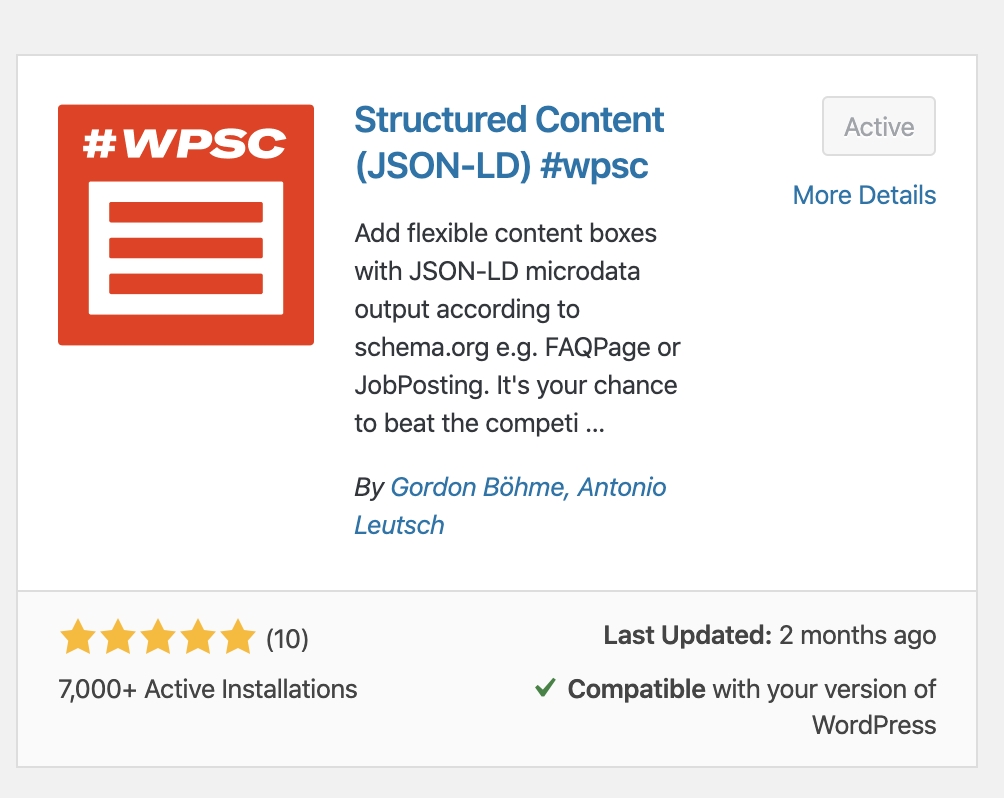
This is my favorite FREE WordPress plugin to empower any WordPress website with schema markup. It immediately adds JSON-LD schema to a blog post! You can install it and enter your content in less than 3 minutes.
Why are SEO professionals excited about featured snippets?
Featured snippets gives lower ranking pages another chance to list at the top of the first page of Google. This is all done with little effort. You can easily get there with the WordPress plugin I recommend called: Structured Content (JSON-LD)
I’m using this post for a quick example. As a trusted SEO Specialist, this is my recommendation!
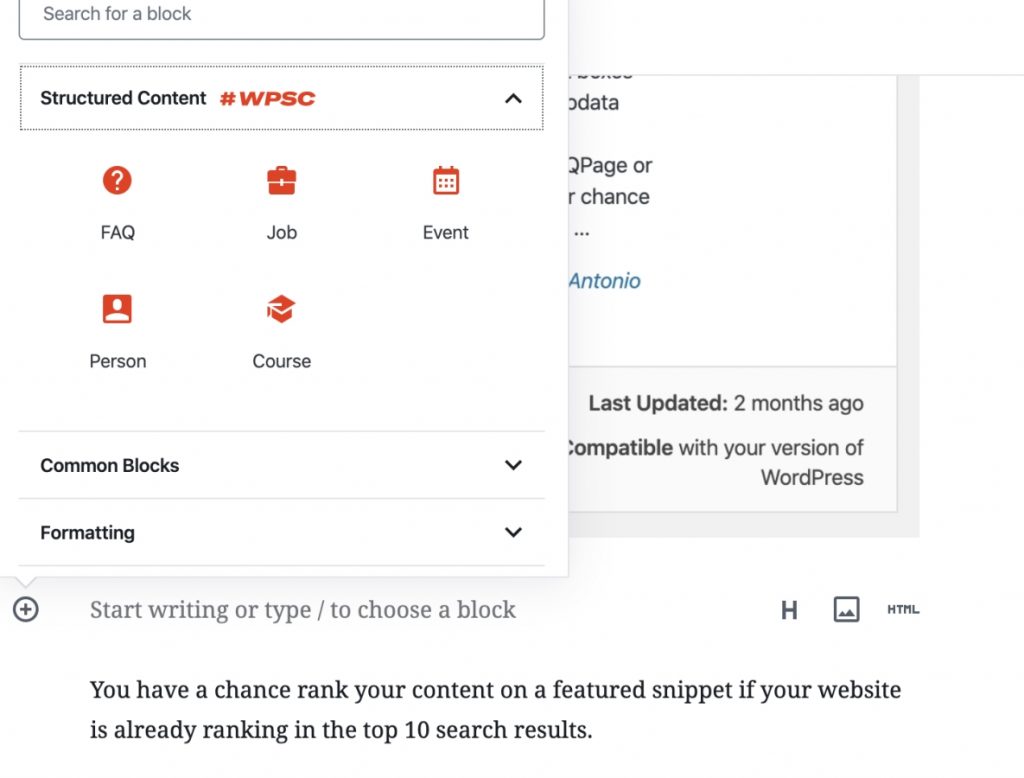
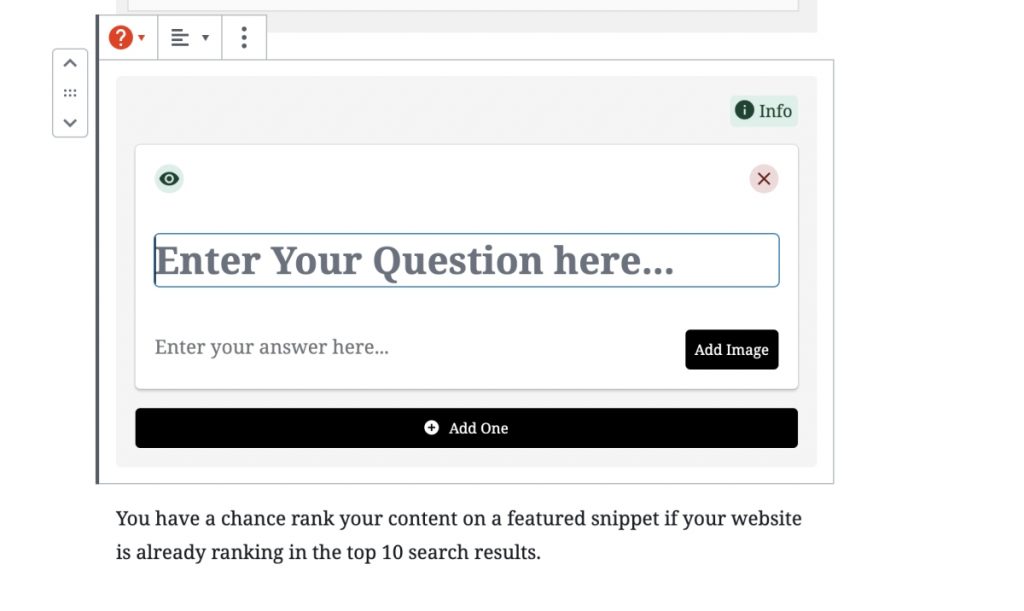
Here’s the plugin in action below and the steps how to use this plugin:
What's the Best Plugin for featured snippets?
Structured Content (JSON-LD) #WPSC plugin by Gordon Bohme, Antonio Leutsh. It uses JSON-LD – Google’s preferred markup.
Step 1
In your WordPress dashboard go to: Plugins
RELATED POST: How to Rank Higher in Google Maps
Step 2
Search for “Structured content”. You’ll see the red #WPSC plugin by Gordon Bohme, Antonio Leutsh.
Step 3
Install the plugin and click “Activate”
RELATED POST: SEO Checklist for New Blog Posts
Step 4
In your Gutenberg editor, add a new block > FAQ
Step 5
Enter your question and answer for your snippet. Don’t forget to add an image.
RELATED POST: SEO Facts Business Owners Overlook
Finished!
That’s all you have to do to get your blog posts ranking in Google’s featured snippets! However, you have to already be ranking in the top 10 SERPS in order to be pre-selected to appear in Google’s featured snippets.
Want to increase your chances being a featured snippet?
Start by conducting a Google search using the query you aim to be featured for. Analyze the existing featured snippet format; if it’s a list, create a well-structured list, and if it’s a table, generate an HTML table accordingly.
Implement structured data using a plugin like “Structured Content #WPSC” by Gordon Bohme and Antonio Leutsh. This helps search engines better understand your content and increases the chances of being featured.
Incorporate related questions and answers within your article. Addressing additional queries related to the main topic can increase the relevance of your content.
Examine the featured snippet of your competitors that is currently ranking. Refine your content to make it more informative, concise, and valuable, surpassing the competitor’s snippet in terms of helpfulness and clarity.
By following these steps, you can optimize your content for featured snippets and improve your chances of being prominently featured in search results.
RELATED POST: The Best FREE Longtail Keyword Generators
That’s it. It’s officially my favorite plugin and I think it’s the best plugin for Ranking in featured snippets.
Thanks for reading!
Please leave any questions in the comments section below!
If you’ve browsed stock photography websites offering high quality photos for $33.00 a pop, you gag.
Forget those “fancy schmancy” stock photo sites…
Check out these 30 bad-ass websites with the freshest and 100% FREE high quality stock photos.
(they’re totally legit and legal too btw.)
I know the struggle…
If you’re new to blogging and can’t afford paying for stock photos or a subscription, I hear ya. That was once me. Heck, I still love using free stock photography to cut costs. 😉
It’s crucial your new blog and social media has stunning images that make people instantly want to share your new blog post. Also she a tweet without even visiting your site. (it’s true)
This is my hand-picked collection of free photo websites that have creative large high quality images you can download for FREE.
Large photos – perfect for trending parallax backgrounds
Videos – another huge web design trend I’m loving
Vector / Illustrations
High Quality
(all links tested and working as of 10/1/2016)
1. PEXELS
pexels.com This free photo website has stunning images. They also add 100 new photos every day. This site keeps getting better. I’ve been using it for the past two years.
2. Pixabay
https://pixabay.com This site is my “go to” for downloading free videos for my web design. I mentioned the parallax web design trend, go here. There’s also nice illustrations and vector graphics all for FREE. Yay! I can always depend on this site’s powerful search tool of I can’t find an image anywhere else for free.
3. Gratisography
http://gratisography.com
This has some attention grabbing images that are kinda bizarre but cool. Perfect for attention grabbing tweets, pins, and blog post header images. I’ve seen a lot of blogs use this website.
4. Picjumbo
https://picjumbo.com I appreciate that this free image site has original photos. All nice big high quality photography. This website has some nice photo categories. I like checking out their tech photos when I blog for an IT company website.
5. New Old Stock
http://nos.twnsnd.co/
If you need vintage photography, this is the website for you! Black and white photos and even sepia colors, you name it. Searching is easy peasy. Fun creative photos to change up the mix.RELATED POST 10 Creative Ways to Use Instagram for Business
6. Snapwire Snaps
https://www.snapwi.re/ You have to check out the photo collections on this website. I love how it’s organized. Cooking, Coffee, Silhouettes, Smiles, Fitness, Fashion…and so many more! its all nicely organized. Amazing images.
More creative video background downloads and free photos. Very creative and useful original collections. I highly recommend these photos for your blog. They’re clean and high quality. Very professional looking photography.
8. Jaymantri
http://jaymantri.com
All these stunning photography were taken by Jay Mantri. Probably the most unique free photo website in this collection. Lots of architecture and close ups of doors,textures… perfect for someone out there.
9. Stokpic
http://stokpic.com Its a great site with easy to navigate categories. Only bummer, you have to register. Worth checking out. I wish they showed more photos per page. I love their fashion collection. I could see these images being used on pinterest.
10. Unsplash
https://unsplash.com Interesting free photo website that keeps growing. Be sure to browse the featured collections.
11. ISO Republic
http://isorepublic.com
Another great free photo resource for web designers that need high quality images. I also love their category of free textures.
12. Picography
http://picography.co/ Just a collection of unorganized photos, however they’re high quality. I wish these free photos had categories. Some real weird photos but hey everyone needs a little weirdness now and then right?
13. Get Refe
http://getrefe.tumblr.com
Great photos, I just don’t like the website usability. There’s some really unique images that catch your eye!
14. Foodies Feed
https://foodiesfeed.com
If you have a food blog… or as they say foodie blog 😉 this site’s for you! Also great if you’re the owner of a health blog, fitness blog, or just need free food related photography. Great hidden gem.
15. Travel Coffee Book
http://travelcoffeebook.com Jaw dropping images of traveling, nature, architecture. Everything is on one long page, sorry no search function. This site has such lovely graphics, you might get inspired to travel too.
http://jeshoots.com This site is bad-ass for having free mockup photos and free photoshop .PSD files. Great if you need a photo of someone holding an iPhone and you want to change the screen etc.
18. CupCake
http://cupcake.nilssonlee.se A small batch of free photography by Jonas Nilsson Lee. Fun to check out. Many scenic photos.
19. MorgueFile
https://morguefile.com/search/morguefile/1/most
This free photo site has tons of photos, all unique. I love how it displays how old each photo is. Check out the most popular / most downloaded images. There’s some great shots. So many images! I searched, typed in “colorful” and was delighted how amazing this site is.
20. Kaboompics
http://kaboompics.com
Clean, high resolution free photos that are all tagged and easy to find. I love the collection of desks with paper, pencils, phones all neatly placed.
21. Freeimages
https://freeimages.red
This website contains a very large selection of photos, but also videos! They offer the opportunity to contribute and get paid for it as well.
22. Life Of Pix
http://www.lifeofpix.com I’m happy to find this free photo site, good layout and they even have free videos! Beautiful images I’m sure you’ll want to place some of these images into your blog.
23. StockSnap
https://stocksnap.io
I thought this was pixels for a second. This has amazing photos… omg. The business category has nice photos. I’ll defiantly be using these in the near future. I love their categories, especially that they share what’s trending. There’s always something good.
24. FancyCrave
http://fancycrave.com
The best part of this site is that they offer free photo collections! It’s amazing. In the nav, click on photo packs. You can get an entire image collection, perfect for consistency if you want to place multiple styled images on one page for a professional look and feel.
25. GoodFreePhotos
https://www.goodfreephotos.com
If you’re in search for location based photos, this is your ticket. Every country is organized on the left navigation. This website does have images I’ve seen on other free photo websites but this is organized. Many as you know are not organized this nicely.RELATED POST Benefits of using instagram for Business
26. LibreShot
http://libreshot.com
Nice big website with a clean layout. They all have some sort of muted tone or styled filter applied to each photo.
27. Idpinthat
http://www.idpinthat.com A great free photo site for bloggers that want to create beautiful pinnable images for pinterest. This website can help everyone build a great pin. The website name says it all!
This free photo site just uploaded a ton of free christmas photos. Worth checking out if you’re going to do seasonal marketing.
29. Stocktookapic
https://stock.tookapic.com/photos?filter=free
Lots of beautiful free photography. Just make sure you click on the photos with the little cloud icon.
30. MMT
http://mmtstock.com/category/new-york/
Gorgeous one-of-a-kind photos by Jeffery Bettes. Nice categories. If you like one photo you’ll love them all. Check out his New York free photo collection. Love it!
31. IM FREE
http://www.imcreator.com/free
Great categories such as Occupation, Icons, Beauty, Fashion, Technology, Business, Recreation, BW, Ambient, People, Templates, Buttons, and more! Check it out already! 😉
WOW, so many websites to choose from with free high quality photos!
I LOVE Ranking Small Businesses Higher in Google Search Results! My favorite moment is when my clients call me saying… “Jen, whatever you did to our website, we’re finally getting more calls and emails…THANK YOU!!!”