I personally have never seen SEO services skyrocket like this before! Everyone wants to rank page 1 and everyone wants to rank #1. The online businesses that put in the consistent work and quality effort will be the ones rewarded by google without a doubt in 2022 and beyond!
So let’s dive into what makes SEO sink or float in 2022:
MY #1 SEO tip for 2022 is consistency!
With SEO more popular than ever – everyone is either doing their own SEO, has an SEO agency already, or looking to hire an SEO company to handle their SEO for them. What makes the difference? How often is there SEO being done for their website? Once every six months? Once a week? When was the last time your content was updated or new content was added?
BTW – Follow me on Instagram for my SEO tips and funny (well I find humourous) videos! yay!
The meta description is another underused SEO boost. It’s time to take advantage of this space with clear and concise copy that includes your focus keywords, which will entice users into clicking on them – thus acting as additional marketing for your brand or website! Look at the competitor’s metas and give yours an irresistible makeover. You can make a spreadsheet for all the titles and descriptions you want to test. Give them a month to measure. Track your results by looking at the page in Google Analytics. Pick the winner from there. I know it’s a pain in the butt to test and have patience, but this can really pay off in the end. Everyone wants a fast fix – but it’s not the case for SEO, it’s a long-term strategy where the patient strategist wins! (Like playing a game of chess!)
Refresh Your Old Top Performing Pages
If you’re looking to boost your site’s SEO, one of the best things that can happen is updating older content with a few new updates. This is really helpful if your content has screenshots of old interfaces – update it with the new interfaces! If there are new facts or data for your topic, add them! This will not only make it more appealing for search engines but also generate fresh organic traffic from social media users who may have forgotten about or never even knew about some previous post! You’ll be able to take advantage of this by going back through all past entries and seeing what could benefit from an update- without changing any URLs. So go ahead – do some refreshed work on those old pieces; rework them into something better than ever before! Heck, you might even want to throw some new internal links to the posts.
Add New Internal Links
Internal links are an easy way to increase clicks on your website without too much work. Google prefers internal linking because they think it makes pages more user-friendly, you get more click-thru opportunities, and it helps Google better understand your content, which means: internal links boost your SEO – you will get higher rankings in search engine results pages (SERPs) if use this technique. Just don’t make it spammy!
Write a LOT about your Niche and Often
A topic cluster is a great way to keep your content fresh and interesting. It’s not enough just launching one piece, you should write about various topics in different posts or pages so that people can read them all together! Link to more in-depth content throughout your content. For example, look above in the paragraph where I mention internal linking – I linked to my in-depth post about internal links. (see what I did there?) If you write about your niche, guess what? Google will understand your website is authoritative in your niche. Cover every question in your niche. You can never run out of blog post ideas following this method.
So, to keep things short and sweet, these are my top 5 must-haves for SEO in 2022!
I hope these SEO tips help you focus on your SEO better this 2022. (be sure to read the update for 2025 here)
I am the only person here at my company. It’s me, Jen, who’s getting the work done and it’s me who you get to work with 1 on 1.
Yes – that’s me! Surprise, I’m a real person in San Diego, CA! 🙂
I get to drive around beautiful San Diego to many small businesses and work 1 on 1 with the business owners themselves. Not only am I making effort to meet with my clients face to face, but I also do the SEO work from my home in San Diego too. Business owners love the fact that I’m the one working on their websites with my 100% attention to their business goals.
With that main reason being said, here are 5 more reasons why San Diego businesses hire me as their SEO expert in San Diego:
Result Driven
From day one working with me, I am determined to align my SEO skills with your goals. We go over your competition, and I help you understand why they’re winning and what needs to be done to get your business there exceeding the competition.
Work ethic
My clients tell me that I’m extremely hard working and they can always depend on me to get the job done. Many of my clients will email me extra projects to help them with and I always make an effort to help them meet their goals. I try my best to always be there for my clients. I am just one person here in my business but it’s also ME that’s getting the job done right for you. I don’t rely on anyone else to do the work that needs to be done to MY standards.
Quick story: My client needed their domain transferred and their new website made live ASAP. I made sure I set my alarm clock to midnight in order to set the new domain up and point to the new website while I presumed nobody would notice in the middle of the night. I wanted to be like the tooth fairy. Well, my client was extremely happy that I made everything live before anyone experienced any downtime or glitches whatsoever. He was also extremely appreciative.
Reputation in the field
My reputation speaks for itself. I bring results. Many of my clients are also referrals from my current clients! When my clients get great results, people get curious… My client had his best year in business during COVID-19 and he said it was thanks to my SEO skills ranking him for our target keywords. Not only did his close business network want to know how he was enjoying an exciting new lifestyle, but they also wanted to know his secret. He referred them to me for SEO! What a compliment!
20+ Years of industry experience
Yes, I’ve started working in the field even while I was enrolled in college. My teachers saw how advanced I was and hired me as a teacher’s assistant while in college! Even during my college years, I was gainfully employed by a company for graphic design, print design, web design, marketing, and when I graduated I was doing all of the above plus SEO. As I grew with many companies in San Diego, I finally stepped out on my own to run my own business. After my wild success the first two years with running my own company, I am well established in San Diego as an SEO expert and have been having a great time continuing that success. It makes me ecstatic that San Diego businesses are also happy with my services and have their own success stories.
Loyalty
My clients’ competitors will ask me for SEO services. I do not take on my clients’ competition because that would be a huge conflict of interest. There are many SEO companies out there that do not care. I care. My clients are important to me. I respect them. They help me with my livelihood and I would never turn my back on a client.
Skills
Yes, I am doing SEO full-time for my clients. However, I’m not limited to SEO. I never have to rely on anyone else to get a job complete. Remember, if you read the above, I started out doing:
Graphic Design
Print Design
Web Design
Photography
Web Development
Website maintenece
Email Marketing
Social Media Management
Copywriting
Google Analynics
Adwords
Facebook Ad
SEO
Personality
OK, not to toot my own horn, “toot! toot!”
BUT, my clients do appreciate that I am down to earth and explain everything in a way they can relate to and understand with confidence. Shall I mention my sense of humor? SEO does not have to be boring and super-duper uptight serious. I make it fun.
SEO doesn’t have to be complicated or overwhelming. My clients appreciate that I break down complex concepts into relatable terms, helping them feel confident and informed about their marketing strategies.
Remember, you get to work with me 1 on 1 and I’m the person that’s working on your website with your best interests in mind. As a matter of fact, the number 1 reason why small business owners in San Diego hire me as their SEO expert, they trust me. They know I’m in it for them. I care and I have empathy for my clients. I want them to win! I LOVE seeing people become successful. When they win, that’s when I shine and feel the happiness that comes from confidence.
The #1 Reason Why Businesses Hire Me: Trust
At the heart of every successful client relationship is trust. My clients know I genuinely care about their success and will do everything in my power to help them achieve their goals.
Seeing my clients win—whether it’s a new #1 Google ranking, increased sales, or expanding their business—is the most rewarding part of my job.
If you’re ready to take your business to the next level, I’d love to work with you. Let’s connect and create a strategy that drives results for your business.
5 FAT Reasons – Why Every Business Should Invest in SEO in 2022 🔥
2022 is right around the corner and you still don’t do SEO on your website?! 😖
Guess what? 🤔
SEO ain’t going anywhere. In fact, SEO is getting more popular because it’s now a necessity! 😎
If you’re still not convinced that SEO is hotter than a sidewalk on the fourth of July, here are 5 BIG FAT reasons why EVERY business should invest in SEO in 2022. (and beyond). Cue the mic drop. 🤚 🎤 💥
SEO in a nutshell.
Search engine optimization is the strategy of making a website rank higher on organic listings, which are free. Organic rankings appear below-paid ads and pages earn these sought-after spots as results from good SEO. It’s not easy to get there though – many factors go into this process such as keywords, links (both inbound and outbound), page content quality & structure, domain authority/rankings etc. All websites, no matter the platform they’re on can implement SEO. I add SEO to WordPress, SquareSpace, Shopify, HTML sites, Yelp, YouTube videos, and Google my Business Pages.
1. Organic Search Results Convert BETTER!
Here’s the fattest fact first. BAM! 💥 The truth just slaps you in the face, and it hurts a little. Google is the preferred search engine for most people, and as a result of this fact SEO has become an incredibly important marketing strategy. The leads generated via SEO have a much higher conversion rate compared to other online marketing strategies, which means that if you target your keywords wisely and get your content ranked on Google then you’ll see a spike in conversions. More conversions will give more sales, profits and increase revenue – making it one of the best investments available. (I’d drop the mic 🎤 again but I’d probably break it at this point)
2. FAR Less Expensive
I hear 👂 ya. You want to implement SEO, but you’re cheap or your boss is cheap. FEAR not! I have some additional reasons why any business owner should invest in SEO (from a business owner’s perspective 💰 ) Check it out below! 👇
SEO is cheaper than other online marketing channels because it relies on ranking factors and algorithms that have nothing to do with Google ads or paid advertisements. Organic results appear on Google due to good SEO, content, and high-quality backlinks which takes time but doesn’t cost you a penny unless you outsource your task or hire an agency (an SEO agency is even more expensive – psst … hire ME instead!). Even so the money spent hiring an SEO company pays off in the long run.
The words on top of organic listings, often called PPC ads or paying-per-click (PPC), are much more expensive. SEO is cheaper and will give you results a lot faster because it doesn’t rely solely on the search engine to come up in rankings for your business.
For example: if someone was typing “pizza place near me” into Google they would get two options; one being an ad from Pizza Hut that costs them money every time somebody clicks through while another free listing finds itself at number eight with all sorts of other pizza places below it as well above them making some people think twice before clicking away from their desired location just because there’s no cost! (BTW – robots and competitors often click on ads to screw with you.) Heck, I click on ads of the competition to research for my SEO clients. I need to see what your competitor is paying for. Then I can study them and look at their data to see if anything they’re doing is a good idea to replicate better. If you are going to use Google AdWords and notice a ton of clicks and no conversions, try https://www.clickcease.com they help prevent click fraud.
3. SEO is the Biggest Source of Traffic
With more than a billion searches every day, Google is the number one search engine in the world. The number 1 result on organic listings gets 33% of clicks and receives 75% of the traffic- which means SEO can be your largest source for traffic if you leverage it wisely!
Google drives 8 times more traffic than all social media networks combined.
Instagram is a popular social media platform, but not when it comes to driving traffic. A study shows that only 1% of the visits for all niches come from Instagram and even less (5%) are coming specifically from fashion or beauty brands driven by influencers such as Kylie Cosmetics launched on the app itself. This seems like an issue since search draws in significantly more visitors with 10 times their monthly visit count at about 60%.
Let’s dive a little deeper.
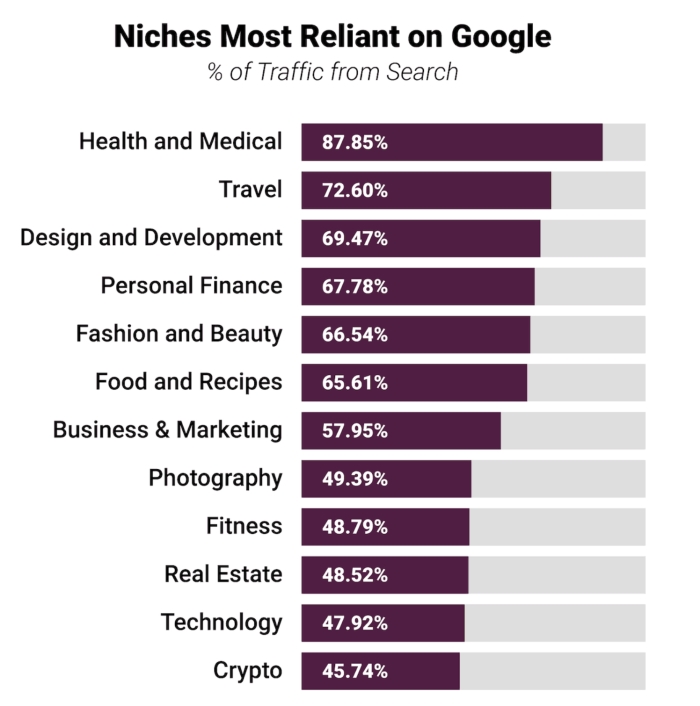
Here’s the Niches that depend on organic google search results the MOST:
Image / data source: https://growthbadger.com/traffic-study/
4. SEO Increases Your Trust and Authority
The online world is competitive and crowded with information. So how can you get a business to notice your website? One way that works well for many businesses today is SEO, or search engine optimization.
How does it work? First of all, we need visitors in order to have customers! And the more people who visit our site means higher rankings on Google’s SERP page (search engine results pages). It sounds simple enough when broken down like this:
SEO includes building trust and credibility via content marketing; link building through guest blogging; social media marketing—and much more. Once these activities are done consistently over time, they lead to brand development which increases visibility online AND leads directly back into conversion rates.
SEO is a long-term investment for building your reputation. It takes time, but it will pay off in the end with people visiting your site directly because they trust you and know what to expect from you when they arrive.
5. SEO is EVERGREEN
Building a strong SEO campaign can take months or even years of work, but the payoff will last as long as you maintain your rankings. The other important factor to consider is that once you rank well on Google for an extended period of time, it becomes very difficult for competitors to outrank you and steal away potential customers from your site. You see this in competitive niches where one website might have been ranking 1st page all year long until they were knocked off by another company who recently came into the market with their own product line targeting those same keywords.
Building up an effective SEO campaign takes some serious dedication – after all, search engine optimization requires continual attention and care if we want results that’ll stick around!
OK – those are my 5 FAT examples why EVERY business should invest in SEO in 2022 and beyond 🚀 !
If you have not started SEO on your business website, have no fear! You can start doing your own basic SEO moves here. Also, if you want to go above and beyond because you want to get serious and dominate, hire an SEO expert such as myself. I’m ready to help you with your SEO.
Your business stands to benefit immensely from SEO optimization for two significant reasons. Firstly, it’s instrumental in elevating the search engine rankings of your website, which, in turn, leads to increased traffic and a higher likelihood of conversions. When combined with a well-crafted content strategy, SEO optimization can also enhance visitor retention rates by delivering more relevant search results and improving the overall user experience.
Research reveals a compelling statistic: individuals who land on web pages positioned at or near the top of Search Engine Results Pages (SERPs) tend to stay longer compared to those who arrive at pages further down the list (62% vs. 47%). In essence, the goal is to secure a place in the top 5 search results, and SEO optimization is the key to achieving this coveted position. Here’s how it significantly benefits your business or website:
Blog posts
How blog posts help a business drive traffic
Blog posts can help your company with any of the following:
-Increase awareness for you or your business in general
-Improve rankings so that more people are exposed to what you have to offer
-Generate leads, prospects, and clients
-Provide educational value through content such as how to guides or tips & tricks. This is great for B2B services and other knowledge-based industries!
A search engine’s algorithm ranks a website by its relevancy to the searcher. For example, if someone is looking for “How to cook rice”, then they might have already typed in that word before their query and are just refining it with something more specific like “cooked” or “how”. That means there will be certain words on your site that you want people to find in order for them to know what your business does!
In this case, those words would include: how, cooked, rice. The higher up these keywords appear on the page (without being hidden) the better chance of getting exposure from SERPs through relevance.
Landing pages
How landing pages help drive website traffic
A landing page is a standalone web page that appears in response to clicking on an online advertisement or when doing other types of searches. These pages are typically designed as advertising, and they should include compelling graphics with words like “discount”, “sale” and “now”. Landing pages should also have a clear call-to-action (CTA) such as: “call now!”
These kinds of websites can be used for email marketing campaigns, lead generation practices, social media posts, etc.
Your messaging has the power to make people feel something—anything from happiness to anger; frustration to wanting more information about your product. The way you phrase things will determine how receptive people are able to relate with what you say which will ultimately impact.
SEO optimization
What is SEO optimization?
Promoting your site through search engine optimization (SEO) is a popular way to make sure that people can find it. This practice involves making changes to your website so that it’s more likely to show up when someone searches for the type of information you offer.
-Improve inbound links: One easy way to improve SEO ranking is by building external backlinks on other sites, which will help increase the number and quality of inbound links pointing at your own domain.
-Publish content regularly: Publishing new posts on a regular basis boosts not only page views but also Google rankings as well. Your best strategy is publishing one or two pieces per week and focusing on optimizing them with long-tail keywords.
Those SEO tips are the tip of the iceburg as they say. That’s why I put together this fabulous gem of a post:
Benefits of optimizing your site for the best possible results in search engines:
-Increased traffic: If your site is optimized with the right keywords and content, you are more likely to rank high on search engine results pages. As a result, it will be easier for people to find what they’re looking for in Google or Bing searches. The increase in organic visitors can lead to higher conversion rates as well because prospects are more apt to buy products after being referred from an authority website like yours.
-Higher quality leads: Your company also has access to better-qualified leads that have already shown interest by finding your business through their own research instead of relying heavily on cold calling techniques which only reach out those who happen upon your site while browsing online at random.
-Less customer churn rate: Customers come back often
Search engine optimization helps make a website more accessible
More accessible to people who are looking for it on Google, Bing, Yahoo!, etc. to find products they need. This means that people searching for your company in Google or Bing searches will be more likely to see the website you created and it can also increase organic visits which lead to higher conversion rates because prospects are more apt to buy a product after being referred from an authority website like yours.
It also helps with customer churn rate management because customers come back often when coming through search engine optimization channels, making it easier for them to purchase again.
-Higher quality leads: Your company has access to better qualified leads that have already shown interest by finding your business through their own research instead of relying heavily on cold calling techniques which only reach out those who happen upon your site while browsing online at random.
-Less customer churn
SEO optimization is a great way to generate more traffic from search engines, which can lead to increased sales for your business. These days there are many tools and services that make it easier than ever before to optimize websites, but you’ll need an SEO expert who knows how – or at least has experience in the field if you want any hope of being successful. If this sounds like something you might be interested in exploring further, let ME know! I offer my clients world-class SEO consulting and digital marketing assistance as well as PPC management.
Short answer: If your Shopify store isn’t ranking in the top 5 Google results, it’s unlikely to generate consistent sales. In 2026, Shopify SEO success depends on original product content, strong internal linking, fast site speed, proper schema markup, and real backlinks, not basic “checklist SEO.”
Key takeaways:
Shopify stores need substantial, original text on product and collection pages
Duplicate product descriptions hurt rankings and conversions
Image optimization (file names + alt tags) is still a major ranking factor
Meta titles and descriptions must be tested and refreshed, not set once
Backlinks, internal links, and local signals still matter
Technical cleanup (tag pages, site speed, schema) separates top-ranking stores from everyone else
As a Shopify SEO expert in San Diego, this is exactly what I see working across both new and established Shopify stores right now.
Your Shopify store needs to rank in the top 5 google search results to have a chance at making sales!
After all, if your product can be found on Amazon, you’re most likely competing against Amazon and big-name brands!
As a Shopify SEO expert in San Diego, I’m managing many new and old Shopify stores right now and I see what’s working to drive traffic.
I had to write this advanced Shopify SEO tips post because there are not enough advanced Shopify store SEO tips online. Most Shopify SEO tips are pretty basic like… “research your keywords, be sure to optimize your meta description, and look both ways before crossing the street.
When I give SEO tips, I imagine you know what SEO is and it’s not your first day doing SEO. Moving on.
1. Your Shopify store NEEDs lots of Text – Add more Text
Most Shopify stores I visit, there’s not enough text on the page. A good way to tell if your store is lacking text, pretend there are no images on the website – would you still understand the store category and product features? I say pretend there are no images because Google does not know what your products are – BTW – sorry, Google can’t see how pretty your site is. Google reads the text it’s supplied on your page. Google is learning images (getting there someday) . Until that day when machines take over etc, please add more text. It helps categorize your website, products, and adds a punch of quality to your website that the competition overlooks.
Q: Jen, where’s a good place to add more text without making the site look messy?
A: Product descriptions! Second, add more text to your collection pages!
2. Be sure your product text is ORIGINAL
OK. This needs to STOP! I see so many Shopify stores that use the “canned” product descriptions that everyone else is using. It makes your site look like you’re lazy. Secondly, it looks spammy to google. Many drop shippers will take the product descriptions from Aliexpress and import them into their Shopify store without changing a thing. I see it every day in newbie stores. It’s bad because most of the time the descriptions are written by non-native English speakers (most likely Chinese) and the grammar is sometimes comical.
If you take time to write your own Shopify product descriptions, you can help add related keywords and other words that naturally occur with instances of the keywords of the product you’re selling online.
Related products the customer may need for the product to function or popular paired items
FAQ
Social proof is hot, like “Hurry, This product is seasonal only…etc.
Speak to your target market in their “lingo”
3. Images
Yes, name your images the product keyword. For example: “leather-earrings-pink.jpg“
Add an Alt tag to each image. (description text for images) As mentioned above, Google can’t see your product image, so it relies on Alt tags.
It’s amazing how much naming your images and adding alt tags helps boost your Shopify SEO. You can even rank better in Google’s image search. Most Shopify store owners are way too lazy to add alt tags to their images and name them properly.
If you can also do your own product photography, you’re ahead of the game. Most product photos are copied, or even sometimes stolen from other websites selling the same product. For example, using your own model for T-shirts, or product photography in natural lighting is phenominal. Professional photos are always best.
4. Testing Meta Title Descriptions
Most Shopify store owners write the meta tile once and leave it to go stale. If your product IS RANKING in Google search, but nobody is clicking on the product, try changing your meta title/description. Be sure to make an excel spreadsheet with titles you’ve tested. Things you may want to try adding for a test:
Add your keyword in the beginning
Free Shipping
OFFICIAL Licenced merch
100% Satisfaction Guaranteed
Free Returns
Add an emoji
5. Google My Business
Do you have a physical store location? This can help you rank in the Google 3 pack and get your brand some exposure. If your store is located around your target market, you have a BIG advantage. You’ll rank locally.
Don’t have a physical store? No problem. You can rent a local office space, get the verification postcard and you do the math. No, you can’t use a P.O. box.
6. Links of all kinds
You should have business citations aka backlinks pointing to your home page. Get your business on directories for credibility! (link has a massive free list you can join now) Get that sweet backlink to your Shopify store. Your product collection can also use some link juice too! Social bookmarks and more.
Second, treat new products as you would treat a new blog post. Gain backlinks to each product. Be sure to check out my blog post, SEO post checklist. Treat the post checklist just as you would a new product. Yes, I said it again because it’s important!
Thirdly, add internal links to your products! I see this being underused BIG TIME. If you place SEO internal links from your blog to your products, it works wonders with Shopify SEO. I like to spy on your competitors and if they have a blog that’s ranking high with products embedded, I do the same for you! I also try to actively outrank their blog posts too!
7. Social Media
Post your products on Pinterest, Instagram, and good old Facebook. Heck, if you can get into a Reddit group, that would be amazing too. People trickle down to your website in so many ways. If they’re not searching for it on google, they’re discovering your Shopify products on social media. Links to your products coming from social media are a ranking signal to Google.
8. De-Index Tag Pages
Shopify makes ugly duplicate pages with tags. If you want to bypass them being crawled by google bots, add this code to your Shopify theme.liquid
No. This is not an overnight process. SEO takes time to do and months and months to start seeing an improvement in your website traffic. I have plenty of Shopify SEO clients that know how long it takes to rank on the first page of Google search.
OK, kiddos (I dunno why I called you that) that’s all I’m sharing for this free Shopify SEO tips blog post. If you want to get the extra tips, you have to hire me for SEO.
Thanks for reading this blog post, I was only gonna share five quick tips, but I wanted to help someone out there struggling have a fighting chance at their Shopify SEO.
Until next time, this is Jen – Your awesome SEO expert in San Diego, California. I help small businesses and entrepreneurs rank higher in google search. I LOVE doing SEO full time. If you or a friend is in need of ranking their website or Shopify store higher in Google search, I’m your gal. Be sure to check out my SEO pricing if you’re serious.
Jen
Frequently Asked Questions (Shopify SEO)
How long does Shopify SEO take to work?
Most Shopify stores start seeing measurable improvements in 3–6 months, depending on competition, content quality, and backlink profile.
Is Shopify SEO harder than WordPress SEO?
Shopify is more restrictive technically, which means content quality, internal linking, and schema matter even more than platform flexibility.
Do product descriptions really affect Shopify rankings?
Yes. Original, detailed product descriptions help Google understand relevance, increase keyword coverage, and improve conversion rates.
Should Shopify stores use AI-written content?
AI can assist with drafts, but fully generic AI content without customization or local context hurts rankings and trust.
Do Shopify stores need schema markup?
Yes. Product, review, organization, breadcrumb, and FAQ schema all help improve visibility, click-through rates, and eligibility for rich results.
Looking everywhere for advanced YouTube video SEO tips? You’re on the right page.
Everyone is talking about the same old YouTube SEO tips…. you know.
“research your keywords… put them in the title…put your keywords into the description… blah blah. 😑
Before you invest in advanced YouTube video SEO tips, please make sure you have the following in check:
Let’s assume your video deserves to rank high! Your video is high quality – helpful, good lighting, good audio, you have longtail keywords in your title, has a nice thumbnail, you actually say the keywords in your video, and you have the right tags.
My awesome client and I had a phone consultation for his YouTube channel. He knows I also do Youtube video SEO services in San Diego so now I’m helping his YouTube channel. He already has the basic SEO tips applied to his channel, so I took it to the next level. Instead of sharing a boring post about advanced SEO tips and strategies. I’m copying and pasting my email recap of our phone call with unique examples applied. So here are my raw advanced SEO tips for any YouTube channel you can implement today! Here is an outline of what we discussed:
Advanced YouTube SEO Tips:
Add playlists:
You have a lot of different topics that can be bundled into playlists. This can help give the users a better click-through rate for finding more useful content on the same topic. You will need to label each video to the specified playlist. You also need to be an authority for topics. The more quality content per category, the more you will be seen as a trusted expert.
For example, based on your current content, I’d make these playlists:
football
real estate
credit repair
wealth tips
business management
entrepreneurship
motivation
commercials
Podcast Video Titles:
The keywords ideally should go to the beginning of the title because that’s what people read first and has benefits in youtube SEO. Podcasts titles can look messy. It’s best to keep them consistent. Follow one of the formats below. Optimized title example: How to Activate Your Beast Mode for Success in 2021 | Podcast #29 | YMA Nation
SEO title here | Podcast #123 | YMA Nation SEO title here | Episode #123 | YMA Nation SEO title here | Ep #123 | YMA Nation
Activate locations:
Whether you have a business location or work in a city, you need citations on YouTube.
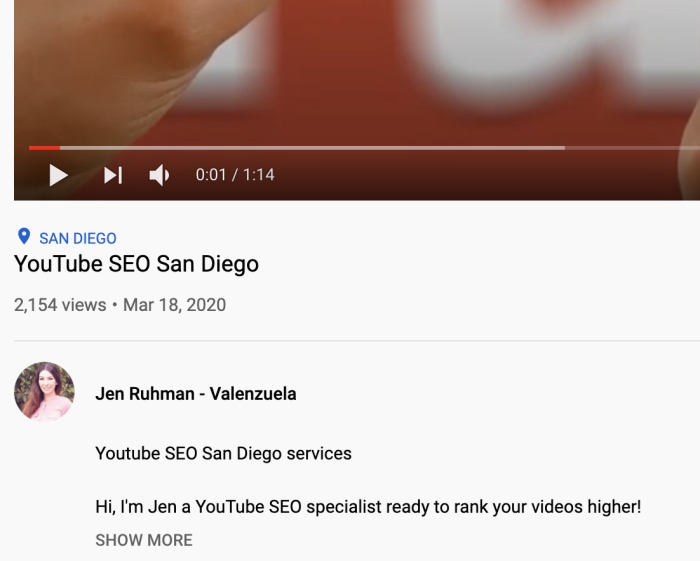
For example, Rebecca is the #1 Real Estate Agent in Greenville SC – add her city location into the videos when she speaks about real estate. We want youtube and google to note she is an authority for real estate in Greenville SC. Her name, title, and location must have many occurrences online. I’d like to do SEO for this search term. here’s an example screenshot (blue San Diego text) where the city is shown in the video:
Rebecca, I have an idea for you. You can have a home walkthrough of a property in your city. These videos are huge right now for realtors not only because of covid-19 but because people want to shop online for home or just get ideas what their money can buy them. People will enjoy hearing you talk and discuss the home and may lead to people wanting to work with you. Rebecca, these are the keywords people are searching in Google right now for your city:
homes for sale under 100k in greenville, sc
cheap houses for sale in greenville, sc
homes for sale by owner in greenville, sc
cheap homes in greenville south carolina
cabins for sale in greenville, sc
investment property for sale in greenville, sc
south carolina cheap homes for sale
homes for sale in greenville county, sc
An example podcast for you could be:
Homes for Sale under 100k in Greenville SC Rebecca Wallace | YMA Nation
Many people are leaving California and looking for homes on the east coast! 🙂 They can be a target for you.
Working with other podcasters/vloggers
Interviewing another podcast personality in your area that has an established following can help give your channel more exposure. Having their name in your video title and them in the thumbnail.
Reviewing products/services
reviewing a product or service is a common search term. Sometimes you can reach out to the brand and ask them to share your review. Sometimes the brand will discover you and provide you with more products to talk about.
Call to action in each video
Make sure you invite people to your website. Is there a specific service you’d like them to sign-up for – free consultation?
Embed your YouTube video into blog posts:
Place the videos (embed) into web 2.0 blog posts with similar keywords and content. This means the blog post title is similar to your video as well as the text written into the blog post.
Backlinks
Are you surprised? You need links to your videos and to your YouTube channel to be noted as an authority.
Place your YouTube video links into blog posts:
On your videos, click “share” and grab that link. Embed them. You can also place these links on the blog posts mentioned above. Backlinks and other internal SEO links drive link juice to the videos.
Because this is a LOT of work embedding videos, it’s most effective to concentrate on 5 videos that are “evergreen”.
Here’s a list of places to embed your YouTube videos:
Take time to respond to your comments. Viewers will appreciate you responding to their comments and answering your questions. Just making that connection of human contact can help you gain more subscribers and validate the authority of your youtube channel.
And those are my Advanced Youtube Video SEO Tips.
Just as you would follow a blog post checklist, be sure to add these advanced video SEO tips to your YouTube channel.
Thanks for reading my SEO blog, I appreciate it! As an SEO company in San Diego, I look forward to answering your questions.