Internal linking is one of the easiest SEO strategies to overlook—and one of the strategies I use constantly when optimizing websites.
An internal link is simply a link from one page of your website to another page on the same website.
But when those links are used strategically, they can help search engines discover your content, understand how pages relate to each other, identify important pages, and make sense of the overall structure of your website.
Internal links also help real people move naturally from one useful resource to another—and eventually toward the service or conversion page that may solve their problem.
I’ve worked in SEO for more than 20 years, and internal linking is something I pay close attention to on both my own website and my clients’ websites.
Best of all?
You have complete control over your internal links.
You don’t have to wait for another website to discover you or link to you. You can improve your internal linking structure today using content you already own.
Quick Answer:
Internal links help search engines discover pages, understand relationships between content, and recognize which pages on your website appear especially important. A strong internal linking strategy can also improve navigation, support topical authority, distribute internal link equity, and guide visitors toward important service and conversion pages.
Internal links are hyperlinks that connect one page of your website to another page on the same domain.
For example, if I write an article about Local SEO and mention Google Maps visibility, I can link readers to my guide explaining how to rank higher in Google Maps.
That’s an internal link.
Internal links appear throughout most websites.
Your navigation menu contains internal links. Your footer contains internal links. Breadcrumbs are internal links. Related-post sections contain internal links.
But some of the most useful internal links are contextual links placed naturally within the body of your content.
Those links provide additional context about how one page relates to another.
Why Are Internal Links Important for SEO?
I use internal links for several reasons.
A strong internal linking structure can help:
Search engines discover pages
Search engines understand relationships between pages
Create a logical website hierarchy
Signal which pages are especially important
Distribute internal link equity
Support service and location pages
Build topical clusters
Prevent important pages from becoming isolated
Help users discover related information
Move visitors toward conversion pages
This is why I don’t treat internal linking as something I add at the end of a blog post just to check an SEO box.
Internal linking is part of the architecture of the website.
How Internal Links Help Google Understand Your Website
Imagine walking into a library where every book has been placed randomly on the floor.
The information might be excellent, but finding anything would be difficult.
A website can have the same problem.
You might have dozens or hundreds of useful pages, but if they’re poorly organized and barely connected, it becomes harder to understand how all that information fits together.
Internal links help establish those relationships.
For example, suppose a personal injury law firm has a primary car accident service page.
The firm might also have articles covering:
What to do after a car accident
How insurance claims work
What happens when the other driver is uninsured
Common car accident injuries
How long a car accident claim may take
Those articles can naturally link to the primary car accident service page and to other relevant supporting articles.
Now the website doesn’t just contain a collection of unrelated URLs.
It has a connected content cluster built around a clear subject.
Can Internal Links Pass Authority?
Internal links can help distribute link equity from one page of your website to another.
This becomes especially useful when you have an established page that already has:
Backlinks
Organic traffic
Search visibility
Years of history
Strong internal authority
If that page contains a relevant internal link to another important page, you’re creating a pathway between them.
This is one reason I frequently review older successful content when working on SEO.
Instead of only asking:
“How can I get more backlinks to this new page?”
I also ask:
“Which strong pages on this website should already be linking to it?”
That is often one of the fastest opportunities available.
Use Internal Links to Strengthen Important Service Pages
For a business website, this is one of the most important uses of internal linking.
Your blog should not exist separately from the pages that actually generate business.
Informational content should naturally support relevant commercial pages.
For example, my website includes articles covering:
SEO
Google rankings
Local SEO
Google Maps
Keyword research
Backlinks
Blogging
AI search
Search intent
When appropriate, those articles can direct visitors toward my primary SEO company in San Diego page or other relevant service pages.
That makes sense for the user, too.
Someone may initially discover my website because they’re trying to understand why their rankings dropped or why their website isn’t generating leads.
After reading several articles, they may decide:
“I don’t want to manage all of this myself.”
Now there’s a logical pathway from educational content to professional services.
That’s good SEO and good user experience working together.
What Anchor Text Should You Use for Internal Links?
Anchor text is the clickable text within a hyperlink.
The words “guide to local keyword research” are the anchor text.
I prefer descriptive anchor text because it helps both the reader and search engines understand what they’ll find on the destination page.
Good Internal Anchor Text Examples
local keyword research
how to rank higher in Google Maps
why SEO results take time
how search intent works
Local SEO for San Diego businesses
Less Helpful Anchor Text
click here
read more
this page
more information
Generic anchors aren’t automatically bad.
Sometimes they make perfect sense in context.
But when I have the opportunity, I prefer anchor text that naturally describes the destination.
Should Every Internal Link Use an Exact-Match Keyword?
No.
You don’t need every link to your primary SEO page to say “SEO company San Diego.”
Natural variation can include:
my SEO services
SEO company in San Diego
professional SEO help
working with an SEO expert
San Diego SEO services
The link should sound natural to a human reader first.
How Many Internal Links Should a Page Have?
There is no universal number of internal links every page should have.
A short 600-word article may need only a few.
A detailed 4,000-word resource may reasonably contain many more.
The better question is:
Does this link help the reader or establish a meaningful relationship between these pages?
If yes, add it.
If you’re forcing links into every paragraph because someone told you every article needs exactly five internal links, you’re probably approaching it the wrong way.
Internal Linking and Topical Authority
Internal linking becomes especially powerful when you’re building authority around a particular subject.
Let’s say you’re a financial advisor.
Your website might contain a primary retirement-planning service page along with supporting articles about:
Retirement income
Social Security
Required minimum distributions
Tax-efficient retirement withdrawals
Long-term care planning
Estate planning
Those pages should not exist as isolated articles.
They’re related.
Strategic internal links can help establish those relationships and make it easier for users to continue exploring the topic.
Instead of publishing random content, I prefer building interconnected resources around the subjects a business actually wants to be known for.
Don’t Forget to Add Internal Links From Older Content
This is one of the biggest internal-linking opportunities I see.
Let’s say you publish a strong new service page today.
You immediately link from that new page to several older articles.
Great.
But don’t forget the reverse.
Go back to relevant older content and add links to the new page.
Older articles may already have:
Backlinks
Organic traffic
Google rankings
Search impressions
Years of history
Those older pages may already carry more authority than the new page.
Don’t leave a new service page sitting by itself waiting for Google to figure out where it fits.
Connect it to your existing content ecosystem.
This is especially important on large websites with years of blog content.
Find and Fix Orphan Pages
An orphan page is a page with no meaningful internal links pointing to it—or one that is extremely difficult to reach through the website’s normal structure.
These pages are easy to forget about.
You may have published an excellent article three years ago, but if nothing on the website links to it anymore, it becomes much harder for visitors to discover naturally.
I want important pages to have clear internal pathways.
This is especially important for:
Service pages
Location pages
High-value evergreen articles
Case studies
Conversion pages
Newly published content
If a page matters to the business, don’t leave it stranded.
How to Prioritize Your Money Pages With Internal Links
Not every page on your website has equal business value.
Some pages educate.
Some pages attract links.
Some pages answer questions.
And some pages are directly connected to revenue.
I think of important commercial pages as money pages.
Examples include:
Primary service pages
Location landing pages
Consultation pages
Product category pages
High-intent commercial pages
When I’m reviewing internal linking, I want to make sure these pages aren’t buried.
Relevant informational content should support them.
For example:
Google Maps article → Local SEO service page
Local keyword research article → Local SEO service page
Search intent article → primary SEO services page
Poway SEO supporting article → Poway SEO location page
This doesn’t mean linking every blog post to every money page.
The relationship should be logical.
But if a service page matters to the business and has almost no internal links pointing to it, that’s something I want to fix.
Common Internal Linking Mistakes
1. Linking Everything to the Homepage
Your homepage is important, but it doesn’t need to receive every internal link.
Deep links to specific service pages, location pages and supporting resources are often more useful.
2. Using “Click Here” Everywhere
When possible, use descriptive anchor text so visitors understand where the link leads.
3. Only Adding Links to New Content
Go backward, too.
Update older content so it links to newer resources and service pages.
4. Creating Orphan Pages
Important pages should have internal links pointing to them.
5. Linking to Irrelevant Pages
Don’t add a link simply because you want to push authority somewhere.
There should be a logical relationship.
6. Overusing the Same Exact Anchor Text
Natural anchor-text variation is usually better than forcing the same exact phrase into every link.
7. Leaving Broken Internal Links
If you delete pages or change URLs, old internal links can break.
Periodically check for 404s and update links or redirects when necessary.
8. Creating Too Many Similar Pages
Sometimes an internal-linking problem is actually a content problem.
If you have six pages targeting almost the same search intent, deciding which one should receive the strongest links becomes difficult.
That can be a sign that you need to consolidate overlapping content.
9. Linking Every Mention of the Same Keyword
If you mention “Local SEO” ten times on one page, you don’t need to link all ten mentions to the same URL.
One or two useful contextual links may be enough.
10. Ignoring Important Older Pages
An older page with backlinks or strong visibility can sometimes be one of your most valuable internal-linking assets.
Don’t assume old means useless.
How I Audit Internal Links
You don’t necessarily need complicated software to start improving internal links.
For a small website, you can begin manually.
Here’s the process I use conceptually:
Identify the pages most important to the business.
Identify supporting content related to each important page.
Check whether supporting pages link to the primary page.
Review the anchor text being used.
Find important pages receiving very few internal links.
Look for older high-performing pages that can link to newer content.
Check for broken internal links.
Look for orphaned or difficult-to-reach pages.
Review whether multiple pages unnecessarily compete for the same topic.
Make sure money pages have stronger internal support than low-value pages.
On larger websites, crawling tools make this much easier because you can analyze hundreds or thousands of URLs at once.
But don’t let a lack of advanced software stop you.
You can make meaningful improvements by opening your most important pages and asking: “Which existing pages should logically link here?”
Do Internal Links Matter for AI Search?
AI-powered search has changed how people discover information, but it hasn’t made good website architecture irrelevant.
If anything, clearly organizing your expertise has become even more important.
Internal links help establish relationships between your pages.
For example, my website doesn’t simply say that I provide SEO services.
I have interconnected content covering:
SEO strategy
Local SEO
Google Maps
Keyword research
Search intent
Backlinks
Topical authority
AI SEO
Website structure
Together, those pages create a clearer picture of what my website—and my business—is about.
Internal links aren’t a magic switch that makes an AI platform cite your website.
But a well-organized site with clear topical relationships is something I want whether the visitor arrives through Google, an AI-powered search tool, Maps or another discovery platform.
My Internal Linking Strategy for SEO Clients
When I’m working on a client’s website, I don’t randomly sprinkle links everywhere.
I start with the pages we actually want to rank and generate business.
These are often:
Primary service pages
Local landing pages
Important product or category pages
High-intent conversion pages
Then I look at the content surrounding those pages.
I ask:
What questions do potential customers ask about this service?
Which related articles already exist?
Which pages have backlinks?
Which pages already have organic visibility?
What supporting content is missing?
Which older pages should link into this cluster?
From there, I build logical pathways.
For example:
Supporting Blog → Primary Service Page
Supporting Blog → Related Supporting Blog → Primary Service Page
Older Authoritative Content → New Relevant Content
Location Article → Primary Location Page
Service Page → Helpful Supporting Resources
That’s very different from saying:
“Put five internal links in every blog post.”
Internal linking should reflect the actual relationships, priorities and architecture of the website.
Internal Linking Is One of the Easiest SEO Opportunities to Miss
One reason I like internal linking is that you don’t need anyone else’s permission to improve it.
You don’t have to email another website.
You don’t have to wait for someone to mention your business.
You don’t have to buy anything.
You already own the website.
You may already have years of useful content.
Sometimes the opportunity is simply connecting those pieces more intelligently.
If your website has been around for years, I’d especially recommend reviewing your older articles.
You may have strong pages sitting there with outdated links—or no links at all to newer services, locations, case studies or articles you’ve created.
That’s one of the first places I would look for SEO opportunities.
Frequently Asked Questions About Internal Linking for SEO
What is an internal link in SEO?
An internal link is a hyperlink from one page of your website to another page on the same website. Internal links help visitors navigate your content and can help search engines discover pages and understand relationships between them.
Do internal links help SEO?
Yes. Internal links can help search engines discover content, understand website structure, identify relationships between pages, and recognize which pages appear important within your website. They can also improve navigation and direct visitors toward useful service or conversion pages.
How many internal links should a page have?
There is no universal number of internal links every page should contain. The right number depends on the length, purpose and subject of the page. Add internal links when they are useful and contextually relevant rather than trying to meet an arbitrary quota.
What anchor text should I use for internal links?
Use concise, descriptive anchor text that helps the reader understand what they’ll find on the destination page. Natural variation is usually better than repeatedly using the exact same keyword phrase.
Should I link from blog posts to service pages?
Yes, when the service page is genuinely relevant to the article. Informational content can educate visitors and then provide a logical pathway toward a related service when someone wants professional help.
Should old blog posts link to new pages?
Yes. When you publish a new service page, location page or article, review relevant older content and add links where the new resource would be useful. Older pages may already have backlinks, traffic and search visibility that can make those connections especially valuable.
What is an orphan page?
An orphan page is a page with no meaningful internal links pointing to it. Important pages should generally be incorporated into your website’s internal structure so both users and search engines can discover them more easily.
Are internal links the same as backlinks?
No. Internal links connect pages within your own website. Backlinks are links to your website from another domain. Both can be useful for SEO, but they serve different purposes.
Can too many internal links hurt SEO?
There isn’t a simple maximum number that applies to every page. However, excessive or irrelevant links can make a page harder to use and weaken the usefulness of your linking structure. Focus on links that genuinely help visitors or establish meaningful relationships between pages.
Should every internal link use an exact-match keyword?
No. Internal anchor text should be descriptive and natural. You can use variations that accurately describe the destination page instead of repeating the exact same keyword every time.
Can internal links help service pages rank?
Internal links can help reinforce the importance and relevance of service pages by connecting them with supporting content. They can also create clearer topical relationships and help distribute internal link equity throughout the website.
Do internal links matter for AI search?
Internal links are not a guarantee that an AI system will cite your website, but they help create clearer relationships between your content and improve overall website organization. That kind of structure remains useful across traditional search and AI-powered discovery.
Need Help Improving Your Website’s SEO Structure?
Internal linking is only one part of a larger SEO strategy.
Your website also needs the right keyword targeting, useful content, strong service pages, technical SEO, backlinks, Local SEO when appropriate, and a clear structure that helps both users and search engines understand what matters.
I’m Jen Ruhman, and I’ve worked in SEO for more than 20 years. I help businesses identify what’s holding their websites back and build strategies designed to improve visibility across Google and today’s evolving search environment.
If you’re looking for an experienced SEO expert in San Diego, I’d be happy to take a look at your website.
Call or text me: (619) 719-1315
— Jen Ruhman SEO Expert & Founder of Jen Ruhman SEO
Everyday is an adventure – as in… you never know what mood Google is going to be in. (LOL a little SEO joke there)
– Jen Ruhman
Content is King but… SEO is your Queen!
-Jen Ruhman
It really brings joy into my life helping business owners rank higher in Google and YouTube.
I’ve been doing SEO for years since 2004, but now it’s been my focus – especially during these past six years. (because SEO is very challenging and competitive nowadays)
SEO is not a luxury service, but a must for all small business owners to remain competitive in Google’s search engine.
Now that 1 in 7 people have a website of some kind, you’re in good company with 1 billion website owners that want to rank on the first page.
This blog post is going to be rather unique because it’s all about myself and how I really work as an SEO expert here in San Diego, CA.
Yes, sometimes I explain SEO as living a double life in the Matrix…
It’s pretty interesting explaining what SEO is and how I do it. The easy answer… Oh I help websites rank higher in Google search results…
Next, they’re like “but how do you do that?” And I say…
I write content that helps people and at the same time optimize it to make google bots understand I want to rank for certain keywords. Yes, there’s a lot going on in the background you would never dream possible. LOL.
– Jen Ruhman
Let’s dive in and talk about my life as an SEO expert!
Here are my typical work schedule tasks: (everything happens after my cup of coffee)
Providing quotes
Getting great backlinks/networking with other SEO experts
Working on making YouTube videos for SEO
Blogging / optimizing blog posts
Adding internal links throughout your content
Corresponding with clients
Creating / editing service pages
Optimizing new / old content
Making your site faster
Updating content as the client’s request
Updating google my business
Sharing your blogs on social media
Writing guest posts to gain you a backlink
Updating the client about progress/direction
Checking the competition
Learning new skills
Adding/implementing new technologies and strategies
Making a list of items to work on for your website
Reports / invoicing / book keeping
Cleaning the house
Walking my dog
Getting dinner on the table! mMMMm.
Mornings
Yes, I get to wake up on my own schedule and it’s AWESOME of course! I think this is a BIG reason why I’m so happy!
Every morning I check my emails to see if there’s anything newsworthy from my clients or if there’s any problems I need to immediately address. If there’s anything urgent, I make a list of things to do ASAP!
The dorkiest thing I do, is usually checking to see how my well cared for keywords are ranking! Really, I will google my target keywords and get excited to see jumps in search results! 😁 I will do my happy dance and grab a sweet treat and reward myself! Woo hoo! First page!
This pineapple knows what’s up!
Next, I like to check out some of my favorite fellow SEO experts on Youtube and see how their tested strategies are doing. I love listening to them while I’m getting ready in the morning. It’s exciting when someone has a new strategy I want to test on one of my own sites and later on use for a client’s site.
Which SEO experts do I enjoy?
I used to really used to enjoy Neil Patel but now I like Ruan Marinho, Chris Palmer, and Brian Dean.
Next, I go into my garden and nurture my plants and sit back and enjoy my morning water or coffee. It’s really important that I do something nice for myself every morning before I start work and that is usually taking my dog for a walk at the park or just tidying up the house nice and neat to feel grounded for day.
Mid-Morning
I’m ready to get started doing SEO! Watch out world!
Crank up my SEO programs
Get out my iPad, MacBook Pro, HP laptop, and my iPhone (because I like testing on all my devices)
Review my work order schedule
My work schedule for the month is blocked in such a way that I pick one client for the day to work on their site. Depending on hours, I may work for one client three days in a row. It’s really important to have a plan of action and strategy for each unique client. Three-hour blocks and a 30 minute break time works best for me, heck I work from home – it’s fantastic!
Afternoon
Time for more coffee! The question is… will I brew it myself or take a trip to get a McCafe (current guilty pleasure – caramel frappe!)
I agree with everything this woman’s coffee cup has to say 😉
Phone calls
This is when I usually schedule times for phone meetings / zoom / onsite meetings
It’s important to me that clients don’t “feel like a number” I really enjoy talking to my clients and genuinely helping them. Attentively listening and taking notes, brainstorming, Some of my clients are so awesome, we will have our meetings at the Cheesecake factory! How cool is that?!
Rankings
Yes, I like to check my Google Analytics and Goole search console for all my clients’ data
Spy on Your Competitors
My clients have competition and I like to see what they’re working on and what’s beneficial for them that I can emulate and do better!
I will see which blog posts they’re promoting or which pages are their most popular and see how I can steal that traffic! (like a bandit)
Breaktime!
I will get far away from my computer and go run errands or spend time with my family, most of all go outside an enjoy the gorgeous weather in San Diego!
Yes, I wake up in the middle of the night thinking about your website!
Yes, I will SEO your website to the top and Yes again, I will pray your website to the top too!
– Jen Ruhman
I call upon my SEO skills and also my faith, why not!?
Sometimes I will wake up in the middle of the night and think about other strategies I can utilize for your website! My mind will “experiment” where to make the changes and run through the process since no two websites are the same. Sometimes I will meditate to see if the universe wants to talk to me and give me insights. Last night I woke up and wrote down a note for myself in the morning. “make sure you do not cache this contact form page – its code is breaking when I minify it. Make a new rule in CloudFlare…”
Sometimes I will even pray for miracles and guidance. I know it sounds strange, but this morning my prayers were answered.
I’m thankful for the SEO clients God has placed into my life and it’s my pleasure to serve them.
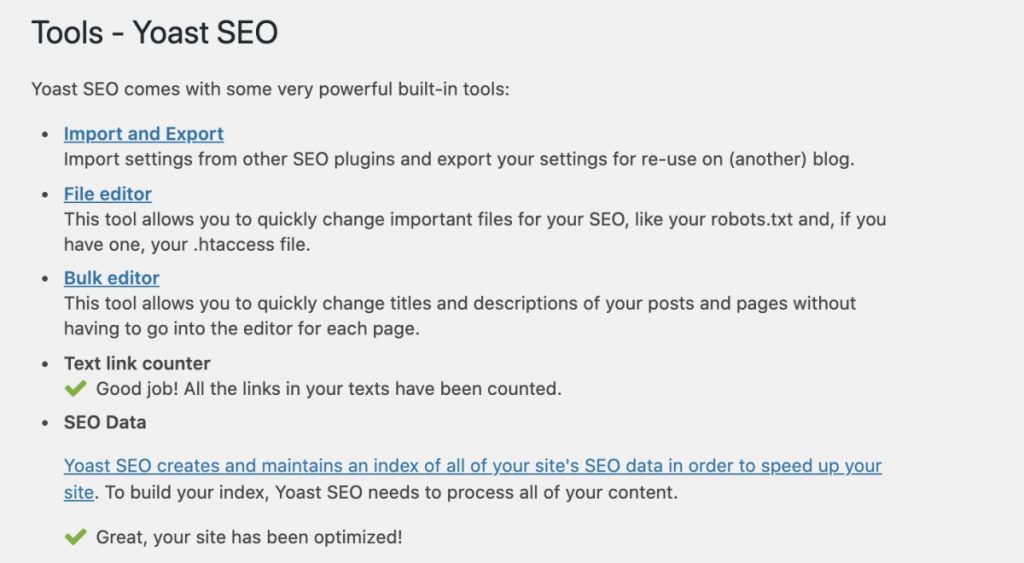
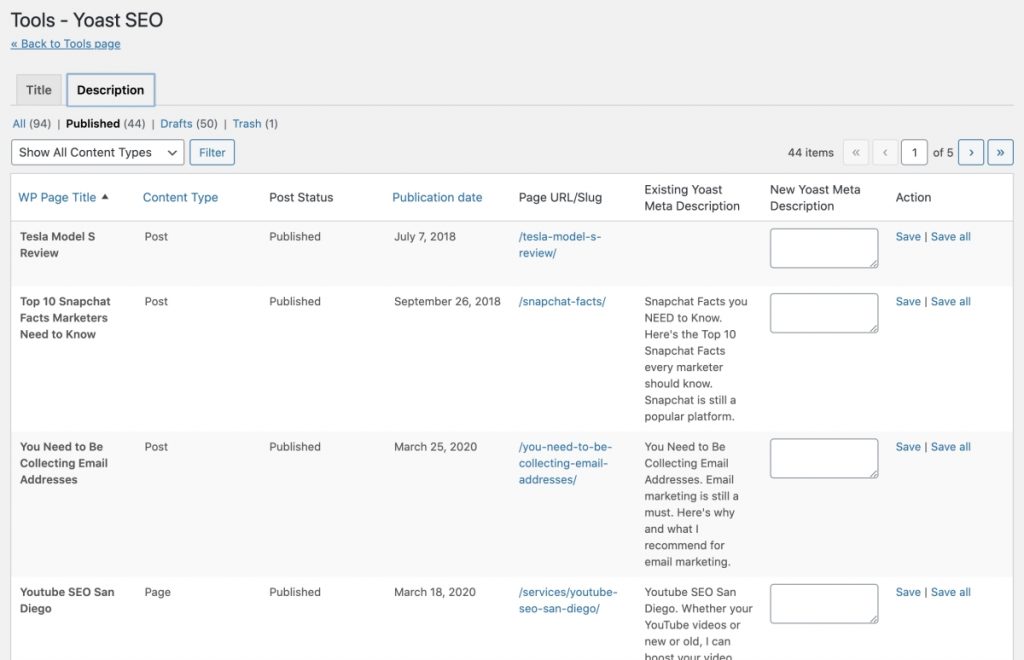
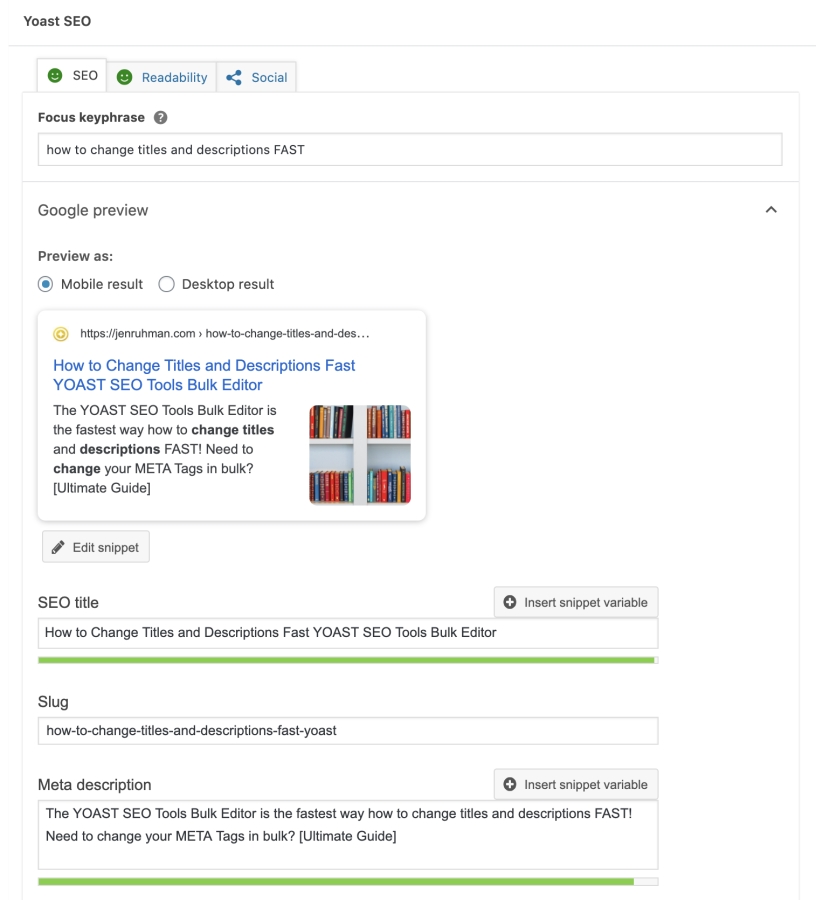
Yoast SEO Tools Bulk Editor is the best way how to change titles and descriptions FAST!
This is included in the free version of Yoast. Yay!
Also known as “META TAGS”, every SEO expert in the world knows how to add META tags but most don’t know how to change them in bulk.
Yoast is by far the best way to change META tags in bulk.
SEO audits always discover META errors…
They will also warn you about “missing META tags” or “duplicate META tags”…
Heck, sometimes you just need to refresh your titles and descriptions to something more enticing aka clickbait.
Instead of going into each and every blog post and page to fix the problem… (spending hours) There’s a faster way to make edits.
Why Would I want to update my meta titles and descriptions?
This is a fantastic element to put to the test. For instance, if you find that your blog post isn’t generating many clicks, consider experimenting with a more compelling title and description. You can incorporate persuasive sales copy that resonates with your target audience. Additionally, if your title contains a previous year, it might be time to update it to reflect the current year, giving your content a fresh and current appearance. These tweaks can be effective in improving the performance and relevance of your content.
So How do I quickly change my Meta Titles and Descriptions?
Allow me to introduce you to a free solution. If you have the famous free YOAST SEO plugin, you already have this META tag tool. However, most people have not discovered this feature when using the plug-in. It’s the quickest way to add/update your meta titles and descriptions all listed accordingly.
Yes, you could open up each page or blog post and edit the meta tags one by one. You could scroll down to the Yoast plugin and make the edits there.
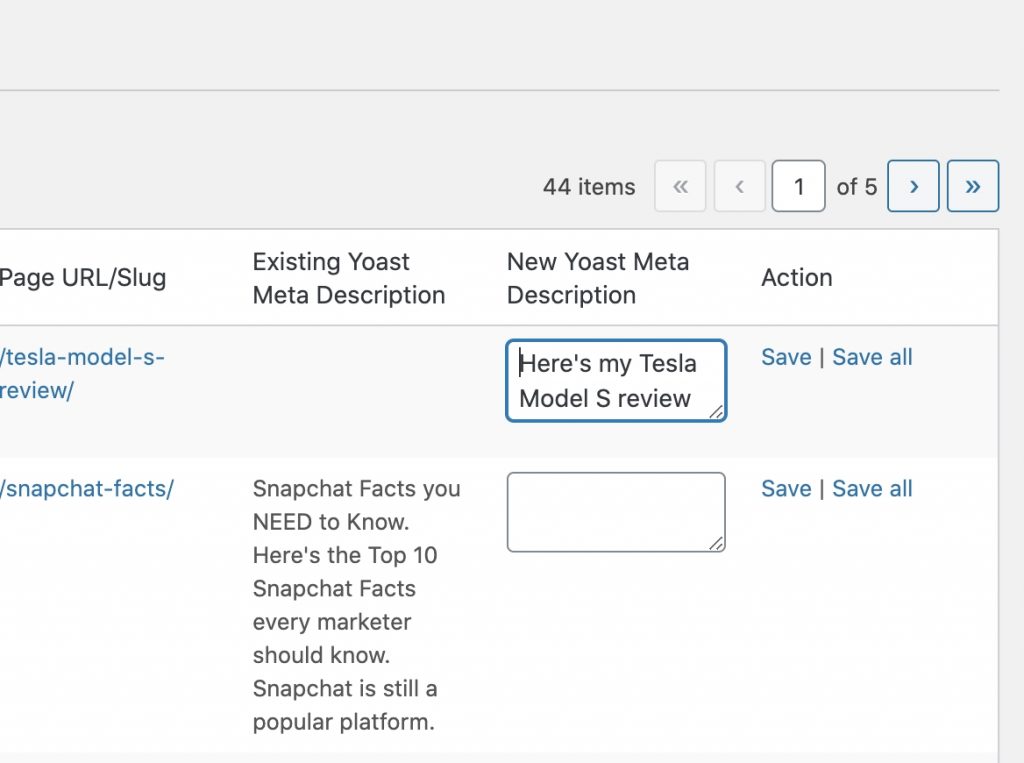
I will say one thing I noticed about Yoast’s bulk editor, sometime it does not save all the new titles or descriptions you just made when you hit “save” or “save all”
Here’s how you can manually go into Yoast and change each meta title and description. It may take a little longer to do but, you’ll be able to make sure your title and description is the perfect length. Second, you can make sure you’re adding your keywords into the meta title and descriptions. Simply click on the preview to make it become editable down below.
Blog Post Promotion Checklist: What to Do After You Hit Publish
Last Updated: 2026
You just spent hours researching, writing, editing, and optimizing a blog post. You finally hit Publish.
Now what?
One of the biggest mistakes I see businesses make is assuming publishing the article is the end of the process. It’s not. Publishing gives your content a URL. Promotion helps the right people actually discover it.
I’ve been doing SEO for more than 20 years, and I’ve watched content promotion change dramatically. Years ago, SEOs could submit an article to dozens of bookmarking sites and directories and call it a day. That’s not the strategy I recommend anymore.
Today, I focus on something much more useful: helping Google discover the page, strengthening its internal authority, putting it in front of the right audience, earning legitimate mentions and links, and repurposing good content across multiple channels.
Here’s the blog post promotion checklist I recommend using in 2026.
Quick Answer: How Should You Promote a New Blog Post?
After publishing a new blog post, start by making sure it is indexable and internally linked from relevant pages on your website. Then distribute it through the channels where your audience already spends time, such as your email list, LinkedIn, Facebook, Instagram, YouTube, or industry communities.
For important articles, look for opportunities to earn relevant backlinks and mentions from other websites. Continue monitoring the post in Google Search Console and update it as you collect real search data.
My basic 2026 promotion process looks like this:
Confirm the article is indexable.
Add internal links from existing relevant pages.
Submit or inspect the URL in Google Search Console when appropriate.
Share the article with your existing audience.
Repurpose the article into other formats.
Look for legitimate backlink and citation opportunities.
Monitor impressions, clicks, queries, and conversions.
Update and improve the article over time.
If you’re still working on the article itself, start with my SEO Blog Post Checklist for Beginners first. That guide covers what to do while creating the content. This article covers what happens after you publish it.
My 2026 Blog Post Promotion Checklist
Before You Promote: Make Sure the Article Is Worth Promoting
I know this sounds obvious, but don’t spend hours promoting a weak article.
Before I start pushing a new page, I want to know that it deserves to rank.
Ask yourself:
Does the article clearly answer the searcher’s question?
Does it provide something useful beyond what’s already ranking?
Is the title compelling and accurate?
Is the article easy to scan?
Does it include useful internal links?
Does it demonstrate real experience or expertise?
Is there a logical next step for the reader?
Promotion can amplify good content. It can’t magically turn weak content into something people want to read or reference.
1. Make Sure Google Can Find and Index the Post
Before worrying about Facebook, LinkedIn, backlinks, or anything else, make sure search engines can actually access the page.
I check:
The page isn’t accidentally set to noindex.
The canonical URL points to the correct page.
The post appears in the XML sitemap.
The page isn’t blocked by robots.txt.
The URL returns a normal 200 status code.
The page has internal links pointing to it.
You can also inspect important new URLs using Google Search Console.
However, don’t rely on manually requesting indexing every time you publish something. A healthy website should have an architecture that allows Google to discover new content naturally.
2. Add Internal Links From Existing Relevant Pages
This is one of the first things I do after publishing a new article.
Don’t create a new blog post and leave it sitting by itself.
Find older pages on your website that discuss related subjects and add a natural internal link to the new article.
For example, after publishing this blog promotion checklist, I might link to it from articles about:
SEO blogging
content marketing
backlinks
Google indexing
internal linking
SEO for beginners
Internal links help search engines discover pages and understand how different pieces of content on your website relate to one another.
They also help real people continue exploring your website.
That’s why I consider internal linking part of both SEO and content promotion.
3. Link the New Article to Your Important Service Pages
Internal linking should work in both directions.
Don’t only send authority to your new blog post. Your informational content can also support the commercial pages that generate leads for your business.
For example, because this article discusses SEO strategy, it makes sense for me to naturally point readers toward my SEO company in San Diego when they’re ready for professional help.
The connection needs to make sense.
I don’t recommend stuffing exact-match anchor text into every blog post. Instead, use internal links where they genuinely help the reader take the next step.
4. Share the Article With Your Existing Audience
Your existing audience is usually the easiest place to begin.
Depending on your business, that might include:
Email subscribers
LinkedIn followers
Facebook followers
Instagram followers
YouTube subscribers
Customers
Professional contacts
Industry communities
You don’t need to be everywhere.
If your customers are primarily business owners, LinkedIn and email might be much more valuable than trying to maintain six different social platforms.
Go where your actual audience is.
5. Don’t Just Share the URL — Give People a Reason to Click
This is something businesses frequently get wrong.
They publish a new article and then post:
“Check out our latest blog!”
That’s not very compelling.
Instead, pull something useful from the article.
For example, if I were promoting this post, I might write:
You hit publish on a new blog post. Now what? One of the biggest SEO mistakes I see is publishing content and never creating internal links to it from older, established pages. Here’s my complete post-publishing checklist.
Now I’ve given someone a reason to care.
Use the most interesting takeaway, surprising observation, common mistake, statistic, question, or result from your article as the hook.
6. Email the Article to Your Subscribers
If you have an email list, use it.
Your email subscribers already know your business, which makes them a valuable audience for new content.
You don’t necessarily need to send the entire article.
Instead:
Introduce the problem.
Give away one useful takeaway.
Explain what else the article covers.
Link readers to the complete post.
You can also include particularly useful evergreen articles in automated welcome sequences or future newsletters.
One good article doesn’t need to be promoted only once.
7. Repurpose the Blog Post Into Social Content
This is one of my favorite ways to get more mileage from the work you’ve already done.
A 1,500-word blog post could potentially become:
A LinkedIn post
An Instagram carousel
A short video
A YouTube video
An email newsletter
A graphic
A checklist
A series of short social posts
A podcast discussion
You’re not creating ten completely new pieces of content.
You’re taking one strong idea and adapting it to different formats.
That’s much more efficient.
8. Turn Important Blog Posts Into YouTube Videos
I especially like this strategy because some people prefer watching a video rather than reading a long article.
If you’ve already researched and written the blog post, you’ve basically created the outline for your video.
You can explain the same subject naturally on camera, upload the video to YouTube, and embed the relevant video back into the article when appropriate.
That gives you another opportunity to reach people who might never have discovered the original blog post.
It also allows you to demonstrate actual experience and expertise instead of relying entirely on written content.
9. Create Original Graphics People Can Share
Visual content can make an otherwise text-heavy article easier to understand and easier to promote.
Consider creating:
Charts
Checklists
Process diagrams
Before-and-after examples
Original screenshots
Infographics
Quote graphics
If the graphic contains genuinely useful information, other websites may also reference it when discussing the subject.
That’s far more valuable than creating generic stock-style graphics simply because you think every blog post needs an image.
10. Earn Relevant Backlinks Instead of Chasing Random Links
Backlinks can still be extremely valuable for SEO, but I don’t recommend chasing every link you can possibly get.
I would rather earn one relevant link from a legitimate website than dozens of meaningless links from random pages created solely for SEO.
Good backlink opportunities can include:
Industry publications
Local news websites
Professional organizations
Business partners
Relevant resource pages
Guest contributions
Original research that journalists or bloggers reference
11. Reach Out to People or Companies You Mentioned
Did you mention a business, expert, tool, organization, study, or resource in your article?
Let them know.
Don’t send a generic email saying:
“I linked to you. Please link to me.”
Instead, simply tell them you included their resource because you thought it would be useful to your readers.
If your article is genuinely good, they might share it with their audience or reference it later.
There’s no guarantee — and that’s okay.
Good outreach should be relationship-oriented, not a forced link exchange.
12. Share It in Relevant Online Communities — Carefully
Reddit, Facebook Groups, LinkedIn Groups, forums, and niche communities can sometimes send excellent traffic.
But there’s a right and wrong way to do this.
Don’t join a community and immediately dump your link everywhere.
That’s spam.
Participate first. Answer questions. Be useful.
Then, when your article genuinely answers someone’s question, you may have an appropriate reason to share it if the community rules allow self-promotion.
The goal is to contribute — not use communities as free link directories.
13. Consider Republishing Strategically
There may be situations where you want to republish or adapt your content for another platform, such as Medium or LinkedIn.
Be thoughtful about this.
I generally prefer keeping the strongest, most complete version of an article on the website I want ranking.
If I repurpose it elsewhere, I may:
Publish an abbreviated version.
Approach the topic from a different angle.
Turn it into a personal commentary post.
Link readers back to the original resource where appropriate.
The goal isn’t to create dozens of copies of the same article across the internet.
The goal is to expand the reach of the original idea.
14. Update Older Articles to Link to Your New Content
This deserves its own section because it’s one of the easiest opportunities businesses overlook.
Every time you publish an important new article, search your own website for older posts that mention the same subject.
Then ask:
Would linking to my new article make this older article more useful?
If yes, add the link.
This creates a stronger network of related content instead of a website full of isolated blog posts.
Over time, this also helps you build deeper topical coverage.
15. Add the Article to Relevant Hub or Resource Pages
If your website contains category pages, learning centers, resource pages, FAQs, or service hubs, make sure important new content appears where appropriate.
A strong article shouldn’t require someone to dig through page 17 of your blog archive to discover it.
Your best resources should be easy to find.
16. Watch the Article in Google Search Console
Promotion doesn’t end after the first week.
Google Search Console can show you which queries are generating impressions and clicks for the page.
This is incredibly useful information.
You might discover that Google is testing your article for a question you barely addressed.
That could be an opportunity to improve the article.
I look at things such as:
Impressions
Clicks
Average position
Search queries
Click-through rate
Don’t obsess over daily fluctuations. Look for patterns over time.
17. Measure Leads and Conversions — Not Just Traffic
This is especially important for business websites.
A blog post getting 5,000 visits per month sounds exciting.
But what if none of those visitors could ever become customers?
Meanwhile, another article might receive only 300 highly targeted visitors and generate several qualified leads.
Which article is more valuable?
For a business, I care about more than traffic.
I also want to know whether organic visitors:
Visit service pages
Submit forms
Call the business
Request consultations
Join an email list
Become customers
SEO traffic should ultimately support a business objective.
18. Refresh Posts That Start Losing Visibility
Don’t assume an article is finished forever.
Search results change.
Competitors improve their pages. Products change. Statistics become outdated. Search behavior evolves. Your own experience grows.
If an important article starts declining, review it.
You may need to:
Update outdated information.
Add new firsthand insights.
Improve weak sections.
Remove obsolete recommendations.
Add better internal links.
Improve the title or introduction.
Add original images or video.
Address new questions searchers are asking.
Updating older content is often one of the highest-value SEO activities you can perform.
19. Don’t Waste Time Promoting Every Blog Post Equally
This is something I’ve learned from years of doing SEO.
Not every blog post deserves the same amount of promotion.
If you’ve created a major resource, original study, comprehensive guide, case study, or article targeting an important business topic, invest more heavily in promoting it.
A small supporting article may only need internal links and basic distribution.
Put the most effort behind the content that has the greatest potential value.
20. Build Content Promotion Into Your SEO Process
The easiest way to promote content consistently is to stop treating promotion as an optional extra.
Build it into your publishing workflow.
For every important article I publish, I want to think about:
What existing pages should link to this?
What page should this article link to?
Who would genuinely find this useful?
Where does that audience spend time?
Could this become a video or graphic?
Is there a legitimate backlink opportunity?
How will I know whether the article is succeeding?
That’s a much stronger strategy than publishing 100 articles and hoping Google eventually figures everything out.
My Simple Blog Promotion Checklist
If the complete guide feels overwhelming, use this shorter version every time you publish:
☐ Confirm the page is indexable.
☐ Make sure it appears in your XML sitemap.
☐ Add internal links from 2–5 relevant existing pages when appropriate.
☐ Link the article naturally to a relevant service or conversion page.
☐ Share it on your primary social channel.
☐ Send it to your email audience if relevant.
☐ Repurpose at least one section into another format.
☐ Look for relevant outreach or backlink opportunities.
☐ Check Google Search Console after the page begins receiving data.
☐ Revisit and update the article when necessary.
You don’t have to do 50 promotional tasks every time you publish.
Do the things that actually make sense for the article and your audience.
Blog Promotion and AI Search in 2026
There’s another reason I’m more selective about content promotion today: people aren’t discovering information exclusively through traditional Google results anymore.
Search now includes AI-powered experiences and assistants in addition to traditional organic listings.
That makes it even more important to create content that clearly demonstrates:
Who created it
Real experience
Original insights
Clear answers
Strong topical context
Connections to other authoritative pages
I don’t recommend trying to “game” AI systems with tricks.
My approach is much simpler: create information worth finding, make its meaning extremely clear, and build a legitimate web presence around it.
That’s also why traditional SEO fundamentals still matter.
Should You Spend More Time Promoting or Writing?
You may have heard the old marketing advice that you should spend more time promoting content than creating it.
I don’t think there’s a universal ratio.
Some articles deserve significant promotion. Others don’t.
I’d rather spend 10 hours creating an exceptional resource and strategically promote it than spend two hours creating something mediocre and 20 hours trying to force people to notice it.
Quality comes first. Distribution comes second.
You need both.
Final Thoughts: Don’t Just Publish and Pray
I still agree with one piece of advice from the early days of blogging:
Don’t publish and pray.
But blog promotion in 2026 isn’t about blasting your URL across hundreds of websites.
It’s about strategically connecting your content to the rest of your website, your audience, other relevant websites, and the larger conversation happening around your topic.
Start with great content.
Make it easy for search engines to discover.
Build strong internal links.
Put it in front of people who might genuinely care about it.
Earn legitimate mentions and backlinks when possible.
Then use real performance data to make the article better.
That’s how I approach content promotion for my own website and for my SEO clients.
Need Help Getting More From Your Content?
If you’re consistently publishing blog posts but they aren’t generating rankings, traffic, or leads, the problem may not be that you need more content.
You may need a better SEO strategy around the content you already have.
I’m Jen Ruhman, an SEO expert in San Diego with more than 20 years of experience helping businesses improve their visibility in search.
I work directly with business owners to improve content strategy, internal linking, technical SEO, local SEO, authority building, and visibility across traditional and AI-powered search.
Frequently Asked Questions About Blog Post Promotion
How do I promote a blog post after publishing it?
Start by making sure the page is indexable and internally linked from relevant pages on your website. Then share it with your existing audience through appropriate channels such as email, LinkedIn, Facebook, Instagram, or YouTube. For important content, consider outreach, legitimate backlink opportunities, and repurposing the article into additional formats.
Do I need backlinks to every blog post?
No. Not every blog post needs its own backlink campaign. Strong internal linking can help search engines discover and understand supporting content. However, relevant backlinks can be particularly valuable for competitive pages, original research, major guides, and other strategically important content.
Does sharing a blog post on social media improve Google rankings?
Social sharing should primarily be viewed as a distribution strategy rather than a guaranteed ranking tactic. Social platforms can expose your content to more people, generate referral traffic, increase brand awareness, and potentially put the article in front of people who may later mention or link to it.
Should I submit every new blog post to Google Search Console?
You can use Google Search Console’s URL Inspection tool for important new or substantially updated pages, but you shouldn’t depend entirely on manual submission. A healthy website should have an XML sitemap and internal linking structure that allows search engines to discover new content naturally.
How many times should I promote the same blog post?
There is no fixed number. Evergreen content can be promoted multiple times when it remains relevant, especially if you use different takeaways or formats rather than repeatedly posting the exact same message.
Should I republish my blog posts on Medium or LinkedIn?
Republishing can be useful for reaching a different audience, but I prefer keeping the strongest and most complete version on the website I want to rank. Another option is to adapt the article into a shorter or differently angled version and direct interested readers to the original resource.
How long should I promote a new blog post?
Promotion doesn’t have to end after launch week. Evergreen articles can continue earning traffic, internal links, external links, social shares, and search visibility for years. Monitor important posts over time and promote or update them when the topic becomes relevant again.
What’s the most important thing to do after publishing a blog post?
For SEO, one of my first priorities is making sure the article is discoverable and connected to the rest of the website through relevant internal links. After that, focus on distributing the content to the audience most likely to benefit from it.
Are business directories still good for SEO in 2026?
Yes—but probably not in the way you’ve been told.
I originally published this article in 2020, when directory backlink lists were everywhere. SEO has changed considerably since then, and I’ve changed how I evaluate these opportunities too.
Today, I don’t recommend submitting your business to hundreds of random websites simply because they let you create a backlink.
I’d rather see a business listed on a smaller number of legitimate, relevant websites that customers, search engines, and AI systems can reasonably associate with that business.
For local businesses especially, directory listings can still be useful for establishing your business information across the web, strengthening local visibility, earning relevant mentions and links, and helping potential customers discover you.
Quick Answer:
Business directories can still be valuable for SEO, particularly for local businesses. Start with major platforms such as Google Business Profile, Bing Places, Apple Business Connect, Yelp, and relevant industry or local directories. Keep your business information accurate and focus on quality and relevance rather than submitting your website to hundreds of low-quality directories just to obtain backlinks.
But I wouldn’t judge a directory solely by whether it gives you a dofollow backlink.
When I’m considering a directory for a business, I ask:
Is this a legitimate website?
Is it relevant to the business?
Is it relevant to the industry?
Is it relevant to the geographic area?
Does it contain real businesses?
Could an actual customer use it?
Does the listing provide useful business information?
Does the website appear maintained?
Would I want my client listed here even if the backlink were nofollow?
That last question is one of my favorites.
If you wouldn’t want the listing without the backlink, ask yourself why you’re creating it.
A legitimate business profile can have value beyond traditional link equity.
It can help establish your business online, send referral traffic, provide another discovery point for customers, reinforce your location or industry, and create another accurate reference to your company.
What Is a Local Citation?
A local citation is an online reference to a business.
It commonly includes information such as:
Business name
Address
Phone number
Website
Business category
Hours
Description
You may hear SEOs refer to the first three as NAP: Name, Address and Phone number.
Citations can appear on business directories, maps, chamber websites, industry organizations, professional profiles, local websites and other online resources.
A citation doesn’t necessarily need to contain a followed backlink to have a reason to exist.
For a local business, accurate business information across important platforms is simply good digital housekeeping.
Yes, but I think NAP consistency is sometimes explained too rigidly.
You obviously don’t want one website saying your phone number is 619-555-1234 and another sending customers to an old number.
The same goes for an old address.
Accurate information matters.
However, don’t panic because one directory says:
Jen Ruhman SEO
and another says:
Jen Ruhman SEO, LLC
The practical goal is to make your business identity clear and your important information accurate.
I pay particular attention to:
Correct business name
Current address when applicable
Correct primary phone number
Correct website URL
Correct hours
Appropriate categories
Duplicate listings
Old locations
This becomes especially important after a business moves, changes phone numbers, rebrands or changes its domain.
Which Business Directories Should You Prioritize?
I wouldn’t start with a list of 300 websites.
I’d start with the platforms that are genuinely important to your particular business.
For many U.S. local businesses, that may include:
Google Business Profile
Bing Places for Business
Apple Business Connect
Yelp
Better Business Bureau when appropriate
Facebook
LinkedIn for appropriate businesses and professionals
Nextdoor for eligible local businesses
Foursquare
MapQuest
Yellow Pages
Chamber of Commerce and legitimate local business organizations
This isn’t a universal checklist.
A restaurant, attorney, doctor, contractor and SEO company shouldn’t necessarily have identical citation strategies.
The best directories depend on what your business does and where it operates.
Industry-Specific Directories Can Be More Valuable
This is where I think business owners should spend more of their attention.
Instead of asking:
“Where can I get another free backlink?”
Ask:
“Where would someone reasonably expect to find a reputable business like mine?”
For example, depending on eligibility and industry:
An attorney may have legal directories and bar association profiles.
A doctor may have healthcare and professional profiles.
A contractor may have home-service and trade-related platforms.
A real estate professional may have real estate-specific profiles.
A hotel may have major travel platforms.
A restaurant may have dining and reservation platforms.
An industry-relevant listing can provide much more context than a random general directory nobody visits.
This is why I don’t judge opportunities based purely on an SEO tool’s authority score.
Don’t Forget Local Directories and Organizations
If you’re a local business, look in your own backyard.
For a San Diego business, for example, I might investigate:
Local chambers of commerce
Neighborhood business associations
Professional organizations
Local media resources
Community organizations
Tourism resources when relevant
Local sponsorship opportunities
Industry organizations with local chapters
These opportunities aren’t always free.
And that’s okay.
I’m not evaluating them simply according to whether I can get a free hyperlink.
I want to know whether the organization is legitimate and whether being associated with it makes sense for the business.
For businesses trying to attract nearby customers, citations are only one part of a larger local SEO strategy.
How I Evaluate a Business Directory
Before creating a listing, take a few minutes to investigate the website.
1. Search for the Directory in Google
Does the site itself appear in search?
Can you find legitimate business profiles from it?
2. Look at the Businesses Listed
Do you recognize real companies?
Or does the site look like thousands of auto-generated pages and spam?
3. Check Relevance
A highly relevant niche directory may be more interesting to me than a generic directory simply because an SEO tool gives the generic site a higher metric.
4. Look at the User Experience
Would you feel comfortable sending a potential customer to your profile on this website?
If the site is covered in aggressive ads, broken pages and questionable content, that’s not a great sign.
5. Ask Whether Customers Could Actually Use It
SEO isn’t only about manipulating rankings.
A good listing may generate:
Referral traffic
Phone calls
Brand exposure
Reviews
Customer discovery
Partnership opportunities
Directory Websites I Would Avoid
I would be cautious about directories that:
Exist primarily to sell backlinks
Promise instant rankings
Contain huge amounts of obvious spam
Publish unrelated businesses and content with no meaningful organization
Require keyword-rich anchor text
Look abandoned
Have large numbers of broken pages
Automatically generate low-quality profiles
Make unrealistic Domain Authority promises
Have no apparent value to an actual user
I also wouldn’t recommend buying a package promising something like:
“500 high-DA directory backlinks delivered in 48 hours.”
More isn’t automatically better.
I don’t want 500 questionable websites linking to a client just so I can make a backlink report look impressive.
I want links and mentions that make sense.
What to Prepare Before Creating Business Listings
Before you start, create a master document containing your correct business information.
This will save you a surprising amount of time.
I recommend having:
Official business name
Business address when applicable
Primary phone number
Website URL
Business email
Hours of operation
Primary business category
Secondary categories
Short business description
Long business description
Logo
Business photos
Social media profiles
Founding date if relevant
Service areas
Services offered
I also recommend keeping track of which listings you create.
You’ll be thankful you did this if your business moves or changes its phone number five years from now.
And use a password manager rather than keeping a giant unprotected spreadsheet of passwords.
Do Directory Links Build Website Authority?
Some directory links may contribute value, but I wouldn’t build an SEO strategy around increasing a third-party “Domain Authority” score.
Domain Authority, Domain Rating and similar scores are metrics created by SEO software companies. They are useful for analysis, but they aren’t Google’s own ranking scores.
What I’m interested in is the bigger picture.
Does your website have credible mentions and links from relevant places?
Are respected websites in your industry referencing you?
Are local organizations mentioning your business?
Are people discovering you through those websites?
Are you building an actual brand?
A backlink profile made entirely from generic directories is not what I’d consider strong authority building.
A healthy SEO strategy can include a combination of:
Business citations
Industry links
Editorial links
Digital PR
Local links
Partnership mentions
Useful resources people naturally reference
Brand mentions
Do Citations Help Google Maps Rankings?
Citations can be part of a strong local search presence, but don’t think of them as a magic Google Maps ranking button.
Local visibility depends on many factors.
I pay attention to the entire local ecosystem, including:
Google Business Profile optimization
Business categories
Reviews
Website relevance
Location signals
Local content
Links and mentions
Business prominence
Accurate information across important platforms
Submitting your company to 200 random directories doesn’t guarantee a top-three Maps position.
This is another reason I’ve changed how I think about directory listings.
People aren’t discovering businesses only through traditional Google search results anymore.
They may use Google Maps, AI-powered search experiences, ChatGPT, Gemini and other platforms to research companies, services and recommendations.
I don’t believe the solution is creating hundreds of low-quality profiles for “AI SEO.”
Instead, I want a business to have a clear, consistent presence across authoritative places on the web.
Your website and important external profiles should make basic facts about your company easy to understand:
Who you are
What you do
Where you’re located
Where you provide services
How customers can contact you
What you’re known for
That’s another reason I prefer legitimate business profiles, professional organizations, media mentions and relevant industry sources over random backlink directories.
My Directory Strategy for a New Local Business
If I were launching a new local business today, here’s how I’d approach citations.
Get the website right first. Clearly explain the business, services, location and contact information.
Establish the major business profiles. Start with platforms that matter most for local discovery.
Find important industry profiles. Identify authoritative organizations and directories specific to the profession.
Find legitimate local opportunities. Look at chambers, associations and community organizations.
Keep the information accurate. Don’t create listings and forget about them forever.
Move beyond directories. Start earning editorial links, local mentions, partnerships, PR and other forms of authority.
That’s a much healthier strategy than spending six months submitting the same business description to hundreds of random websites.
Frequently Asked Questions About Business Directories and SEO
Are business directories still good for SEO?
Yes, legitimate and relevant business directories can still be useful. They can provide citations, links, brand mentions, referral traffic and additional ways for customers to discover your business. Quality and relevance are more important than the total number of directories.
How many business directories should I submit my website to?
There isn’t a magic number. Focus first on major platforms, relevant industry directories and legitimate local resources. You don’t need hundreds of random directory listings simply to increase your backlink count.
Are directory backlinks safe?
A legitimate business listing on a reputable directory is very different from mass-producing profiles on low-quality websites solely to manipulate rankings. Evaluate the quality, relevance and purpose of each directory before creating a listing.
Do directory listings help local SEO?
They can be part of local SEO by helping establish accurate business information and creating relevant citations, links and mentions. However, directory submissions alone aren’t enough to create a successful local SEO campaign.
Does NAP consistency still matter for SEO?
Accurate business information remains important, particularly for customers and local businesses. Keep your name, address, phone number, website and other important details current across major platforms.
Are nofollow directory links worthless?
No. A business listing can provide value through customer discovery, referral traffic, brand visibility, citations and business information even if the link isn’t a traditional followed backlink.
Should I pay for a business directory listing?
It depends on the directory. A paid membership or listing can make sense if the organization is reputable and provides meaningful business value, visibility, networking, referrals or industry credibility. Don’t pay solely because someone promises an SEO backlink.
Can directory backlinks increase Domain Authority?
Some links may influence third-party SEO metrics, but increasing a Domain Authority score shouldn’t be the primary objective. Focus on building a credible website and earning relevant links and mentions that support actual search visibility and business goals.
What are the best directories for a local business?
The best directories depend on your industry and location. Major business and map platforms are a good starting point, followed by reputable industry-specific directories, professional associations, chambers of commerce and relevant local organizations.
Directory Backlinks Are Only One Piece of SEO
If there’s one thing I want you to take away from this updated guide, it’s this:
Don’t confuse creating backlinks with building authority.
A directory listing can be useful.
But strong SEO comes from the combination of a technically sound website, useful content, strong service pages, internal linking, local optimization, relevant backlinks, brand mentions and real-world authority.
If you’re a business owner trying to figure out which SEO opportunities are actually worth your time, that’s exactly the type of work I do.
I’m Jen Ruhman, an SEO expert in San Diego, and I’ve been helping businesses improve their search visibility for more than 20 years.
If you’d like me to look at your website and identify what’s holding it back, you can request a free SEO analysis.
Call or text: (619) 719-1315
— Jen Ruhman SEO Expert & Founder of Jen Ruhman SEO
Want to improve your website’s SEO and get more visibility in Google? You don’t necessarily need to start by publishing dozens of new blog posts or completely rebuilding your website.
Some of the biggest SEO improvements I’ve seen come from getting the fundamentals right: targeting the right searches, improving existing pages, strengthening internal links, creating genuinely useful content, fixing technical problems, and building authority around the topics that matter to the business.
I’ve worked in SEO for more than 20 years, and one thing I’ve learned is that there isn’t one magic SEO trick.
Good SEO is usually the result of many smart improvements working together.
Below are 10 SEO strategies I recommend businesses focus on in 2026.
Quick Answer:
To improve your website’s SEO, focus on matching search intent, creating useful content, strengthening important service pages, using descriptive internal links, improving technical performance, earning quality backlinks, optimizing images, updating older content, building topical authority, and measuring results with Google Search Console. You don’t need shortcuts—you need a website that deserves to rank.
This is something I think many business owners get backward.
They spend enormous amounts of time blogging while their actual service pages contain three paragraphs of generic copy.
If you’re trying to generate leads, your commercial pages deserve serious attention.
A strong service page may include:
A clear primary heading
A strong explanation of the service
The problems the service solves
Who the service is for
Your process
What makes your approach different
Relevant experience
Photos or videos when helpful
Testimonials or case studies when appropriate
Frequently asked questions
Related services
A clear call to action
For local businesses, the page should also make it clear where the business provides the service.
This is especially important when you’re targeting searches with strong local intent.
For example, my own homepage isn’t simply a generic digital marketing page. It clearly establishes what I do and where I do it because I’m targeting people looking for an SEO company in San Diego.
Your important money pages should be some of the strongest pages on your entire website.
4. Improve Your Internal Linking
This remains one of my favorite SEO strategies because it’s something you have direct control over.
An internal link connects one page on your website to another page on your website.
Internal links can help:
Visitors discover related information
Search engines discover pages
Establish relationships between content
Build logical topic clusters
Signal which pages are important
Direct visitors toward service and conversion pages
Don’t just link everything to your homepage.
And don’t rely on vague anchor text such as “click here” when a more descriptive phrase would make sense.
Go deep on the subjects that actually matter to your business.
10. Measure What Is Actually Working
SEO without measurement becomes guesswork.
One of my favorite free tools is Google Search Console.
It can show you:
Which queries generate impressions
Which queries generate clicks
Which pages receive organic traffic
Average search positions
Click-through rates
Indexing problems
Google Analytics can provide another view of what visitors do after arriving on the site.
But don’t become obsessed with rankings alone.
If you’re a business owner, I ultimately care about whether SEO contributes to actual business results.
That may include:
Phone calls
Contact-form submissions
Appointments
Sales
Qualified leads
Revenue
You can rank for thousands of keywords and still have a lousy SEO campaign if none of those searches have anything to do with your customers.
What About SEO for AI Search?
Search has expanded beyond the traditional list of blue links.
People now discover businesses and information through Google AI-powered search experiences and AI assistants in addition to traditional search results.
That doesn’t mean you should abandon SEO fundamentals.
Quite the opposite.
I want a website to make it extremely clear:
Who the business is
What it does
Where it operates
What subjects it has expertise in
How its pages relate to one another
Why its information should be trusted
Clear writing, useful answers, strong entity signals, organized site architecture, original experience, authoritative mentions, and comprehensive topical coverage all contribute to a stronger web presence.
This is why I don’t think of AI SEO as throwing traditional SEO out the window.
The fundamentals still matter. The search environment has simply expanded.
SEO Mistakes I See Business Owners Make
After working on business websites for many years, I see certain mistakes repeatedly.
Targeting keywords nobody valuable is searching for
Publishing content without a strategy
Having weak service pages
Creating multiple pages for essentially the same search
Ignoring internal links
Buying questionable backlinks
Ignoring technical problems
Never updating older content
Expecting SEO results immediately
Measuring success only by keyword rankings
Another big one?
Doing SEO for three months and then stopping because you’re not #1 yet.
If you’re looking at this list thinking, “Jen, that’s a lot,” don’t try to do everything in one afternoon.
Start with the pages closest to revenue.
Ask yourself:
What are my most important services?
What searches would someone use when they’re looking for those services?
Do I have a strong page that satisfies each important search?
Can Google crawl and index those pages?
What existing content should link to them?
What supporting questions should my website answer?
Do I have evidence of authority and trust?
Am I measuring whether those pages generate leads?
That’s a much better starting point than randomly publishing another blog post.
Frequently Asked Questions About Improving Website SEO
What is the fastest way to improve website SEO?
There is no single change that guarantees immediate rankings. However, fixing major technical problems, improving pages that already rank near page one, strengthening internal links, and better matching search intent can sometimes produce faster improvements than starting entirely from scratch.
Can I improve my website’s SEO myself?
Yes. Business owners can handle many SEO fundamentals themselves, including improving page content, adding useful internal links, optimizing images, updating old articles, and using Google Search Console. Competitive SEO campaigns may require more advanced technical, content, local, and link-building expertise.
How long does it take to improve SEO?
SEO timelines vary significantly depending on the website, competition, market, existing authority, technical condition, and keywords being targeted. Some improvements may become visible relatively quickly, while competitive organic growth can take many months of consistent work.
Does adding more content improve SEO?
Not automatically. New content can help when it addresses valuable topics your website doesn’t already cover. Publishing thin, repetitive, or overlapping content simply to increase your page count may provide little value and can make your website harder to manage.
Do backlinks still help SEO?
Yes. Relevant, reputable backlinks can contribute to a website’s authority and visibility. Focus on earning meaningful links rather than simply trying to accumulate the largest possible number of backlinks.
Are internal links important for SEO?
Yes. Internal links help connect related pages, make content easier to discover, establish website structure, and guide visitors toward additional resources and important service pages.
Does updating old content improve rankings?
It can when the update genuinely improves the page. Correct outdated information, strengthen weak sections, improve internal links, address current search intent, and add useful information. Simply changing the date without improving the content isn’t the same thing.
Should I focus on SEO or AI search optimization?
Businesses should build a strong overall search presence rather than treating them as completely separate strategies. Useful content, technical accessibility, topical depth, authority, clear business information, and a well-organized website can support visibility across traditional and AI-powered search experiences.
Want Help Improving Your Website’s SEO?
If your website isn’t generating the organic visibility, leads, or sales you expected, there usually isn’t one magic button that needs to be pushed.
I look at the entire picture: keywords, search intent, content, service pages, internal links, technical SEO, backlinks, local visibility, competition, and the authority you’ve built around your business.
I’m Jen Ruhman, and I’ve worked in SEO for more than 20 years. I help businesses improve their visibility in Google search, local search, and today’s evolving AI search environment.
If you’re looking for an experienced SEO expert in San Diego, I’d be happy to take a look at your website and identify where your strongest opportunities are.
Call or text me: (619) 719-1315
— Jen Ruhman SEO Expert & Founder of Jen Ruhman SEO