How to get Started Using Instagram for your Local Business
Instagram isn’t going anywhere and just keeps on getting better and bigger. If you haven’t started your local business on instagram yet, there’s no better time than now to start enjoying the latest instagram upgrades and benefits. And if you are using instagram already, these advanced local business tips for your company’s instagram will give you a competitive edge.
This guide is tailored to getting your local business started on instagram, If you’d like a broader audience, check out my ultimate guide how to get your business started on instagram.
How would you like your small local business to gain global traffic?
Sure, you can target just local business and I’ll show you how, but it’s also possible to gain global traffic! Instagram constantly impresses me with its capabilities to level the playing field for both small local business and large global businesses. That’s right, you’re competing with big brands using the same app. I have seen small local businesses succeed in marketing a service or product on instagram that literally sells out overnight! I have witnessed small business’ beauty salons services become overbooked and apparel becoming out of stock after instagram posts are published.
Today you can literally grow a small business by networking on instagram. It really is exciting to think of all the possibilities and witnessing people becoming “quit your daytime job” successful from instagram.
I’m going to let you in on some instagram hacks for local business
These local business instagram tips will help you get started on the right foot and ahead of competitors. realistically, you will gain local followers, global followers, brand exposure, and revenue. And with this recipe, if If you’re really lucky , you could have an instagram image go viral and gain overnight stardom.
That’s right, instagram – the free social media app for sharing photo rich content, descriptions, and hashtags.
Take your pick! Instagram is capable of delivering large truckloads of consumer traffic to your brick and mortar business or to your online retail store
Let’s make sure your instagram is optimized correctly from the start
Setting up a Local Business Instagram Account
Be sure to use your company’s name as your instagram user name. Do not use a cute or sexy username, keep it professional. If you run into the unfortunate event seeing your business’ name taken already on instagram, don’t worry follow this user guide to take action. If your local business is not your username, I suggest you change your instagram username. Once your instagram username is setup properly, let’s set up your profile correctly.RELATED POST How to Rank Higher on Yelp FREE
Instagram Profile Page Optimization
Link your website: The instagram profile page is essential for properly optimizing your business page. This is the only place you can place a link to your website or website landing page to drive targeted traffic. It’s crucial that your website is responsive. A responsive website adapts perfectly to your mobile device. The user should not have to struggle zooming in and out of your content. It always amazes me how many small businesses don’t list their website on their profile page or even worse they don’t have a website.
Profile picture: Make sure you have a high quality profile photo of your logo. Meaning, make sure it’s not blurry or pixelated. Make sure the photo looks good with both rounded corner and squared corners because your profile photo will be displayed squared on the web and rounded on mobile devices. Your profile photo cannot be more than 110×110 pixels. Your photo updates cannot be larger than 612×612 pixels. I recommend that you don’t alternate profile photos. People will slowly but surely recognize your profile photo and company name. Changing one of them could cause you to lose followers.
Build your local instagram powerhouse
You will need to be self disciplined when it comes down to what to post, when to post, and how to engage.
Only post high quality photos you’re proud of
Post consistently
Find the best time to update. What time did you post your most liked content?
Repost your fan’s photos and give them credit
Answer your audience’s questions
Get to know your fans
Post some local photos of your surroundings
Use your city as a hashtag
Follow local people that use your city’s hashtag
Have contests
Recycle your instagram content
It can be a chore to create amazing posts sometimes when you’re not inspired. Study what’s receiving likes for you business’ instagram page, go that direction. Give your fans more of what they want. You can even upload photos you already posted but apply a different filter.
You can take at least thirty minutes a week and plan your instagram posts ahead of time. Plan a weeks worth of high quality photos that will get your audience intrigued. Perhaps pick a theme of posts for the week. Having a saved library of stored photos ready to post at anytime is a smart idea. This way you can use these saved photos when you don’t have time to photograph or you’re stuck in the office all day or doing business errands. You can mix it up, take fresh photos and weave in your saved photos.RELATED POST How to Get Your Business Started on Instagram
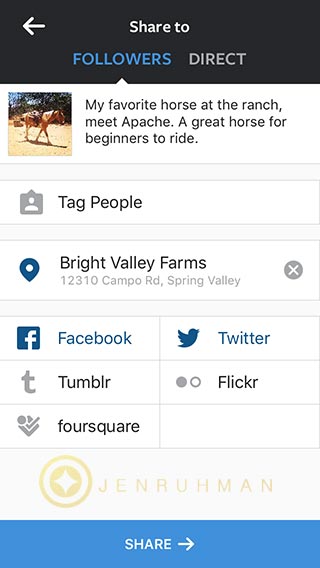
Using Instagram for your Local Business is done best when you geotag your photos. This will help you gain local instagram followers and attract local instagram users walking into your local business. Do this with every photo you post when you’re at your local business.
How to geotag instagram photos
Make sure your location settings are turned on
Click Add to Photo Map
Find your business location
Click on your location
Now all your instagram followers can see what else customers have tagged in the location, simplify by clicking on your location link.
Follow Local, Gain Local
You should follow local instagram users that geotag their location at your business. Get creative, find local followers by searching your city’s hashtag. Have a nearby local competitor? Follow their followers. When they see who’s following them, they may thank you and learn about your competitive services on your page.
Include instagram on your current marketing channels
You should include your social media usernames on all your marketing material. Everything from in store signage, flyers, postcards, coupons, email marketing, on your website, and mention your instagram account on your twitter and Facebook page.
Creative Ideas Using Instagram for your Local Business
Model your product at your local landmarks
Geotag your local photos
Repost your local followers photos
Network Locally
Do you have any local followers that have a HUGE following? Contact them, offer them free services or products in return for promotion on their instagram account and social media feeds. These people are also known as influencers. Find a few that you think will do a high quality job and watch for an increase of followers and foot traffic. Nearby local business owners will most likely like to network and boost foot traffic in the area too. Collaborate and ask them to share your business on their page and vice versa. Perhaps they can promote your products or services. It’s usually a win win situation.RELATED POST How to Get Local Instagram Followers
Have an instagram contest/giveaway
Contests can run like wildfire when you have something amazing you’re giving away for free! Free products or services will engage and attract a large amount of attention. Word of mouth about the contest generates brand exposure like nothing else I’ve seen on instagram. Instagram users LOVE a good contest. Don’t forget to promote the winner of your contest to gain more credibility. You will also want to select a winner that has a huge list of followers because they will share the news about their win. You will usually want to have a custom graphic made that shows everything the contest is offering, include your logo, and include the word contest or giveaway. When you post the photo, be sure to geotag, ass some has tags such as #contest #giveaway #free #freebies etc. Give instructions on your description by having users repost the photo and “tag 3 friends” for extra points. Users will most limey be glued to your page waiting to find out who won the prize.
Interact
Use instagram to communicate and engage your customers. Talk to them, like their photos. Have fun on instagram! Don’t limit yourself by only talking to local instagram users, talk to everyone you follow.
Local Hashtags
Don’t forget to use local hashtags. When you update, be sure to use your city or state.
Any ideas or suggestions? Please let me know in the comments.
And there you have it some hacks for using instagram for your local business.
This is my favorite FREE WordPress plugin to empower any WordPress website with schema markup. It immediately adds JSON-LD schema to a blog post! You can install it and enter your content in less than 3 minutes.
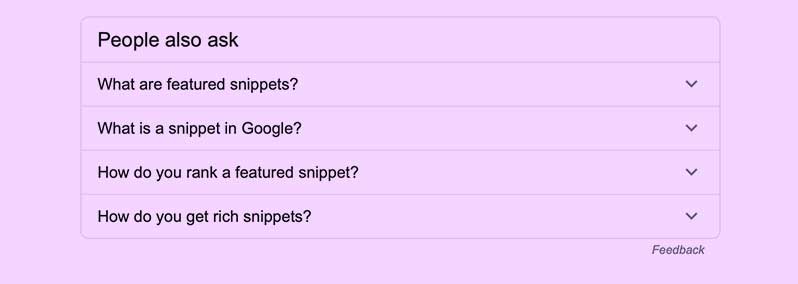
Why are SEO professionals excited about featured snippets?
Featured snippets gives lower ranking pages another chance to list at the top of the first page of Google. This is all done with little effort. You can easily get there with the WordPress plugin I recommend called: Structured Content (JSON-LD)
I’m using this post for a quick example. As a trusted SEO Specialist, this is my recommendation!
Here’s the plugin in action below and the steps how to use this plugin:
What's the Best Plugin for featured snippets?
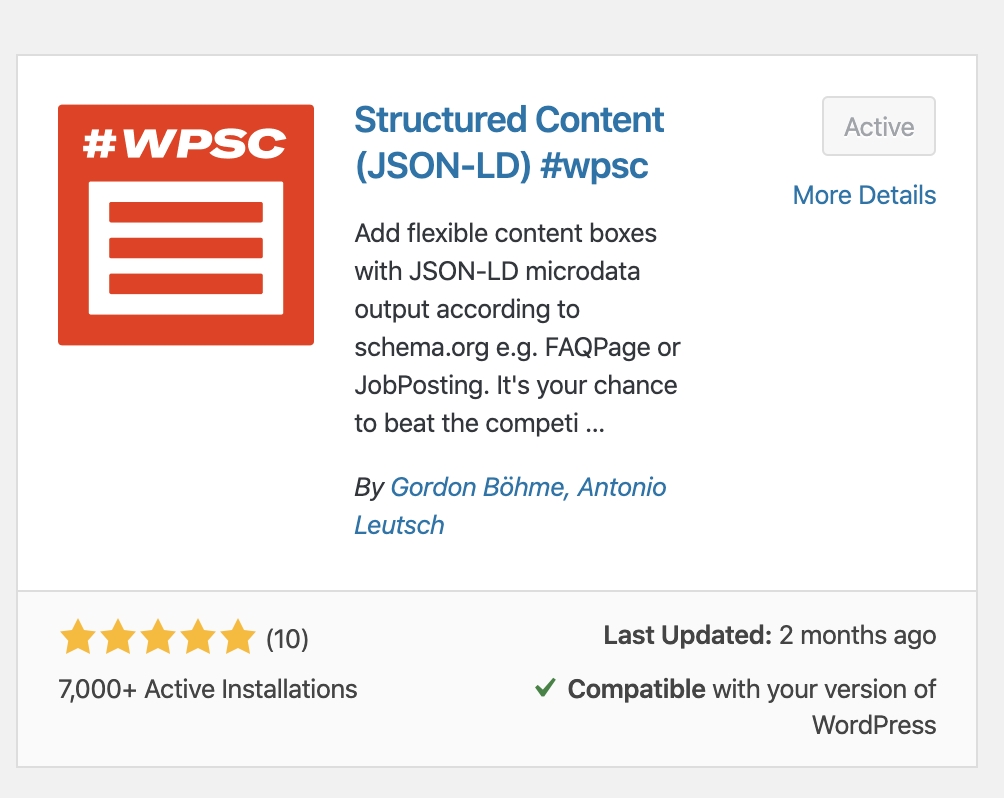
Structured Content (JSON-LD) #WPSC plugin by Gordon Bohme, Antonio Leutsh. It uses JSON-LD – Google’s preferred markup.
Step 1
In your WordPress dashboard go to: Plugins
RELATED POST: How to Rank Higher in Google Maps
Step 2
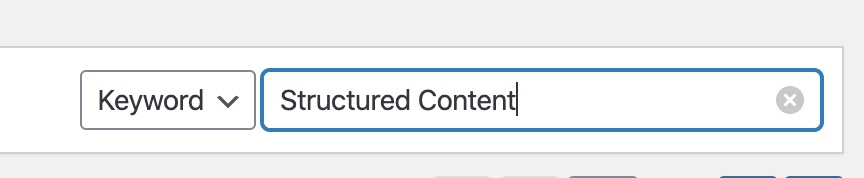
Search for “Structured content”. You’ll see the red #WPSC plugin by Gordon Bohme, Antonio Leutsh.
Step 3
Install the plugin and click “Activate”
RELATED POST: SEO Checklist for New Blog Posts
Step 4
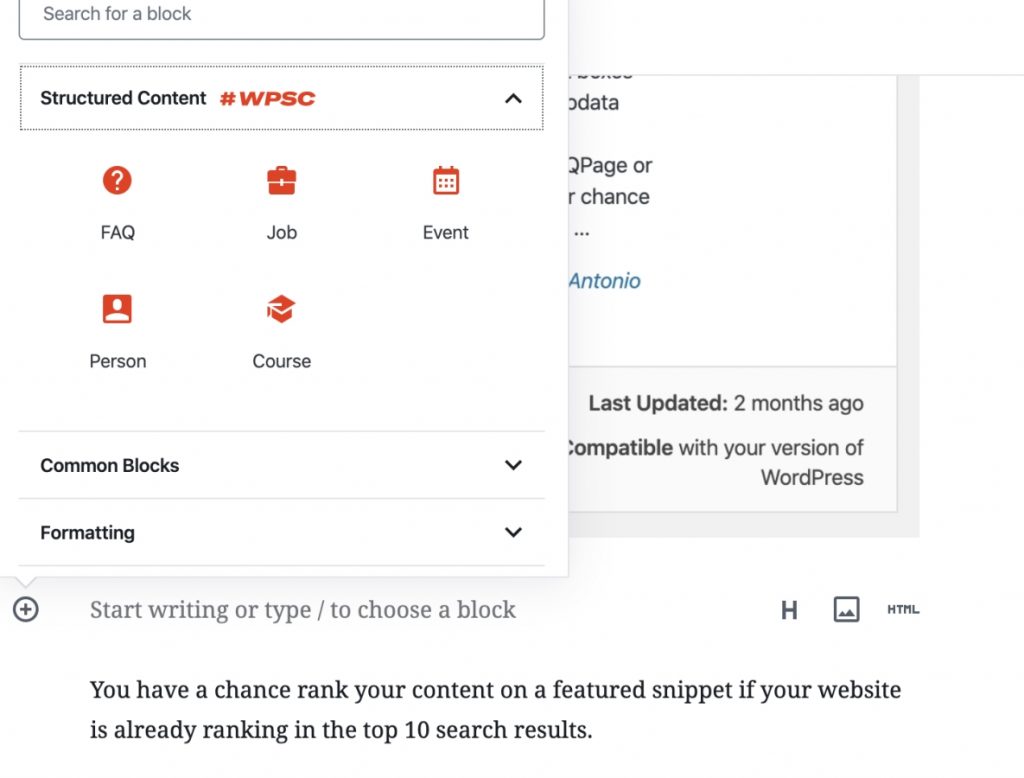
In your Gutenberg editor, add a new block > FAQ
Step 5
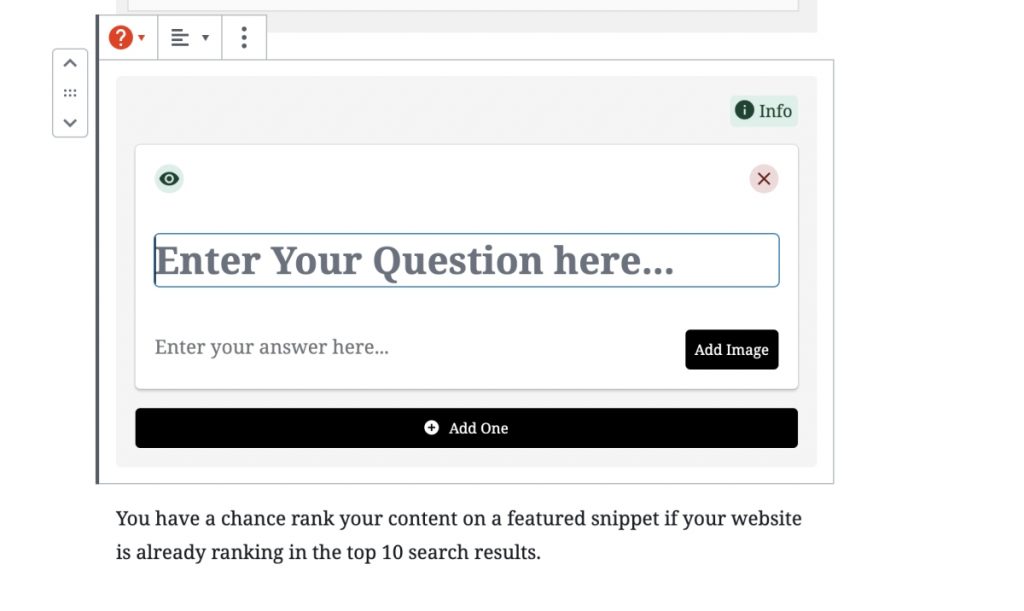
Enter your question and answer for your snippet. Don’t forget to add an image.
RELATED POST: SEO Facts Business Owners Overlook
Finished!
That’s all you have to do to get your blog posts ranking in Google’s featured snippets! However, you have to already be ranking in the top 10 SERPS in order to be pre-selected to appear in Google’s featured snippets.
Want to increase your chances being a featured snippet?
Start by conducting a Google search using the query you aim to be featured for. Analyze the existing featured snippet format; if it’s a list, create a well-structured list, and if it’s a table, generate an HTML table accordingly.
Implement structured data using a plugin like “Structured Content #WPSC” by Gordon Bohme and Antonio Leutsh. This helps search engines better understand your content and increases the chances of being featured.
Incorporate related questions and answers within your article. Addressing additional queries related to the main topic can increase the relevance of your content.
Examine the featured snippet of your competitors that is currently ranking. Refine your content to make it more informative, concise, and valuable, surpassing the competitor’s snippet in terms of helpfulness and clarity.
By following these steps, you can optimize your content for featured snippets and improve your chances of being prominently featured in search results.
RELATED POST: The Best FREE Longtail Keyword Generators
That’s it. It’s officially my favorite plugin and I think it’s the best plugin for Ranking in featured snippets.
Thanks for reading!
Please leave any questions in the comments section below!
If you’ve browsed stock photography websites offering high quality photos for $33.00 a pop, you gag.
Forget those “fancy schmancy” stock photo sites…
Check out these 30 bad-ass websites with the freshest and 100% FREE high quality stock photos.
(they’re totally legit and legal too btw.)
I know the struggle…
If you’re new to blogging and can’t afford paying for stock photos or a subscription, I hear ya. That was once me. Heck, I still love using free stock photography to cut costs. 😉
It’s crucial your new blog and social media has stunning images that make people instantly want to share your new blog post. Also she a tweet without even visiting your site. (it’s true)
This is my hand-picked collection of free photo websites that have creative large high quality images you can download for FREE.
Large photos – perfect for trending parallax backgrounds
Videos – another huge web design trend I’m loving
Vector / Illustrations
High Quality
(all links tested and working as of 10/1/2016)
1. PEXELS
pexels.com This free photo website has stunning images. They also add 100 new photos every day. This site keeps getting better. I’ve been using it for the past two years.
2. Pixabay
https://pixabay.com This site is my “go to” for downloading free videos for my web design. I mentioned the parallax web design trend, go here. There’s also nice illustrations and vector graphics all for FREE. Yay! I can always depend on this site’s powerful search tool of I can’t find an image anywhere else for free.
3. Gratisography
http://gratisography.com
This has some attention grabbing images that are kinda bizarre but cool. Perfect for attention grabbing tweets, pins, and blog post header images. I’ve seen a lot of blogs use this website.
4. Picjumbo
https://picjumbo.com I appreciate that this free image site has original photos. All nice big high quality photography. This website has some nice photo categories. I like checking out their tech photos when I blog for an IT company website.
5. New Old Stock
http://nos.twnsnd.co/
If you need vintage photography, this is the website for you! Black and white photos and even sepia colors, you name it. Searching is easy peasy. Fun creative photos to change up the mix.RELATED POST 10 Creative Ways to Use Instagram for Business
6. Snapwire Snaps
https://www.snapwi.re/ You have to check out the photo collections on this website. I love how it’s organized. Cooking, Coffee, Silhouettes, Smiles, Fitness, Fashion…and so many more! its all nicely organized. Amazing images.
More creative video background downloads and free photos. Very creative and useful original collections. I highly recommend these photos for your blog. They’re clean and high quality. Very professional looking photography.
8. Jaymantri
http://jaymantri.com
All these stunning photography were taken by Jay Mantri. Probably the most unique free photo website in this collection. Lots of architecture and close ups of doors,textures… perfect for someone out there.
9. Stokpic
http://stokpic.com Its a great site with easy to navigate categories. Only bummer, you have to register. Worth checking out. I wish they showed more photos per page. I love their fashion collection. I could see these images being used on pinterest.
10. Unsplash
https://unsplash.com Interesting free photo website that keeps growing. Be sure to browse the featured collections.
11. ISO Republic
http://isorepublic.com
Another great free photo resource for web designers that need high quality images. I also love their category of free textures.
12. Picography
http://picography.co/ Just a collection of unorganized photos, however they’re high quality. I wish these free photos had categories. Some real weird photos but hey everyone needs a little weirdness now and then right?
13. Get Refe
http://getrefe.tumblr.com
Great photos, I just don’t like the website usability. There’s some really unique images that catch your eye!
14. Foodies Feed
https://foodiesfeed.com
If you have a food blog… or as they say foodie blog 😉 this site’s for you! Also great if you’re the owner of a health blog, fitness blog, or just need free food related photography. Great hidden gem.
15. Travel Coffee Book
http://travelcoffeebook.com Jaw dropping images of traveling, nature, architecture. Everything is on one long page, sorry no search function. This site has such lovely graphics, you might get inspired to travel too.
http://jeshoots.com This site is bad-ass for having free mockup photos and free photoshop .PSD files. Great if you need a photo of someone holding an iPhone and you want to change the screen etc.
18. CupCake
http://cupcake.nilssonlee.se A small batch of free photography by Jonas Nilsson Lee. Fun to check out. Many scenic photos.
19. MorgueFile
https://morguefile.com/search/morguefile/1/most
This free photo site has tons of photos, all unique. I love how it displays how old each photo is. Check out the most popular / most downloaded images. There’s some great shots. So many images! I searched, typed in “colorful” and was delighted how amazing this site is.
20. Kaboompics
http://kaboompics.com
Clean, high resolution free photos that are all tagged and easy to find. I love the collection of desks with paper, pencils, phones all neatly placed.
21. Freeimages
https://freeimages.red
This website contains a very large selection of photos, but also videos! They offer the opportunity to contribute and get paid for it as well.
22. Life Of Pix
http://www.lifeofpix.com I’m happy to find this free photo site, good layout and they even have free videos! Beautiful images I’m sure you’ll want to place some of these images into your blog.
23. StockSnap
https://stocksnap.io
I thought this was pixels for a second. This has amazing photos… omg. The business category has nice photos. I’ll defiantly be using these in the near future. I love their categories, especially that they share what’s trending. There’s always something good.
24. FancyCrave
http://fancycrave.com
The best part of this site is that they offer free photo collections! It’s amazing. In the nav, click on photo packs. You can get an entire image collection, perfect for consistency if you want to place multiple styled images on one page for a professional look and feel.
25. GoodFreePhotos
https://www.goodfreephotos.com
If you’re in search for location based photos, this is your ticket. Every country is organized on the left navigation. This website does have images I’ve seen on other free photo websites but this is organized. Many as you know are not organized this nicely.RELATED POST Benefits of using instagram for Business
26. LibreShot
http://libreshot.com
Nice big website with a clean layout. They all have some sort of muted tone or styled filter applied to each photo.
27. Idpinthat
http://www.idpinthat.com A great free photo site for bloggers that want to create beautiful pinnable images for pinterest. This website can help everyone build a great pin. The website name says it all!
This free photo site just uploaded a ton of free christmas photos. Worth checking out if you’re going to do seasonal marketing.
29. Stocktookapic
https://stock.tookapic.com/photos?filter=free
Lots of beautiful free photography. Just make sure you click on the photos with the little cloud icon.
30. MMT
http://mmtstock.com/category/new-york/
Gorgeous one-of-a-kind photos by Jeffery Bettes. Nice categories. If you like one photo you’ll love them all. Check out his New York free photo collection. Love it!
31. IM FREE
http://www.imcreator.com/free
Great categories such as Occupation, Icons, Beauty, Fashion, Technology, Business, Recreation, BW, Ambient, People, Templates, Buttons, and more! Check it out already! 😉
WOW, so many websites to choose from with free high quality photos!
Want to learn How To Start a Blog and Make Money Online? Keep reading! I’m taking you under my wing.
Blogging 101 super EASY step by step How To Start a Blog and Make Money Online – Complete Guide.
Perfect for beginners.
Come fly with me! Let’s make money and have fun blogging!
Everyone is an expert at something or has a passion that they’re excited to share.
Put that passion and expertise to work for you and start making money today.
I have personally sat down and talked 101 with close friends and showed them how to get started. I have also had some speaking engagements presenting my own amazing personal blogging success story. I do a great job inspiring people about starting their own blog. I do have some close success stories of people I’ve personally helped, however, many start and quickly stop. Ugh! WHY? Because they have some personal traits that sabotages their success.
I think it’s very important to understand which traits these people have before you start your own successful blog.
I’m not sugar coating anything and telling you the honest truths you need to hear before you dive in and get discouraged or fail.
I don’t want to sound rude, but I’m very blunt.
I WANT you to succeed. I WANT everyone to succeed and make money by blogging what they’re passionate about.
I’ve sat down with people 101 and showed them step by step how to start a blog and making money online and unfortunately the majority get lazy and don’t go 100% with the steps. Why?
They’re lazy
Don’t MAKE the time
Not Passionate
Unrealistic Expectations
Get overwhelmed
Don’t want to keep learning about blogging tips
Give up too soon
It’s like they expect me to blog for them. It kinda pisses me off when I take time out of my schedule to genuinely help someone and they don’t make the effort back. That’s why thanks to them, I’m making this blog post instead, that you can just read and follow along.
These are the same steps I take when I create a new blog from scratch and want to monetize it fast. If I can make money from my blogs, do can you.
You really can blog for money, it’s a fact.
Anyone can become a blogger but not everyone knows how to make money being a blogger.
Comments / Excuses I often hear:
“Do people actually make a living from a blog?!”
“Bloggers just sit in coffee shops all day.”
“Who do you have to know to get famous blogging?”
“Why can’t I just quit my job and blog if it’s so easy?”
“I don’t have the time to blog…”
“I wish I had time like you… you’re lucky.”
“Blogger?.. so you don’t have a real job?”
It sounds too good to be true but it’s really happening.
I still don’t think people take bloggers seriously. Yet, there’s bloggers out there right now making 100K a month.
If you actually follow these steps and make the time, you’ll make money blogging and become a great blogger
If you skip the steps and try to take short cuts or get lazy, don’t even bother continuing reading this article. You’re not meant to be a blogger. Go keep complaining how unfair life is and all that jazz…peace.
Still reading? I didn’t upset you?! SWEET!
Let me tell you the BIG secret How people are becoming bloggers and making money
The big secret is that they don’t stop blogging. Why? Because successful bloggers of this caliber blog with passion. I like to refer to them as blogger unicorns. They’re the real deal and take the time going above and beyond to create a high quality blog post.
10 $ Successful Blogger characteristics:
Writes useful information
Includes details and secret tips
Comments back and answers questions
Interacts on social media
Able to take criticism
Includes helpful sharable images
Blogs with passion
Regularly blogs with passion
Has a nice WordPress design
Has SEO knowledge
When you have a passion, you genuinely want to learn and experience everything about it. When you have a passion, don’t you MAKE time for it? Am I right or what?!
There’s nothing more amazing than talking to someone that’s passionate about something, you can see this mysterious and contagious sparkle in their eyes. Have you witnessed this before? It’s mesmerizing.
You live, eat, breath it. You’re active on your blog not only blogging, but actively responding to comments – connecting with others.
It’s the secret sauce that makes a blog rich with delicious honey, that attracts bees to… sometimes even bears. LOL You want that buzz! It’s called traffic.
Good traffic generates:
An audience
Social media shares
Authority
Making money $
Brands wanting to work with you
Email newsletter signups
Comments
Are you ready to get started blogging and making income?
Ready to get serious and not look back?
Let’s get started.
Here’s the steps to become a Blogger and Make Money Online
1. Identify your passion and expertise!
What are you always eager to learn more about? What gets you excited? When you have passion and expertise, you have the ability to write a large amount of helpful content. The more original and helpful content you create, the bigger your site. The more pages you have ranking in Google, the more related ads you can sprinkled on you site. With more people able to visit so many pages, the more likely users will click on ads and generate monthly blog income. I want to also mention that the more trust you build, the more likely people are to make purchases from your site or click on Amazon Associate links of items you recommend.RELATED POST How to Make Money Blogging
2. Choose a name for your blog
(have your category in your domain name for SEO) This should be primarily what you’re going to be blogging about, your passion!
Need help deciding a blog name?Leave a comment below, what’s the majority of your blog posts going to be about?
Install WordPress (the blogging platform onto your hosting account) You’ll install this onto the root of your website -so leave the directory field empty.
Blogging Platform I highly recommend
I highly recommend you use WordPress as your blogging platform. It has the best usability and use of built-in SEO features that will help optimize your post. In other words, WordPress will handle all the HTML and SEO (search engine optimization) for you.
6. Purchase a Professional WordPress Theme
I recommend you purchase a high quality wordpress them if you want to be serious and monetize your blog. A nice responsive theme that has a clean design. This way you can always contact the theme’s support if you have a problem with your blog. I highly recommend using a theme from elegantthemes.com I’m not being paid to recommend this company! They just released Divi 3.0. It’s a phenomenal WordPress theme that you can use to easily design your blog. It has a WYSIWYG. “what you see is what you get.” You don’t have to know HTML, CSS, or even PHP.
7. Install these FREE helpful plug-ins that set you up for success
Using these plug-ins will help you start blogging the right way from scratch. The better foundation your blog starts with, the more traffic you’ll receive. I’m sharing my holy grail of plug-in you NEED.
So just how do bloggers make money from blogging is the mystery I’m sharing today. I hope you get inspired and make the effort needed to become successful. I’m also sharing with you my secret formula I use everyday to create blog posts for other companies that gain them first page rankings. (And if not the first page, the second…)
Even if you already have a blog that’s not earning money, I’ll let you know what you can start doing today and how to make money from your blog. You might have made some mistakes that beginners often make. It could be as simple as installing a wordpress plug-in.
9. Craft your First Blog Post with an Excellent Headline
Your success relies on using a catchy headline. Heck, sometimes on twitter, people see a cool headline and just share the tweet regardless! Amazing powerful stuff right?
People click on headlines that tease, build curiosity, sound super helpful, and excite.
Get ideas for sensational headlines by using headline generators.
You can also Google your topic and see what similar successful blogs are doing, just make yours better!
Blog as much as you want. Go on, let it all out. Blog blog blog! Scream, shout and type it all out. Keep it organized. Be specific. Be weird. Be REAL. Write from your unique perspective. Write useful content!
You WILL be a Great and Successful Blogger if You want to write and share Useful Information
Contribute to the free wealth of knowledge online. Perhaps you figured something out on your own when you couldn’t find any help online yourself.
Chances are, there’s someone else out there like you that’s searching Google for the same problem. There’s moments when you’re dealing with software and you run into a problem, Google it and there’s nothing to help, nothing on a community forum, you even contact the company support with little or no helpful response. Then you somehow after an hour of frustration figure it out on your own. You think…this would really help someone if I just blogged about it with screen shots.RELATED POST 70+ Ad Networks to Join – Make Money Blogging Today
You’re just what the internet needs.
It’s not just about how to blog for money, it’s how to add quality online too. Never forget that.
Count all the times the internet has helped you. The internet has SAVED me so many times with random things. You know what I mean…
11. Pump up the SEO
Get yourself a nice long tail keyword and work it into your headline.
Wait, what’s a long tail keyword?
They’re the search term people type into Google’s search bar. For example, a keyword could be “Computer repair San Diego” lots of competition for this popular keyword if you’re an IT shop in San Diego. So you should use a long tail keyword that’s less popular and more specific. An example would be “Lenovo laptop repair San Diego” or even longer “Lenovo laptop keyboard repair San Diego” Now we’re targeting a brand of laptops and location for laptop repair. This is an easier search term to rank for.
When you’re using the Yoast SEO plug-in, be sure to place this long tail keyword onto your title tag as well as url. See my example below:
This ranked the page #1 in the organic search results.
Work this keyword and variations of the keyword naturally into the content. Make sure you name the images this long tail keyword and also the alt tags.
12. Submit your blog post to Google
Using Yoast SEO plugin will help you with your SEO.
Share your new blog post on your favorite social media platforms. I highly recommend that you unleash the magic of Pinterest. Make a sharable image you’d like to see on Pinterest. I recommend http://www.idpinthat.com for newbies that want to use free images combined with a free image editor online. Using the free SumoMe will allow your website visitors to hover over the image on a desktop computer or click on the image on their mobile device to share on Facebook, twitter, and pinterest.
When you self promote and you’re new… you should do the 80/20 rule. Promote your posts only 20% of the time and promote similar high quality content 80% of the time. This will help give your audience helpful information.
If you’re new and don’t have established social media accounts, create them now and join http://viralcontentbuzz.com
This is a site where you can submit your blog post and people will share it on their social media posts in exchange for points. You earn points when you share someone’s post. It costs you points to get your article shared. Get it? It’s a win win.
Email your blog post to your friends and family. Why not? Maybe you have some friends that are natural influencers.
You can even put your social media accounts on auto pilot using Meet Edgar.com (paid) or Buffer.com (free)
I prefer Meet Edgar (I’m not paid for promoting this)
Have you read it a few times and think you forgot something? Maybe more helpful graphics? Share updated information that can make the content even more relevant. Perhaps adding more related images can help make the content less boring.
15. Internal Linking
Sprinkle links of related blog posts you’ve written into your new blog posts. Mix the fresh with old. This can help the click through rate of you site and keep your visitors on your site. This helps your page rank. Google will see your site as more valuable and want to rank it higher in search results. You want a site that keeps visitors engaged reading, learning, commenting.
16. Rinse and Repeat
Wow, you just went on a trip and a journey with me. Did you learn anything new? (I hope) Perhaps you already have a blog and you learned some new tips that can help you earn more money with your blog. Great! Which tips will you use on your own journey now?
Thank you for reading. I honestly hope you will get inspired to start a blog and make money starting today!
17. Your blog needs Patience, Persistence, Passion!
Congrats!!! You know how to get your blog started, monetized, and promoted. NOW you need to use your passion and keep motivated to blog!
This is how you need to picture blogging success
Starting a blog is like planting a seed.
Developing your brand, domain name, topic, installing your blogging platform, this is like planting a seed. Soon, your blog sprouts and it’s a new seedling, it needs water.
Blogging makes content and that content is your water. Without water, your seedling will dry up and wither away.
Soon you develop lots of content and a healthy young tree. Lots of time passes and your tree begins to produce fruit and shade. Branches – backlinks from other websites. The shade attracts life.RELATED POST How to Promote a Jewelry Business on Social Media
Your blog gets bigger and attracts visitors. The fruit is your revenue. Keeping your tree plentiful of juicy fruit requires lots of watering.
18. Keep the momentum going
Once you become this unstoppable blogging machine that blogs their heart out with passion. You become an authority of your topic. People become interested in your opinion. You’re eager to share new things you’ve learned and share what works and what does not. You’re sharing that passion with others. There’s no magic number of blog posts you need to start making money.
Your content has these key factors
Original
Good photos
Has helped people solve a problem
Has helped people make a purchase based on your unbiased review
Has long tail keywords and phrases that people have searched into Google
High quality – valuable information
Other blogs have linked to -backlinks
Has been interesting enough to get shares on social media
Creates buzz
19. Don’t be a cry baby blogger
What the hell does that mean? It means, once you start a blog you don’t just blog ten articles and call it a blog and stop. Don’t wimp out. Keep going. It can take a year before you see thousands of daily visitors.
It took me about one year to start making BIG money from one of my blogs. I started seeing 7k website hits per day. It took time to build an audience, trust, and useful content. Because I blog with passion and it’s a rewarding process in itself, making money from my blog is a bonus.
However, when making money from a blog, people lack patience!
Most people wimp out too early and never make a successful blog.
These are always their cry baby reasons why they stop:
“Blogging takes too long…” – If it takes too long you probably don’t have the passion
“I just wrote a new blog post and it’s not making money… this doesn’t work, you lied…” – It takes a long time to start seeing massive daily traffic.
“I have five blog posts, they’re good but they’re not getting traffic…” -However your blog posts are less than 400 words and it’s low quality
You don’t just wake up one morning and say… “uh… I’m bored blogging about cooking…” “I’m gonna blog about dogs instead…””
You also don’t wine that you’re not getting traffic or making money
Blogging should never be solely for the sake of just quitting your job, that’s just the benefit of a successful blog
Blogging should ALWAYS be for sharing useful quality information
Blog as often as you can make high quality content! Websites that have fresh content receive more traffic. However… never blog when you’re not feeling into it. Your readers can tell when a blog post feels forced. Google loves fresh content and as an incentive, Google rewards you with frequently sending google bots to your site to check for new content. You also gain an increase on your search rankings, (SERPS).
Ideally, the longer the post, the higher it will tend to rank. It’s seen as having more valuable content. Try looking at the top ranking blog posts for a random search in Google. If you can go 2500 words, do it!
How to keep your blog posts ranking high?
Once you get a highly successful blog post that ranks on the first page, you want to keep its place.
Frequently publish more high quality blog posts
Update the content of the aging blog post
Add internal links to old posts within your new posts
Continue to promote the old blog posts on Social media
The number one fault I see on blogs that causes their rankings to slowly drop
Many bloggers don’t make improvements or keep up with Google’s algorithm changes. For example, Google had a responsive website update. Google rewarded websites that used a responsive website design. This is one of Google’s many quality content guidelines.
If you run a local business, ranking higher in Google Maps can put your company directly in front of people who are actively searching for the products or services you provide.
I’ve worked in SEO for more than 20 years, and Google Maps has become one of the most important visibility opportunities for many of the local businesses I work with.
But the strategy has changed significantly since I first published this article.
Years ago, Local SEO advice often focused on tricks: putting keywords everywhere, geotagging photos, embedding maps repeatedly, building links to Google Business Profile URLs, or trying to manipulate business names.
That’s not how I approach Google Maps SEO today.
In 2026, I focus much more heavily on whether Google clearly understands:
What your business does
Where your business is located or operates
Which searches your business is relevant to
How established and trustworthy the business appears
Whether your website reinforces the same information
Whether customers consistently interact with and review the business
There is no legitimate ten-minute trick that guarantees a top-three Google Maps ranking.
But there are many things you can do to strengthen your local visibility.
Quick Answer: How Do You Rank Higher in Google Maps?
To improve your visibility in Google Maps, focus on three broad areas:
Relevance: Make it clear what your business does and which searches it should appear for.
Distance: Your physical location or relationship to the searcher’s location affects local visibility.
Prominence: Build a stronger reputation and authority through reviews, website SEO, backlinks, mentions and overall business visibility.
In practical terms, that means maintaining a complete Google Business Profile, choosing accurate categories, earning genuine reviews, building a strong local website, keeping business information consistent, and developing authority around your company.
You cannot completely control proximity.
But you can improve many of the other signals Google uses to understand your business.
How Google Determines Local Rankings
Google Maps rankings are not based on one optimization trick.
Google has long described local results around three broad concepts:
Relevance
How closely does your business match what the person is searching for?
If someone searches for a financial advisor, for example, Google needs enough information to understand that your company actually provides financial advisory services.
Distance
How far is the business from the person conducting the search?
This is why two people standing in different parts of San Diego can search for the same service and see different map results.
Prominence
How established or well-known does the business appear?
Prominence can be influenced by signals across the web, including reviews, links, mentions, directories and the strength of the business’s website.
Understanding these three concepts makes Google Maps SEO much easier to think about.
You aren’t trying to trick Google.
You’re trying to give Google stronger reasons to consider your business a relevant, nearby and credible result.
1. Complete Your Google Business Profile
Your Google Business Profile should contain complete and accurate information.
At minimum, review:
Business name
Address, if displayed
Service area, if applicable
Phone number
Website
Primary category
Secondary categories
Business hours
Services
Business description
Photos
Attributes
The more accurately Google understands your business, the easier it becomes to match the company with relevant searches.
This doesn’t mean stuffing keywords into every field.
It means providing useful information that accurately represents the business.
2. Use Your Real Business Name
This is one of the biggest changes I would make to my original advice.
Years ago, adding service keywords to a Google listing name could sometimes produce very fast ranking changes.
I do not recommend doing that today unless those words are genuinely part of the real-world business name.
Your Google Business Profile name should match how your business is actually known and represented in the real world.
For example, if your real business name is:
ABC Plumbing
don’t change the profile name to:
ABC Plumbing | Best San Diego Emergency Plumber & Drain Cleaning
just because those are keywords you want to rank for.
That’s not a sustainable SEO strategy.
I would rather strengthen relevance through your categories, services, website, content, reviews and authority.
3. Choose the Right Google Business Profile Categories
Your primary category is one of the most important pieces of information on your profile.
Choose the category that most accurately describes the core business.
You can also select relevant secondary categories when appropriate.
For example, a company may legitimately provide several related services.
But don’t add unrelated categories simply because they seem like additional keywords.
The goal is accuracy.
If your category is wrong, you’re making it harder for Google to understand which searches your business should appear for.
4. Add Accurate Services and Business Information
Use the available profile fields to clearly explain what your business provides.
Depending on your business category, that may include individual services or other business details.
This helps create stronger relevance between your profile and the searches potential customers perform.
For example, a personal injury law firm may provide several distinct services:
Car accident representation
Motorcycle accident representation
Pedestrian accident representation
Wrongful death representation
A financial advisor may provide:
Retirement planning
Wealth management
Investment guidance
Financial planning
Make it easy for both Google and customers to understand exactly what you do.
5. Build a Strong Google Review Profile
Reviews matter for both rankings and conversions.
When potential customers compare several businesses in Google Maps, review quantity, quality and recency can strongly influence which company they click.
Google also uses review-related information as part of its understanding of local prominence.
My recommendation is simple:
Create a consistent process for asking real customers for honest reviews.
Do not manufacture reviews.
Do not purchase reviews.
And I wouldn’t coach customers to stuff specific keywords into their reviews.
Instead, ask them to describe their genuine experience in their own words.
Those natural reviews often mention services and experiences anyway.
You should also respond to reviews.
Responses show customers that someone is actively paying attention to the business.
6. Add Useful, Real Photos of Your Business
Photos can make your profile much more useful to potential customers.
For a storefront business, useful photos may include:
The exterior of the building
Entrance
Parking area
Reception area
Interior
Team members
Products
Completed work
For service businesses, you may show:
Employees performing services
Company vehicles
Equipment
Completed projects
Team photos
I used to recommend geotagging photos as a Local SEO tactic.
I no longer consider that something businesses should spend their time worrying about for Google Maps rankings.
Focus instead on uploading clear, relevant, authentic images that accurately represent the business.
7. Strengthen the Website Connected to Your Google Business Profile
This may be one of the most underestimated Google Maps SEO strategies.
Your website matters.
Google can use information across the web to better understand your business, and the website connected to your Business Profile provides important context.
Your website should clearly explain:
What your business does
Which services you provide
Where you operate
Who you serve
Why customers should trust you
A local business website should also have strong:
Title tags
Headings
Service pages
Internal links
Location signals
Schema markup where appropriate
Mobile usability
Technical SEO
This is why I don’t treat Google Business Profile optimization and website SEO as separate projects.
8. Build Relevant Local Service and Location Pages
If your business serves specific cities or neighborhoods, your website may benefit from strong local landing pages.
But I don’t recommend creating hundreds of nearly identical pages where only the city name changes.
A useful location page should provide real information about the relationship between your business and that area.
Depending on the business, that may include:
Services offered in that location
Local customer examples
Relevant neighborhoods
Local FAQs
Case studies
Testimonials
Driving or service-area information
Supporting local articles
The goal is to create genuine geographic relevance, not manufacture hundreds of doorway-style pages.
9. Improve Your Internal Linking
Internal links help Google understand relationships between your pages.
For example, if you have a Local SEO service page and several supporting articles about:
Google Maps rankings
Google Business Profile
Reviews
Local citations
Location pages
Proximity
those pages should connect naturally.
Internal links can help reinforce which pages are most important and how your topics relate to one another.
For local businesses, this can also help create stronger relationships between service pages and location pages.
10. Keep Your Business Information Consistent Across the Web
Local citations are mentions of your business on other websites and directories.
These can include:
Industry directories
Local directories
Chambers of commerce
Professional associations
Business organizations
Local publications
Your core business information should be reasonably consistent wherever it appears.
That includes your:
Business name
Address
Phone number
Website
I don’t obsess over whether one directory writes “Road” and another writes “Rd.”
The bigger goal is preventing genuinely conflicting business information.
For example, an old phone number, outdated address or incorrect website URL is much more concerning than harmless formatting differences.
11. Earn Local Backlinks and Mentions
Backlinks still matter.
But I wouldn’t focus on building backlinks to your Google Business Profile share link.
I would focus on building authority around your actual business and website.
Useful local link opportunities might come from:
Local media
Business associations
Professional organizations
Community sponsorships
Local events
Industry publications
Organizations you genuinely work with
Google’s understanding of prominence can include information it finds about your business across the web.
That’s why legitimate mentions can be valuable beyond the backlink itself.
12. Set Up Service Areas Correctly
If you travel to customers instead of serving them at a storefront, you may operate as a service-area business.
Make sure your Google Business Profile accurately reflects that setup.
Don’t create fake locations in cities where you don’t actually have staffed physical locations.
And don’t assume adding dozens of cities to your service area will automatically make you rank throughout those cities.
Service-area settings help describe where you operate, but they don’t eliminate Google’s consideration of distance and other local ranking signals.
13. Keep Your Google Business Profile Useful and Current
Your profile should accurately reflect the current business.
That means updating things when they change, such as:
Business hours
Holiday hours
Services
Photos
Contact information
Relevant updates
You can also publish Google Business Profile updates when you have something useful to share.
I don’t view posting frequency as a magic ranking switch.
I view it as part of keeping the profile useful, active and informative for potential customers.
14. Monitor Your Business Profile for Accuracy
Don’t create your Google Business Profile and forget about it.
Check it periodically.
Make sure your:
Phone number is still correct
Website link works
Hours are accurate
Categories still make sense
Services are current
Photos represent the business
Reviews are being monitored
Keeping your profile accurate isn’t glamorous, but Local SEO often comes down to getting many small details right consistently.
Why Proximity Still Matters in Google Maps
This is one of the Local SEO realities business owners sometimes don’t want to hear.
You cannot completely optimize your way around geography.
If someone searches from downtown San Diego and your business is located far outside that area, nearby competitors may have a natural proximity advantage.
This is one reason rankings can look dramatically different depending on where the search is performed.
A business may rank extremely well near its location but fall significantly as the searcher moves farther away.
That doesn’t necessarily mean your SEO is failing.
One of the biggest lessons I’ve learned working on Local SEO is that Google Maps rankings and organic SEO are deeply connected.
Imagine two local businesses.
Business A has:
A basic five-page website
Very little service information
Few backlinks
No supporting local content
Business B has:
Strong dedicated service pages
Helpful supporting content
Clear location information
Quality backlinks
Local mentions
Good internal linking
Case studies
Consistent business information
Business B gives Google significantly more context about what the company does and where its expertise lies.
That’s why my Local SEO strategies don’t stop with Google Business Profile.
Your website is one of your strongest local authority assets.
Google Maps SEO Mistakes to Avoid
Keyword Stuffing Your Business Name
Don’t add keywords to your Google Business Profile name unless they are genuinely part of your real-world business name.
Creating Fake Locations
Don’t create profiles for offices or cities where you don’t legitimately operate according to Google’s eligibility requirements.
Buying Fake Reviews
Fake reviews create unnecessary risk and undermine trust.
Obsessing Over Photo Geotags
Spend your time creating useful, authentic business photos instead.
Building Hundreds of Low-Quality Citations
Relevant and accurate citations are more useful than blindly submitting your business to every directory you can find.
Ignoring Your Website
Your Google Business Profile does not replace website SEO.
Expecting to Rank Everywhere
Distance matters. A business usually won’t have identical Google Maps visibility across an entire county or metro area.
Thinking There Is a Secret Google Maps Hack
There isn’t.
Strong Maps visibility usually comes from building relevance, authority, reputation and geographic credibility over time.
How Long Does It Take to Rank Higher in Google Maps?
There isn’t one standard timeline.
Some businesses can see improvement relatively quickly after correcting major problems such as:
An incorrect category
An incomplete profile
Weak website relevance
Missing service pages
Incorrect business information
Competitive markets can take considerably longer.
A business trying to rank for a competitive service across San Diego may be competing against companies with:
Years of reviews
Strong websites
Established backlinks
Local press mentions
Strong brand awareness
Years of Local SEO work
I would evaluate progress over time rather than expect a guaranteed ranking within days or weeks.
My Google Maps SEO Approach in 2026
If I were trying to improve a local business’s Google Maps visibility today, I would prioritize the strategy roughly like this:
Make sure the Google Business Profile is legitimate, verified and accurate.
Choose the most relevant primary and secondary categories.
Complete the available profile information.
Build a consistent process for earning genuine customer reviews.
Improve the website’s service and local relevance.
Create strong service and location pages where appropriate.
Improve internal linking.
Correct inaccurate business information across important directories.
Earn relevant local and industry backlinks.
Continue strengthening the business’s authority and reputation.
That’s not as exciting as claiming there’s a secret Maps trick.
But it’s far more sustainable.
Want to Rank Higher in Google Maps in San Diego?
If your business isn’t appearing prominently in Google Maps—or your visibility drops dramatically outside your immediate location—I can help identify what may be holding it back.
I’ve worked in SEO for more than 20 years and use both website SEO and Local SEO to help businesses improve their visibility across Google.
As a San Diego SEO expert, I look at your Google Business Profile, website, competitors, rankings, reviews, content, backlinks and local authority rather than relying on one optimization trick.
Frequently Asked Questions About Ranking Higher in Google Maps
What determines Google Maps rankings?
Google Maps and local search visibility are primarily influenced by relevance, distance and prominence. Google considers how closely a business matches the search, how far it is from the searcher and how established or well-known the business appears.
Can I pay Google to rank higher in Google Maps?
You cannot pay Google for a better organic local ranking. Businesses can advertise through Google, but paid placements are separate from organic Google Maps rankings.
Do Google reviews help Maps rankings?
Reviews can contribute to local prominence, and a strong review profile can also significantly affect whether potential customers choose your business. Focus on consistently earning genuine reviews from real customers rather than trying to manipulate review content.
Does my website affect my Google Maps ranking?
Yes. Website SEO can support local visibility by helping Google understand your services, location, relevance and authority. Strong service pages, local content, internal links and backlinks can all contribute to the broader authority of your business.
Should I put keywords in my Google Business Profile name?
Only if those keywords are genuinely part of your real-world business name. Adding extra service or location keywords solely to improve rankings can violate Google Business Profile guidelines.
Does geotagging photos help Google Maps rankings?
I would not rely on photo geotagging as a ranking strategy. Focus instead on uploading authentic, clear and useful photos that accurately represent your business, team, location, products or services.
How many reviews do I need to rank in Google Maps?
There is no universal number of reviews that guarantees a Maps ranking. Review quantity and ratings are only part of the larger local ranking picture, which also includes relevance, distance, website authority and other prominence signals.
Can a service-area business rank in Google Maps?
Yes. Eligible service-area businesses can use Google Business Profile and set the areas they serve. However, adding a city to your service area does not guarantee strong rankings throughout that city because distance and other ranking factors still apply.
How long does Google Maps SEO take?
Results vary depending on competition, location, website authority, reviews, profile quality and the current state of the business’s Local SEO. Some businesses see early improvements after correcting obvious issues, while competitive markets can require sustained work over several months or longer.
Is Google Maps SEO the same as Local SEO?
Google Maps optimization is an important part of Local SEO, but Local SEO is broader. It also includes website optimization, local content, service and location pages, citations, reviews, backlinks and other signals that help a business become more visible for geographically relevant searches.
Yes—but probably not for the reason many business owners think.
I originally wrote this article back in 2019, when the standard SEO advice was basically: publish more blog posts, target more keywords, and watch your traffic grow.
SEO has changed quite a bit since then.
Simply publishing blog post after blog post does not automatically improve your rankings. In fact, I’ve worked on websites with hundreds of blog posts that receive practically no organic traffic.
But strategic blogging?
That’s still incredibly valuable.
A well-planned business blog can help you answer the questions your customers are searching for, build topical authority, support your important service pages, attract backlinks, demonstrate your experience, and bring potential customers into your website much earlier in their decision-making process.
Quick Answer:
Blogging can help SEO when you publish useful content based on topics your customers actually search for. Strategic blog content can increase keyword visibility, support service pages through internal links, earn backlinks, demonstrate expertise, attract long-tail traffic, and give your business more opportunities to appear in traditional and AI-powered search. The goal isn’t to publish as many posts as possible. It’s to publish the right content.
4. Blogging Demonstrates Your Experience and Expertise
This benefit has become even more important.
Your website gives you an opportunity to demonstrate that you actually know your industry.
If you’re an attorney, financial advisor, contractor, doctor, real estate professional, fitness professional, or another experienced business owner, you probably answer customer questions every day.
Those real questions can become excellent content.
And this is where businesses have an advantage over websites publishing generic information.
You can add things AI-generated summaries and generic articles often don’t have:
Firsthand experience
Real examples
Professional observations
Original photos
Case studies
Local knowledge
Unique opinions
Lessons learned from working with customers
That’s the kind of content I want to see more businesses create.
Don’t just repeat what the first ten Google results already say. Add something useful of your own.
5. Great Blog Content Can Earn Backlinks
Service pages aren’t always easy to earn backlinks to.
Think about it.
Why would another website randomly link to your page advertising a service?
A genuinely useful resource is different.
People may link to:
Original research
Statistics
Detailed tutorials
Industry studies
Useful checklists
Calculators
Original infographics
Expert commentary
Comprehensive guides
Those blog posts can become linkable assets.
Backlinks from relevant, reputable websites can help strengthen your website’s authority and can also send referral traffic directly to your site.
This was one of my favorite points in the original version of this article, and it still applies.
Every useful article creates another potential entry point into your website.
But getting traffic isn’t enough.
You need to think about what the visitor should do next.
Suppose you own a computer repair company and publish:
10 Signs Your Computer May Have Malware
Someone finds the article through Google because their computer is behaving strangely.
You answer their question.
Great.
But don’t stop there.
If your company provides malware removal, the article should naturally explain that professional help is available.
Depending on the topic, your call to action could be:
Schedule a consultation
Call your business
Request an estimate
Visit a related service page
Book an appointment
Download a resource
A blog should create paths into your business—not dead ends.
7. Blogging Gives You Content for Other Marketing Channels
One good article can become much more than a Google result.
You can repurpose it into:
LinkedIn posts
Instagram posts
Short-form videos
YouTube videos
Email newsletters
Google Business Profile posts
Infographics
Sales resources
This is one reason I don’t like thinking about blogging as an isolated marketing activity.
You’re creating an original resource on a website you own.
Then you can distribute that information through other channels.
Instead of wondering what to post on social media every week, your blog can become the foundation of your content strategy.
8. Evergreen Blog Posts Can Generate Long-Term Traffic
This is one of the biggest differences between SEO content and paid advertising.
When you stop paying for an ad, the ad stops running.
A strong evergreen article can continue attracting visitors long after you publish it.
I have articles on my own website that I originally published years ago and have continued updating as SEO changed.
That’s important:
Evergreen doesn’t mean “publish it once and forget about it forever.”
Old articles can become inaccurate, outdated, or less competitive.
I regularly revisit older content to:
Update outdated information
Improve examples
Remove obsolete recommendations
Add internal links
Improve formatting
Answer new questions
Make the content more useful
Sometimes updating an existing article is a better SEO investment than publishing another new one.
9. Blog Content Can Increase Your Visibility in AI Search
Search isn’t limited to a traditional list of ten blue links anymore.
People now discover information through Google AI experiences and AI assistants in addition to traditional organic search.
This makes useful, clearly structured content even more valuable.
Businesses should think beyond:
“How do I rank #1 for this exact keyword?”
I also think about:
Does this website provide information that search engines and AI systems can clearly understand, associate with the business, and potentially reference when answering related questions?
That’s another reason I like:
Clear headings
Direct answers
FAQs
Original expertise
Strong author information
Consistent business/entity information
Useful supporting content
We’re no longer optimizing solely for a single list of traditional search results.
10. Blogging Lets You Reach Customers Earlier
Your potential customer doesn’t always begin by searching:
“hire [your service] near me”
They may start by researching a problem.
A homeowner might search:
Why is my air conditioner making a rattling noise?
Later, they may realize they need an HVAC company.
A person nearing retirement might search:
How much money do I need to retire in San Diego?
Later, they may decide they need a financial advisor.
A business owner might search:
Why isn’t my website showing up on Google?
Eventually, they may decide they need an SEO professional.
Blogging allows your business to be present during those earlier research stages.
If your content genuinely helps them, they may already know who you are when they’re ready to hire someone.
Why More Blog Posts Don’t Always Mean Better SEO
This is where my advice has changed significantly since I originally published this article in 2019.
In fact, excessive blogging can create problems such as:
Keyword cannibalization
Thin content
Overlapping topics
Outdated information
Poor internal linking
Pages receiving no traffic or impressions
A bloated website that’s difficult to maintain
That’s why I periodically audit content rather than blindly adding more.
If you have a large business blog, I strongly recommend reading my article about why publishing more blogs doesn’t always improve SEO.
How Often Should a Business Blog?
There isn’t one publishing schedule that works for every business.
I’d rather see you publish one excellent article that supports your SEO strategy than four rushed articles simply because your content calendar says you need to post weekly.
Yes. Strategic blogging can help your website rank for more relevant searches, build topical depth, create internal linking opportunities, attract backlinks, demonstrate expertise, and reach potential customers throughout their research process. Simply publishing large quantities of blog posts, however, does not automatically improve SEO.
How often should I blog for SEO?
There is no universal publishing frequency. Your ideal schedule depends on your competition, industry, existing content, available topics, resources, and ability to maintain quality. One excellent article can be more valuable than several rushed posts.
How long should a blog post be for SEO?
There is no ideal word count that guarantees rankings. A blog post should be long enough to satisfy the searcher’s intent and explain the topic thoroughly without adding unnecessary filler solely to increase word count.
Can blogging help my service pages rank?
Yes. Relevant supporting articles can internally link to important service pages and help create a logical topical structure around your services. Blog content can also attract backlinks and visitors who may eventually move to your commercial pages.
Should every business have a blog?
Not necessarily. Blogging makes the most sense when your potential customers research topics related to your products, services, problems, or industry. Businesses should evaluate whether useful search demand and content opportunities exist before investing heavily in blogging.
Does Google prefer websites that publish frequently?
You should not publish content simply to make your website appear fresh. Publishing frequency by itself does not make content valuable. Focus on creating useful content and keeping important existing pages accurate and current.
Can old blog posts still rank on Google?
Yes. Evergreen articles can continue generating organic traffic for years when they remain relevant and competitive. Older content should be reviewed periodically and updated when information, search intent, competition, or best practices change.
Can blog posts generate leads?
Yes. Blog posts can attract people researching problems related to your services. Strategic internal links and calls to action can then direct those visitors toward relevant services, consultations, products, appointments, or other conversion opportunities.
Can blogging help with AI search visibility?
Useful, clearly structured website content can give search engines and AI-powered systems more information about your business, expertise, services, and subject areas. There is no guarantee that a particular article will be cited or surfaced by an AI system, but creating original, authoritative, well-structured content gives your website more useful information to be discovered and understood.
Is it better to update an old blog post or publish a new one?
It depends on the topic. If an existing article already addresses the same search intent, improving that page may be better than creating another competing URL. A new article makes more sense when you’re addressing a genuinely different topic, question, or search intent.
Want Blogging to Actually Help Your SEO?
A business blog can become an incredibly valuable SEO asset—but only when there’s a strategy behind it.
I’m Jen Ruhman, and I’ve worked in SEO for more than 20 years. I help businesses determine what they should publish, what existing content should be improved, how their articles should support important service pages, and how all of that content fits into a larger SEO strategy.
If you’re looking for an experienced SEO expert in San Diego, I’d be happy to take a look at your website and identify your strongest opportunities.
Call or text: (619) 719-1315
— Jen Ruhman SEO Expert & Founder of Jen Ruhman SEO