Feb 20, 2024 | SEO Tips
Does updating old website content help SEO?
Yes — when the update actually improves the page.
Simply changing a publication date, rewriting a few sentences, or adding another paragraph does not automatically make a page rank better.
The real opportunity is identifying older pages that have potential and making them more accurate, useful, complete, and aligned with what people are searching for today.
In many cases, improving an existing page can be a better SEO investment than publishing another new article.
I see this frequently on established websites.
A business may already have dozens or hundreds of pages sitting in Google’s index.
Some are ranking.
Some are getting impressions.
Some are sitting on page two.
Some used to perform better.
And some are competing with newer pages covering almost the same topic.
Before creating more content, I often want to know:
What can we improve first?
Quick Answer: Does Updating Old Content Help SEO?
Updating old content can help SEO when the changes make the page meaningfully better.
That may include:
- Correcting outdated information
- Improving alignment with search intent
- Expanding sections people actually need
- Removing obsolete advice
- Adding firsthand experience
- Improving headings
- Strengthening internal links
- Consolidating overlapping content
- Improving the title and meta description
- Adding better examples
- Making the page easier to use
- Updating weak calls to action
The goal is not to make the page look newer.
The goal is to make the page better.
Old Does Not Automatically Mean Bad
One of the biggest mistakes I see is assuming older content needs to be rewritten simply because it is old.
That is not how I approach SEO.
An article published five years ago may still:
- Rank well
- Answer the search query perfectly
- Attract backlinks
- Generate leads
- Receive consistent organic traffic
- Be completely accurate
If that page is working, I do not want to change it just to say I updated it.
Sometimes the best SEO decision is:
Leave it alone.
This is especially important when a page already owns a strong search position.
Unnecessary changes can introduce new problems.
When Should You Update Old Content?
I usually look for specific signs that a page could benefit from an update.
1. The Information Is Outdated
This is the most obvious reason.
Industries change.
Products change.
Technology changes.
Regulations change.
Software interfaces change.
Statistics change.
And recommendations that were useful three years ago may no longer make sense today.
If outdated information could mislead the reader, update it.
Accuracy comes first.
2. Rankings or Traffic Have Declined
A page that performed well in the past but has steadily lost visibility deserves investigation.
That does not automatically mean the content is bad.
I would look at:
- Search intent
- Competitors
- SERP changes
- Internal linking
- Content overlap
- Title changes
- Backlinks
- Technical issues
- Whether newer information is now expected
A drop in traffic is a signal to investigate, not a command to rewrite everything.
3. The Page Gets Impressions but Few Clicks
Google Search Console can reveal pages that appear frequently in search results but receive relatively few clicks.
That can be a great opportunity.
I may look at:
- The SEO title
- Meta description
- Search intent
- Query relevance
- Whether the page fully addresses the terms generating impressions
Sometimes the content itself is strong, but the title does a poor job of earning the click.
Other times, Google is showing the page for subjects that deserve better coverage.
4. The Page Is Ranking on Page Two
This is one of my favorite opportunities.
If a page already ranks around positions 11–20 for relevant searches, Google is already telling us something:
The page has potential.
Instead of immediately creating another article targeting a similar keyword, I may strengthen the page that already has visibility.
That might include:
- Improving search intent alignment
- Adding missing information
- Strengthening internal links
- Adding original examples
- Improving topical depth
- Updating the title
- Improving readability
An existing page with traction can sometimes be easier to strengthen than starting from zero.
5. Search Intent Has Changed
This is an important one.
A page can be well written and still struggle because it answers the wrong type of question.
Search results evolve.
A keyword that once returned mostly educational articles may now favor:
- Service pages
- Product pages
- Comparison guides
- Local results
- Videos
- Forums
- Firsthand experiences
Before rewriting content, look at what Google is currently rewarding for that query.
Ask:
What is the searcher actually trying to accomplish?
Then decide whether the page still fits that intent.
6. You Have Better Firsthand Experience Now
Your experience grows.
Your content should be allowed to grow with it.
An article you wrote four years ago may have been accurate but fairly generic.
Since then, you may have:
- Worked with more clients
- Solved more problems
- Seen common mistakes firsthand
- Collected case studies
- Learned which recommendations actually work
- Developed stronger opinions
- Discovered exceptions
Add that.
That is one of the most valuable updates you can make.
Generic information is easy to find.
Real experience is harder to duplicate.
7. The Page Has Weak Internal Links
Older pages often have poor internal linking simply because many of your newer resources did not exist when the article was written.
This is something I check regularly.
For example, an older article on my website may now have a natural reason to link to my guide on internal linking for SEO or my broader SEO audit guide.
Those pages did not always exist.
Updating internal links can help visitors discover related information while creating a clearer site structure.
It also helps prevent valuable older content from becoming isolated.
8. Several Pages Are Competing With Each Other
Sometimes the solution is not to update one page.
It is to combine several.
Established websites often accumulate articles targeting slight variations of the same search intent.
For example:
How to update old content
Should I refresh old blog posts?
Does updating content help SEO?
How often should I update website content?
Do all four need separate URLs?
Maybe not.
If the intent is essentially the same, one stronger page may perform better than several weaker pages competing for the same topic.
This is one reason I have become much more selective about publishing new content.
I explain this further in Why Publishing More Blogs Doesn’t Always Improve SEO.
Use Google Search Console to Find Content Worth Updating
Google Search Console is one of the first places I look when identifying content-refresh opportunities.
Instead of randomly choosing old articles, use actual performance data.
Look for pages with:
- Declining clicks
- Declining impressions
- High impressions but low click-through rates
- Rankings around positions 8–20
- Many relevant queries
- New search queries the article only partially addresses
Those are often much more interesting than a page receiving no visibility at all.
For example, suppose an article ranks around position 13 for several valuable queries.
That tells me Google already understands the page and sees some relevance.
I would investigate whether a meaningful improvement could move it further.
That is a much more strategic approach than saying:
“This post is two years old. Let’s rewrite it.”
Do Not Update Content Just to Change the Date
This is one practice I do not recommend.
Changing:
Published 2023
to:
Updated 2026
does not make the article better by itself.
If you display an updated date, there should have been a real update.
Maybe you:
- Rewrote major sections
- Updated outdated advice
- Added new data
- Added examples
- Reworked search intent
- Improved internal links
- Consolidated content
- Added new firsthand experience
Then an updated date makes sense.
But changing the date purely to make content appear fresh misses the point.
Should You Completely Rewrite an Old Article?
Sometimes.
But not always.
I prefer to preserve what is already working.
If a page ranks well for several queries, I do not automatically want to replace every sentence.
I may instead keep the strongest sections and improve weaker areas.
Think of it as renovation rather than demolition.
Keep the foundation when the foundation is good.
A complete rewrite makes more sense when:
- The article is badly outdated
- The intent has changed significantly
- The writing no longer represents the business
- The structure is poor
- Most of the information needs replacement
- The page was originally thin or generic
When Should You Leave an Old Page Alone?
This deserves its own section because more SEO work is not always better.
I would be cautious about changing a page that:
- Ranks strongly
- Receives consistent traffic
- Converts well
- Has good backlinks
- Still contains accurate information
- Clearly satisfies search intent
- Has no meaningful weaknesses
You do not get extra points for touching every page.
Sometimes the best thing you can do is monitor it and move on.
Spend your time where there is a clearer opportunity.
Updating Content vs. Publishing New Content
This is where SEO strategy becomes important.
You have limited time and resources.
So should you:
Write something new?
or:
Improve something you already have?
I usually start by asking whether the search intent is already covered.
If yes, improve the existing page.
If not, a new page may be appropriate.
This is the same philosophy I use when deciding how often a business should blog for SEO.
Do not publish just to hit a quota.
Find the opportunity first.
What Should You Update on an Old Page?
Here is the checklist I use.
Check the Search Intent
Does the page still answer what people searching the target query want?
Check Accuracy
Remove or correct outdated facts, screenshots, statistics, recommendations, links, or references.
Review the Title
Does the SEO title accurately describe the page?
Could it better match the queries already generating impressions?
Review the Introduction
Does the opening answer the question quickly?
Or does the visitor have to scroll through several paragraphs before getting useful information?
Improve Headings
Make headings descriptive and easy to scan.
Good headings should help both visitors and search engines understand the structure of the page.
Add Missing Sections
Look at questions users actually ask.
But do not add sections simply to make the article longer.
Add Firsthand Experience
Include:
- Examples
- Observations
- Client experiences
- Processes
- Case studies
- Lessons learned
This can make the article much stronger than generic information assembled from other websites.
Strengthen Internal Links
Link to genuinely useful related pages.
For example, content updates often reveal internal-link opportunities that did not exist when the article was first published.
If your site has weak internal structure, my internal linking SEO guide explains how I approach it.
Improve the Call to Action
Older pages sometimes attract traffic but give visitors nowhere logical to go next.
Ask:
What should this visitor do after reading?
That could be:
- Read another article
- Visit a service page
- Book a consultation
- Request an analysis
- Contact the business
Make the next step natural.
Content Refreshes Can Also Improve Conversions
SEO is not only about rankings.
Suppose an older article already receives traffic.
But the page has:
- Weak calls to action
- Old branding
- Poor formatting
- Broken links
- Unclear navigation
- No logical path to a service
Improving those elements may increase the business value of the traffic you already have.
A page does not have to gain ten ranking positions for the update to be worthwhile.
Sometimes improving conversion is the bigger win.
Updating Content Can Strengthen Your Entire Website
Refreshing older content can also improve the relationships between pages.
Imagine you publish an important new service page.
You may already have ten older articles that mention that service.
Updating those articles with relevant internal links can help integrate the new page into the website more effectively.
This is especially useful on mature websites where hundreds of pages have accumulated over time.
Good SEO is not simply about creating individual pages.
It is also about building a website where those pages make sense together.
How Updating Content Fits Into an SEO Audit
Content refreshes should not happen randomly.
During an SEO audit, I look at the broader picture:
- What is already ranking?
- Which pages are losing visibility?
- Which URLs overlap?
- Which pages have backlinks?
- Which pages generate leads?
- Which pages should be consolidated?
- Which pages need stronger internal links?
- Which important topics are missing?
That gives you a prioritized roadmap.
Instead of updating fifty articles because they are old, you may discover that only ten actually deserve attention.
That is a much better use of resources.
Does Updating Content Help With AI Search?
The same basic principle applies.
I would not update every page simply because AI search exists.
Instead, make important pages clearer and more useful.
That may mean adding:
- Direct answers
- Firsthand experience
- Clear business information
- Useful examples
- Well-organized sections
- Accurate facts
- Better context
AI-powered search does not change the fundamental goal:
Create information worth understanding and using.
If AI visibility is important to your business, I explain the broader relationship in my guide to how AI search is changing local SEO.
How Often Should You Update Website Content?
There is no universal schedule.
I do not believe every article needs to be updated every six months or every year.
Review content based on:
- Performance
- Accuracy
- Business importance
- Industry changes
- Search intent
- Ranking opportunities
A fast-changing industry may require frequent updates.
An evergreen article may remain useful for years.
Again:
Opportunity should determine the update — not the calendar.
My Approach to Content Refreshing
After more than 20 years working in SEO, I have become much less interested in publishing content simply to keep a website looking active.
I would rather improve a page that already has potential.
Today I spend much more time asking:
Should this page be updated?
Should it be merged?
Should it be redirected?
Should it be left alone?
Does another URL already own this search intent?
That is how I approach my own website too.
I am constantly reviewing older content, consolidating overlapping articles, improving internal links, and strengthening pages that deserve more support.
That work can be just as important as publishing something new.
Frequently Asked Questions About Updating Old Content for SEO
Does Google prefer fresh content?
Not every search requires fresh information. What matters more is whether the page remains accurate, useful, relevant, and appropriate for the search intent.
Will changing the publication date improve rankings?
Changing the date alone is not a meaningful content improvement. Update the date when you have actually made substantial changes to the page.
How often should I update blog posts?
There is no required schedule. Review articles when information becomes outdated, performance declines, search intent changes, or data reveals a clear opportunity.
Should I update pages that already rank well?
Be careful. If a page ranks strongly and remains accurate, avoid making major changes without a clear reason.
Is updating old content better than publishing new content?
Sometimes. If you already have a page addressing the search intent, strengthening it may be better than creating another competing URL.
Can updating internal links help SEO?
Yes. Updating internal links can make important pages easier for visitors and search engines to discover while clarifying relationships between topics across your website.
Should I delete outdated blog posts?
Not automatically. Depending on the page, you may update it, merge it with another resource, redirect it, or leave it alone. Review traffic, backlinks, rankings, relevance, and search intent before making the decision.
Before You Publish Another Article, Look Back
Some of your best SEO opportunities may already exist.
They may be sitting on page two.
They may have thousands of impressions but very few clicks.
They may contain outdated information.
They may need stronger internal links.
They may be competing with another page.
Or they may already be performing beautifully and need absolutely nothing.
The important thing is to make the decision based on evidence.
Do not update content just to make Google “happy.”
Update it because you can make the page more useful.
That is the difference between performing random SEO tasks and having an actual strategy.
Need Help Finding the Best SEO Opportunities on Your Website?
If you have years of website content and are unsure what should be updated, consolidated, redirected, or left alone, I can help identify the strongest opportunities.
As an SEO expert in San Diego, I work with businesses to improve existing websites rather than automatically recommending more pages, more blogs, or an entirely new website.
Sometimes the biggest SEO opportunity is already there.
You just need to find it.
Learn more about working with my San Diego SEO company or request a free website review below.
GET YOUR FREE SEO ANALYSIS →
Or call/text me at (619) 719-1315.
— Jen Ruhman
SEO Expert & Founder of Jen Ruhman SEO
Jan 17, 2024 | SEO Tips
Introduction to SEO and Its Significance
In today’s digital age, the importance of Search Engine Optimization (SEO) cannot be overstated. We often hear the term SEO, but what does it really mean? Simply put, SEO is the art and science of optimizing your online content so that a search engine likes to show it as a top result for searches of a certain keyword.
Why SEO Matters in the Digital World
With millions of websites vying for attention, standing out in the vast ocean of online content is crucial. SEO is the beacon that guides potential customers to your website through the clutter. It’s about understanding what people are searching for online, the answers they are seeking, the words they’re using, and the type of content they wish to consume.
Maximizing Online Visibility: A Success Story in SEO
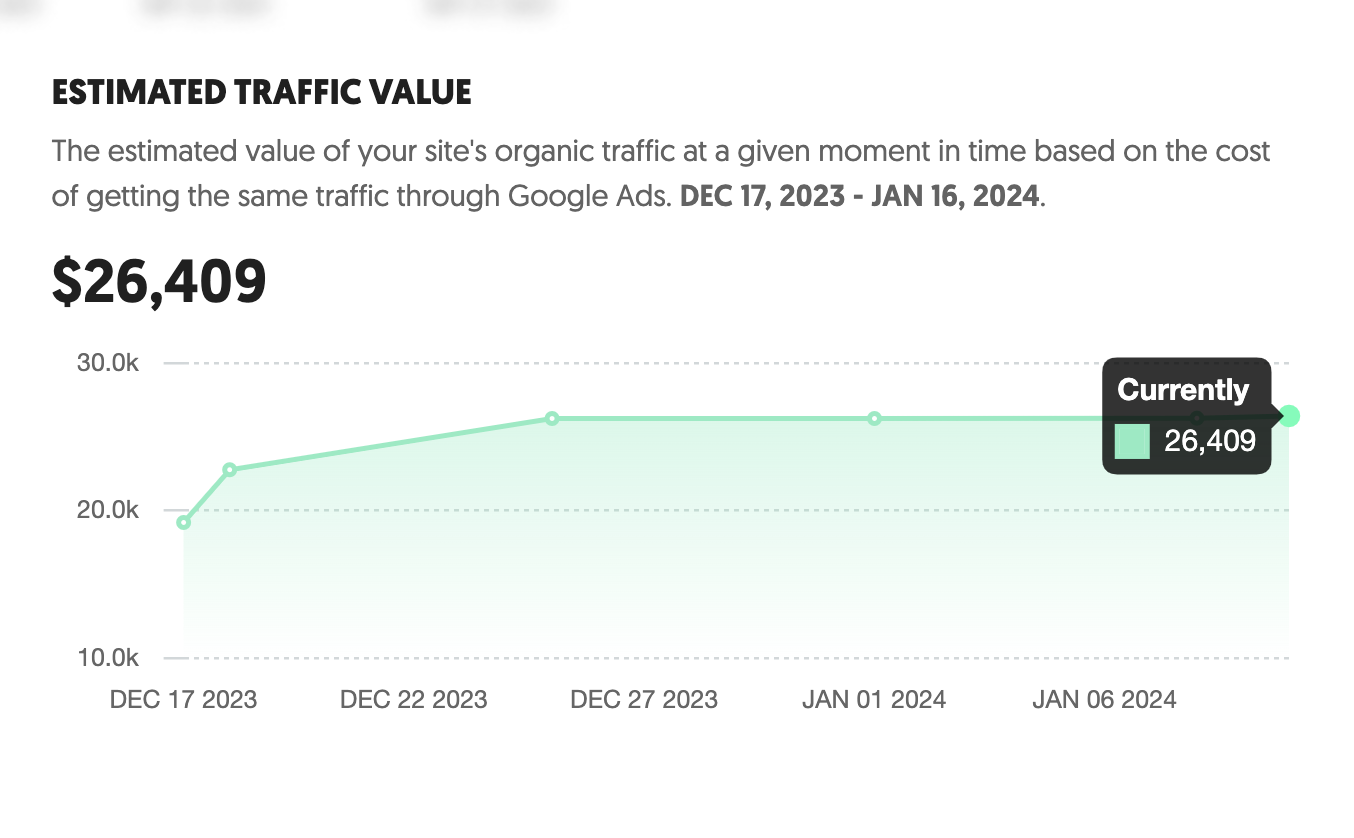
Here’s a screenshot from my client’s ubersuggest SEO dashboard showing their monthly SEO estimated traffic value
Substantial Savings Through Strategic SEO
Check out the results my San Diego SEO company delivered for another local business. One of my esteemed clients has experienced a remarkable boost in their online presence since partnering with our SEO services. Utilizing the sophisticated analysis provided by UberSuggest’s SEO tool, we’ve identified that they are now reaping the benefits of an estimated $26,000 worth of free organic traffic each month.
The Value of SEO Over Paid Advertising
This impressive figure represents the potential cost they would have incurred had they opted for paid advertising through Google AdWords to achieve the same level of traffic. By investing in our monthly SEO services, they’ve effectively sidestepped these substantial advertising costs. Instead, they’re enjoying a significant influx of organic visitors, thanks to our tailored SEO strategies that enhance their online visibility and search engine ranking. This success story underscores the immense value of SEO in today’s digital marketplace, offering tangible, cost-effective results that go beyond traditional paid advertising methods.
Understanding Google’s Algorithms
How Google Ranks Websites
Google uses complex algorithms to rank websites. These algorithms consider various factors like keyword relevance, site speed, mobile-friendliness, and user experience.
The Role of Keywords in SEO
Keywords are the cornerstone of SEO. They are the words and phrases that searchers use in Google. Optimizing your content with the right keywords can significantly increase the chances of your website appearing in top search results.
The Benefits of SEO for Businesses
Increased Visibility and Brand Awareness
SEO helps in increasing the visibility of your website, leading to more traffic and brand awareness.
Cost-Effectiveness of SEO
Unlike paid advertising, SEO provides a cost-effective way to attract organic traffic. It’s an investment that pays dividends over time.
Strategies for Effective SEO
On-Page SEO: Optimizing Content and Structure
On-page SEO involves optimizing the content and structure of your website. This includes using relevant keywords, creating high-quality content, and optimizing HTML tags.
Off-Page SEO: Building Backlinks and Online Presence
Off-page SEO refers to actions taken outside of your own website to impact your rankings within search engine results pages (SERPs). This includes building backlinks from other websites.
The Role of Content in SEO
Creating Quality Content that Ranks
Content is king in the world of SEO. The creation of engaging, informative, and relevant content is essential for ranking higher in search results.
Balancing Keywords and Readability
While keywords are crucial, it’s important to balance them with readability. Overstuffing keywords can harm your SEO efforts.
The Future of SEO
Adapting to Algorithm Changes
SEO is an ever-evolving field. Staying updated with Google’s algorithm changes is crucial for maintaining high rankings.
The Growing Importance of Voice Search and AI
With the rise of voice search and AI, optimizing for these new technologies is becoming increasingly important in SEO strategies.
SEO is an invaluable tool for businesses looking to increase their online presence and attract organic traffic. By understanding and implementing effective SEO strategies, businesses can significantly enhance their online visibility and reach.
Ready to Elevate Your Business’s SEO in 2024?
Join forces with us and watch your online presence soar! It’s simple to start – reach out and let’s discuss strategies to boost your digital footprint.
Reach Out to Jen Ruhman for Professional SEO Assistance:
Stop being shy -You’re welcome to call or text me: (619) 719-1315 🙂
Located in sunny San Diego, CA.
Let’s collaborate and propel your website’s SEO to new heights! woo hooo!
btw – read the update for 2025 here

Dec 29, 2023 | SEO Tips
Updated for 2026
SEO success looks very different today than it did just a few years ago.
It isn’t about publishing the most blog posts, repeating keywords throughout your website, buying hundreds of backlinks, or chasing every new SEO trend.
After more than 20 years working in SEO, I’ve learned that the strongest strategies are usually much more practical.
Understand what your customers are searching for. Create the right pages for those searches. Make your website easy for search engines and people to understand. Build real authority. And measure whether that visibility is actually helping your business.
That’s what successful SEO looks like to me in 2026.
Quick Answer: What Does SEO Success Require in 2026?
Successful SEO in 2026 requires a combination of:
- Understanding search intent
- Targeting keywords with real business value
- Strong service and product pages
- Helpful supporting content
- Technical SEO
- Logical website architecture
- Strategic internal linking
- Relevant backlinks and authority
- Local SEO when geography matters
- A strong brand and trustworthy online presence
- Good user experience
- Visibility across traditional and AI-powered search
- Conversion tracking and business-focused measurement
The goal isn’t simply to increase rankings.
The goal is to become more visible to the right potential customers and turn that visibility into meaningful business opportunities.
Table of Contents
SEO Has Changed, but the Fundamentals Still Matter
Every year somebody announces that SEO is dead.
I’ve been hearing versions of that statement for years.
SEO isn’t dead.
Search is changing.
Google’s search results have evolved dramatically, and potential customers can now discover businesses through traditional organic search, Google Maps, AI-powered search experiences, ChatGPT, Gemini, and other discovery platforms.
But businesses still need to clearly communicate:
- Who they are
- What they offer
- Who they serve
- Where they operate
- Why they’re credible
- What topics they’re experienced in
That’s why I don’t believe successful SEO in 2026 requires throwing away everything we know about SEO.
It requires applying the fundamentals more intelligently.
1. Start With Business Goals
Before I start researching keywords for a business, I want to understand what the company actually wants to accomplish.
“Get more traffic” isn’t specific enough.
I want to know:
- Which services are most profitable?
- Which products need more visibility?
- Which geographic markets matter?
- Which customers are most valuable?
- Where does the company want to grow?
Your SEO strategy should support those objectives.
For example, if a law firm wants more car accident cases, I would rather strengthen its car accident SEO ecosystem than generate thousands of visitors for unrelated legal questions.
Traffic isn’t the strategy. Business growth is the strategy.
2. Understand Search Intent
Search intent is what the person making the search actually wants.
For example:
“What is SEO?”
is primarily informational.
“SEO company San Diego”
has much stronger commercial intent.
Those searches should not necessarily lead to the same type of page.
An informational search might be best served by an educational article.
A commercial search usually deserves a strong service page.
One of the biggest improvements businesses can make is matching the correct page type to the searcher’s intent.
3. Choose Keywords Based on Business Value
Keyword research still matters.
But I don’t automatically choose keywords with the largest search volume.
I consider:
- Search intent
- Business value
- Competition
- Geography
- Conversion potential
- The pages currently ranking
- Whether the website can realistically compete
A keyword receiving 100 searches per month can sometimes be much more valuable than one receiving 10,000 searches.
If you want to dig deeper into this strategy, read my guide on how to find long-tail keywords for SEO.
4. Build Excellent Service and Product Pages
This is one of the biggest areas I emphasize with clients.
Your money pages need to be strong.
I see websites with hundreds of blog posts and incredibly thin service pages.
That’s backwards.
A strong service page should clearly explain:
- What the service is
- Who it’s for
- Problems it solves
- How the process works
- Why the company is qualified
- What makes the service different
- Frequently asked questions
- What the visitor should do next
Your supporting content can then strengthen these important commercial pages.
Your blog should support your business, not compete with it for attention.
5. Create Helpful Content With a Purpose
I still believe strongly in content.
What I don’t believe in is publishing content just because someone told you Google likes websites that blog frequently.
Every important article should have a reason to exist.
Before publishing, ask:
- What question does this answer?
- Who is searching for it?
- Does it support a service or product?
- Do we already have another page about this?
- Can we provide something genuinely useful or original?
One strong article can be far more valuable than several generic articles created only to satisfy a publishing calendar.
You can read more about this in my article explaining why publishing more blog posts doesn’t automatically improve SEO.
6. Add Real Experience and Expertise
This is one area where businesses have an advantage over generic content websites.
You actually do the work.
Use that experience.
Add:
- Firsthand observations
- Real examples
- Case studies
- Original photos
- Professional opinions
- Lessons you’ve learned
- Questions customers really ask
If every sentence on your website could have been written by somebody who has never worked in your industry, you’re missing an opportunity.
Your experience should be visible in your content.
7. Get the Technical SEO Right
Great content can struggle when the underlying website has technical problems.
Technical SEO may include:
- Crawlability
- Indexing
- Canonical tags
- Redirects
- XML sitemaps
- Broken links
- HTTP status codes
- Mobile usability
- Structured data
- Website performance
Technical SEO doesn’t need to become mysterious.
The basic question is:
Can search engines efficiently access and understand the pages we actually want them to find?
If you’re struggling with pages that aren’t appearing in Google, read my SEO tips for getting pages indexed.
8. Create a Logical Website Structure
Your website shouldn’t feel like a giant pile of unrelated URLs.
I want a logical structure connecting:
- Homepage
- Primary services
- Sub-services
- Locations
- Supporting content
- FAQs and resources
For example:
Homepage → Local SEO Service → Supporting Local SEO Articles
makes much more sense than scattering 40 unrelated SEO articles throughout a blog with no clear relationship to your commercial pages.
9. Use Internal Links Strategically
Internal links are one of my favorite SEO tools because they’re completely within your control.
They help:
- Connect related topics
- Help visitors discover additional information
- Help search engines discover pages
- Reinforce relationships between content
- Support important commercial pages
If you publish an excellent article about a service but never link it to the corresponding service page, you’re missing an opportunity.
I explain this strategy in my guide to internal linking for SEO.
10. Build Real Authority and Backlinks
Backlinks still matter.
But I don’t recommend trying to collect the largest possible number of links.
I prefer relevant, legitimate mentions from sources that make sense for the business.
Examples might include:
- Industry publications
- Local news
- Professional associations
- Business organizations
- Partners
- Universities
- Original research citations
- Expert interviews
- Digital PR
One strong, relevant editorial link can be far more interesting to me than dozens of questionable links created solely for SEO.
11. Take Local SEO Seriously
If your customers come from a specific geographic area, Local SEO deserves its own strategy.
A local campaign may involve:
- Google Business Profile
- Reviews
- Local service pages
- Location relevance
- Business categories
- Local backlinks
- Citations
- Consistent business information
- Local content
For local businesses, you’re often competing for visibility in both traditional organic results and Google Maps.
If nearby customers matter to your business, learn more about my Local SEO services.
12. Build Trust Beyond Your Website
Your website isn’t the only place potential customers evaluate you.
They may look at:
- Google reviews
- Professional profiles
- Industry websites
- Social accounts
- Media mentions
- Business directories
- Case studies
A strong online presence creates consistency.
Someone should be able to search your business and quickly understand that you’re a legitimate company with real expertise and customers.
13. Provide a Good User Experience
SEO isn’t only about getting someone onto your website.
They need to be able to use it once they arrive.
I want websites to be:
- Fast
- Mobile-friendly
- Easy to navigate
- Readable
- Stable while loading
- Clear about the next step
Website performance matters, but I wouldn’t obsess over obtaining a perfect performance score while ignoring weak content, service pages, authority, and conversions.
User experience is part of the strategy, not the entire strategy.
14. Prepare for AI-Powered Search
This is one of the biggest differences between SEO in 2024 and SEO in 2026.
Searchers can now discover information and businesses through traditional results as well as AI-powered search experiences.
That means I increasingly think about whether the web clearly communicates:
- Who the business is
- What it specializes in
- Where it operates
- Who its experts are
- What subjects it has genuine experience with
- What independent sources say about it
I don’t believe AI search requires abandoning traditional SEO.
I think it makes clarity, authority, useful content, and recognizable expertise even more important.
That’s why my AI Search Optimization work builds on the same strong SEO foundation.
15. Improve Existing Content Before Creating More
This has become a major part of my SEO process.
Before adding another article, I look at what already exists.
An older page might need:
- Updated information
- Better search-intent alignment
- More useful examples
- Better internal links
- A stronger title
- Consolidation with another page
- A redirect
Sometimes the highest-value SEO work is improving an existing asset instead of adding another URL.
I go much deeper into this process in my guide to content refreshing for SEO.
16. Optimize for Customers, Not Just Traffic
What happens after someone lands on your website?
This question doesn’t get enough attention in SEO.
Your website should make it easy for potential customers to:
- Understand your service
- Trust your company
- See evidence of your experience
- Find your phone number
- Submit a form
- Book an appointment
- Take the next logical step
A ranking that produces no business may not be nearly as valuable as it looks in an SEO report.
If you’re ranking well but aren’t generating customers, read my article about why rankings don’t always translate into business.
17. Measure SEO Against Business Results
I track rankings, impressions, and organic clicks.
But those aren’t the only numbers that matter.
I also want to know whether SEO is producing:
- Qualified traffic
- Phone calls
- Forms
- Appointments
- Sales
- Customers
- Revenue when attribution is available
The best SEO reporting connects:
SEO activity → search visibility → customer behavior → business results.
If you’re responsible for explaining the financial impact of SEO, read my guide on measuring SEO ROI.
18. Think Long Term
One of SEO’s biggest advantages is that the work can build upon itself.
A strong service page can continue ranking.
A useful article can continue attracting traffic.
A backlink can continue pointing to your website.
Internal links can continue supporting important pages.
Brand recognition can increase.
Reviews can accumulate.
That doesn’t mean rankings are permanent.
Competitors improve. Search results change. Your website needs maintenance.
But SEO has the potential to create digital assets that become more valuable over time.
SEO Strategies I Would Avoid in 2026
Just as important as knowing what to do is knowing what not to do.
I would be cautious about strategies built around:
- Publishing huge amounts of generic content
- Keyword stuffing
- Creating separate pages for every tiny keyword variation
- Buying large quantities of questionable backlinks
- Creating thin city pages with only the location changed
- Obsessing over third-party authority scores
- Making SEO changes solely to satisfy a plugin score
- Ignoring conversions
- Copying competitors without understanding their strategy
- Chasing every new SEO trend
Good SEO is usually less about hacks and more about building a better website and stronger online presence than your competitors.
What Does SEO Success Actually Look Like?
This is an important question because SEO success isn’t identical for every business.
For one company, success might mean:
- More qualified calls from Google Maps
- Moving important service keywords onto page one
- Increasing non-branded organic leads
- Reducing dependence on Google Ads
- Generating more e-commerce revenue
- Increasing visibility for a new service
- Becoming more visible in AI-powered search
The metrics should match the business objective.
SEO success isn’t ranking for the most keywords. It’s creating the search visibility that matters to your business.
Frequently Asked Questions About SEO Success
Does SEO still work in 2026?
Yes. SEO still helps businesses become more visible when people search for information, products, services, and local businesses. Search is evolving with AI-powered experiences, but strong content, technical accessibility, relevant authority, internal linking, and clear business information remain important.
What is the most important SEO strategy in 2026?
There isn’t one tactic that guarantees success. Strong SEO usually comes from combining search intent, useful content, strong commercial pages, technical SEO, internal linking, authority, and business-focused measurement rather than relying on one isolated tactic.
Are keywords still important for SEO?
Yes. Keywords help you understand how people search and what language they use. Modern keyword strategy focuses more on search intent and relevance than repeatedly placing an exact phrase throughout a page.
Do I need to publish blog posts every week for SEO?
No. There is no universal blogging frequency required for SEO success. Publish content when it serves a useful purpose and supports your audience, services, products, or topical authority. Updating valuable existing content can sometimes be more useful than continually creating new articles.
Are backlinks still important in 2026?
Relevant and legitimate backlinks can still contribute to a strong SEO strategy. Quality, relevance, and credibility are generally more useful goals than simply trying to acquire the largest possible number of links.
Does website speed affect SEO?
Website performance and page experience matter, but speed is only one part of SEO. A fast website still needs useful content, strong pages, authority, good structure, and relevance to compete successfully.
Does AI search replace traditional SEO?
No. AI-powered search is changing how people discover information, but many traditional SEO fundamentals still support visibility across search experiences. Businesses should focus on clear, useful, accessible, authoritative information rather than treating AI search as a completely separate system.
How long does successful SEO take?
There is no universal timeline. SEO results depend on competition, website history, authority, technical health, content quality, target keywords, geography, and available resources. Competitive markets usually require sustained work over time.
How should a business measure SEO success?
Businesses should look beyond rankings and measure outcomes such as qualified organic traffic, calls, forms, appointments, sales, customers, and revenue when accurate attribution is available. Rankings and impressions are useful supporting metrics, but they are not the ultimate business objective.
Is SEO worth investing in during 2026?
SEO can be a valuable investment when potential customers actively search for what a business offers and organic visibility has meaningful commercial value. Whether SEO is the right investment depends on the business, competition, customer value, search demand, budget, and long-term goals.
Want a Stronger SEO Strategy in 2026?
I’ve worked in SEO for more than 20 years, and I don’t believe successful SEO comes from blindly following a checklist.
Every website has different strengths, weaknesses, competitors, and opportunities.
Some businesses need better service pages.
Some need technical SEO.
Some need stronger authority.
Some need Local SEO.
Some already have plenty of content and need to clean up what they have.
The first step is understanding what’s actually holding the website back.
I’m Jen Ruhman, an experienced SEO expert in San Diego, and I work directly with business owners to develop SEO strategies based on their actual goals and competitive landscape.
Start with my free SEO analysis.
Call or text: (619) 719-1315
Thanks for reading,
Jen Ruhman
SEO Expert & Founder of Jen Ruhman SEO

Dec 5, 2023 | SEO, SEO Tips
Boost Your TripAdvisor Visibility: A Jen Ruhman Guide to Mastering SEO for Your Business Listing
Why TripAdvisor Matters for Your Business
The Power of Online Reviews
In today’s digital era, TripAdvisor has emerged as a pivotal platform for businesses in the hospitality and travel sector. Its vast user base and influence make it an essential tool for enhancing visibility and attracting potential customers. But how do you ensure your business stands out on TripAdvisor? The answer lies in effective SEO strategies tailored for TripAdvisor.

Understanding TripAdvisor’s Algorithm
How TripAdvisor Ranks Businesses
Key Factors Influencing Your TripAdvisor Ranking
TripAdvisor’s algorithm is a complex system that decides how businesses are ranked. Understanding the factors that influence this ranking, such as the quality and quantity of reviews, the recency of reviews, and user engagement, is crucial for optimizing your TripAdvisor profile.
Crafting a Winning TripAdvisor Profile
Essential Elements of Your Profile
Optimizing Each Component for Maximum Impact
A compelling TripAdvisor profile is more than just a list of services. It involves a strategic presentation of your business, including high-quality images, detailed descriptions, and a complete listing of amenities and services. Each element should be optimized to improve your search visibility on TripAdvisor.
Leveraging Reviews for Higher Rankings
Encouraging Customer Reviews
Responding to Reviews: A Key SEO Strategy
Reviews are the lifeblood of TripAdvisor SEO. Encouraging your customers to leave reviews and responding to them promptly and professionally can significantly boost your TripAdvisor ranking.
Building a Strong Online Presence Beyond TripAdvisor
Linking Your TripAdvisor Profile to Your Website
Social Media Integration and Its Benefits
Having a robust online presence is vital. Linking your TripAdvisor profile to your website and integrating it with your social media platforms can drive more traffic and improve your overall online visibility.
Local SEO and Its Impact on TripAdvisor Rankings
Understanding the Role of Local SEO
Tips for Boosting Local SEO for Your TripAdvisor Profile
Local SEO plays a significant role in TripAdvisor rankings. Ensuring your business is listed accurately on local directories and maps, and using location-based keywords in your TripAdvisor profile, can enhance your visibility to local audiences.
Advanced TripAdvisor SEO Tactics
Utilizing Keywords Effectively
Harnessing the Power of Visual Content
While TripAdvisor isn’t a traditional search engine, using relevant keywords in your profile and review responses can help. Additionally, high-quality visual content can significantly enhance user engagement and SEO performance.
Monitoring and Analyzing Your TripAdvisor Performance
Tools and Techniques for Tracking Success
Making Data-Driven Decisions
Regularly monitoring your TripAdvisor performance using analytics tools can provide valuable insights. This data can help you fine-tune your SEO strategies and make informed decisions to improve your ranking.
- Stay Fresh and Updated: Keep your listing as current as your business. New services? Changed your hours? Tell the world.
- Show Off Your TripAdvisor Street Cred: Got awards or high ratings? Flaunt them on your website and in your marketing. It’s like wearing a badge of honor.
- Be a Local SEO Hero: Make sure your business is listed correctly on Google Maps and other local directories. It’s a sneaky way to boost your TripAdvisor game.
Conclusion: Maximizing Your TripAdvisor Potential
The Continuous Journey of TripAdvisor SEO
Embracing Change and Staying Ahead
TripAdvisor SEO is an ongoing process. Staying updated with the latest trends, continuously optimizing your profile, and actively engaging with your audience are key to maintaining and improving your TripAdvisor ranking.
Are you eager to bestow the gift of SEO on your business or perhaps a friend?
Getting started is a breeze. Just reach out to me, and let’s chat about boosting your online presence together.
Contact me, Jen Ruhman, for SEO Services:
Give me a Call or Text at:
(619) 719-1315
Based in: San Diego, CA Hire me today, and let’s jumpstart your website’s SEO adventure!

Oct 27, 2023 | SEO Tips
When we delve into the realms of content creation and digital marketing, one term that frequently crops up is “editorial content.” But what exactly does this term entail? In this comprehensive guide, we’ll explore the nuances of editorial content, its significance, and how it stands apart from other types of content.
Defining Editorial Content
Understanding Editorial Content Editorial content can be broadly defined as any material in written, visual, or audio form that expresses opinions, insights, or provides in-depth information on a particular topic, subject, or issue.
Characteristics of Editorial Content
Opinionated and Insightful At its core, editorial content is characterized by its opinionated nature. It often reflects the viewpoints, beliefs, and values of the author or the publication’s editorial board.
Well-Researched and Informative Despite being opinionated, high-quality editorial content is always well-researched and backed by facts and evidence. This ensures that the content is not just a rant but an informed opinion that adds value to the reader.
Engages and Provokes Thought Editorial content aims to engage its audience, provoke thought, and initiate discussions. It encourages readers to reflect on issues, form their own opinions, and participate in broader conversations.
The Role of Editorial Content
Building Credibility and Trust Editorial content plays a crucial role in building the credibility and trustworthiness of a publication or a brand. By expressing opinions and providing well-researched insights, it establishes the author or brand as an authority in their field.
Influencing Public Opinion
Shaping Perceptions Through its opinionated nature, editorial content has the power to influence public opinion and shape perceptions on various issues.
Driving Change Beyond just influencing opinions, editorial content can also drive social, political, and economic changes by raising awareness, highlighting issues, and advocating for change.
Different Types of Editorial Content
Opinion Pieces and Commentaries These are pieces where authors express their personal opinions on topics. They are subjective but should still be grounded in facts and logical reasoning.
Analysis and Interpretation This involves providing in-depth analysis and interpretation of events, trends, or data. It goes beyond just reporting facts and adds value through expert insights and context.
Reviews and Critiques Editorial content also encompasses reviews and critiques of products, services, books, films, and more. These pieces provide evaluations based on the author’s experiences and criteria.
Creating Effective Editorial Content
Understanding Your Audience Knowing your audience is crucial when creating editorial content. Understanding their interests, beliefs, and values helps in crafting content that resonates with them.
Maintaining a Balance
Balancing Opinions and Facts While editorial content is opinionated, maintaining a balance between opinions and facts is essential. This ensures credibility and helps in building trust with your audience.
Avoiding Sensationalism It’s important to avoid sensationalism and hyperbole. Staying true to the facts, even while expressing opinions, ensures that the content is taken seriously and respected.
The Future of Editorial Content
Adapting to Changing Trends The world of content is ever-evolving, and editorial content is no exception. Adapting to changing trends, technologies, and audience preferences is key to staying relevant and effective.
Embracing New Formats and Channels
Expanding Beyond Text With the rise of video, podcasting, and other formats, editorial content is expanding beyond traditional text-based articles. Embracing these new formats and channels can help in reaching wider audiences and staying ahead in the content game.
Editorial content is a powerful tool in the arsenal of content creators and marketers. It builds credibility, influences opinions, engages audiences, and drives change. By understanding its nuances, characteristics, and role, and by creating high-quality, balanced, and engaging editorial content, we can leverage its full potential to connect with audiences, establish authority, and make a lasting impact.
FAQs
- What makes editorial content different from other types of content?
- Editorial content is opinionated, insightful, and aims to engage and provoke thought, making it distinct from other more straightforward, objective types of content.
- How does editorial content build credibility?
- By expressing informed opinions, providing insights, and establishing authority on topics, editorial content builds credibility and trust with audiences.
- Can editorial content be in formats other than text?
- Yes, editorial content is evolving to include video, audio, and other formats, expanding its reach and engagement.
- Is it important to balance opinions and facts in editorial content?
- Absolutely, maintaining a balance between opinions and facts is crucial in editorial content to ensure credibility and trustworthiness.
- How does editorial content influence public opinion?
- Through its opinionated nature and ability to engage audiences, editorial content has the power to shape perceptions and influence public opinion on various issues.
Do you want to boost your website’s visibility?
Optimizing your website for search engines is a proven strategy to attract more visitors. With our monthly SEO services, your website can climb the Google rankings, resulting in increased leads and sales.
At Jen Ruhman SEO, we’re one of the top SEO companies in San Diego – our goal is to aid in the online growth of your business. We are confident that an effective SEO plan can lead to substantial growth in both traffic and revenue. Recognized as a leading SEO firm in San Diego, CA, we are just a phone call away when you need our assistance.
Book a complimentary consultation with us today!

Oct 27, 2023 | SEO Tips
What Is Amazon Moments?
In today’s fast-paced digital world, companies are constantly looking for innovative ways to engage their customers and create lasting relationships. Amazon, being a pioneer in the digital transformation, has introduced a revolutionary reward system called Amazon Moments. But what exactly is Amazon Moments, and how can it benefit both businesses and consumers?
Unraveling the Mystery of Amazon Moments
Amazon Moments is a versatile and robust reward delivery system that allows businesses to create compelling and personalized customer experiences. By providing tangible rewards for digital and physical achievements, Amazon Moments has managed to bridge the gap between online engagements and real-world value.
How Does Amazon Moments Work?
For Businesses
Businesses can leverage Amazon Moments to set specific goals or achievements for their users. Upon reaching these predetermined milestones, customers are rewarded with items from Amazon’s vast selection of products. This creates a win-win situation, where businesses can boost engagement and customer loyalty, while customers enjoy tangible rewards.
For Consumers
From a consumer’s perspective, Amazon Moments is like a treasure trove of surprises. Engaging with your favorite brands and achieving set goals not only results in a satisfying sense of accomplishment but also leads to real, valuable rewards. It’s like getting a pat on the back and a gift for your efforts!
The Benefits of Using Amazon Moments
Boosting Customer Engagement
Amazon Moments encourages customers to engage more deeply with brands, as there is a tangible reward at the end of the journey. This heightened engagement leads to increased customer loyalty and, ultimately, higher revenue for the business.
Personalized Customer Experiences
By analyzing customer behavior and preferences, businesses can offer personalized rewards that resonate with individual users. This personal touch fosters a stronger connection between the brand and the customer, enhancing the overall customer experience.
Easy and Secure Reward Distribution
Amazon Moments takes care of the entire reward distribution process, ensuring that rewards are delivered securely and promptly. This seamless process eliminates the need for businesses to manage inventory or handle distribution logistics, allowing them to focus on what they do best.
How to Get Started with Amazon Moments
Getting started with Amazon Moments is straightforward. Businesses need to set their campaign objectives, define the achievements or actions required to earn rewards, and choose the rewards from Amazon’s extensive catalog. Amazon’s user-friendly platform guides businesses through the entire process, ensuring a smooth and hassle-free experience.
Success Stories: Brands Thriving with Amazon Moments
Many brands have already harnessed the power of Amazon Moments to drive customer engagement and loyalty. By creating unique and rewarding customer experiences, these brands have seen a significant uplift in customer interaction and satisfaction.
Navigating the Challenges
While Amazon Moments offers numerous benefits, businesses need to carefully plan and execute their campaigns to avoid common pitfalls. Ensuring that rewards are relevant and attainable is crucial to maintaining customer interest and trust.
Setting Realistic Goals
It’s important for businesses to set realistic and achievable goals for their customers. Setting the bar too high can lead to frustration, while making it too easy may diminish the perceived value of the rewards.
Maintaining a Balance
Finding the right balance between rewarding customers and maintaining profitability is key. Businesses need to ensure that the cost of the rewards does not outweigh the benefits of increased customer engagement and loyalty.
Future of Amazon Moments
As we look ahead, Amazon Moments stands poised to revolutionize the customer engagement landscape. Its ability to create unique, personalized, and rewarding customer experiences positions it as a crucial tool for businesses aiming to thrive in the digital age.
Amazon Moments represents a significant leap forward in the world of customer engagement and loyalty programs. By providing tangible rewards for digital achievements, it has successfully created a system where both businesses and consumers can reap the benefits of increased interaction and loyalty. As we embrace this innovative platform, the future of customer engagement looks brighter than ever.
FAQs
1. How do businesses benefit from using Amazon Moments?
Businesses benefit from using Amazon Moments through increased customer engagement, loyalty, and ultimately, revenue.
2. Can consumers choose their rewards in Amazon Moments?
No, rewards are predefined by the businesses based on customer achievements and engagement.
3. Is Amazon Moments available for all types of businesses?
Yes, Amazon Moments is versatile and can be utilized by businesses of all sizes and industries.
4. How does Amazon Moments ensure secure reward distribution?
Amazon takes care of the entire reward distribution process, ensuring secure and prompt delivery of rewards to customers.
5. Can Amazon Moments be used for physical rewards, or is it limited to digital rewards?
Amazon Moments can be used to offer both digital and physical rewards from Amazon’s extensive product catalog.
Are you on the quest for ways to enhance the traffic flowing to your website?
SEO stands out as the most effective strategy to increase your website’s visibility. Engaging in our monthly SEO services will elevate your rankings in Google searches, opening doors to augmented leads and sales derived from your website.
At Jen Ruhman SEO, bolstering your online business growth is at the core of what we do. We are well-versed in the transformative impact that a meticulously crafted SEO strategy can have on your website’s traffic and revenue. Proudly positioned as one of the leading SEO companies in San Diego, CA, we are just a phone call away, ready to propel your business to new heights.
Don’t miss out on the opportunity; schedule a free consultation with us today! Let’s embark on a journey to unlock the full potential of your online presence together.
