

If you’ve spent enough time reading technical SEO advice, you’ve probably heard that you need to “optimize your crawl budget.”
That sounds important.
After all, if Google isn’t crawling your website, how can your pages appear in search results?
But here’s something I think many small-business owners need to hear:
You probably don’t need to worry very much about crawl budget.
Crawl budget is a legitimate SEO concept, but it becomes much more important on very large websites or sites with complicated URL structures.
For most small and medium-sized business websites, I would spend far less time trying to “increase crawl budget” and much more time making sure Google can easily discover, crawl, index and understand the pages that actually matter.
Those aren’t quite the same thing.
Let’s break down what crawl budget really means, when it matters and what I look at instead when auditing a typical business website.
Quick Answer: What Is Crawl Budget in SEO?
Crawl budget refers broadly to how much crawling Googlebot can and wants to perform on a website within a given period.
Google doesn’t endlessly crawl every URL on every website.
Its systems make decisions about how much crawling a site can handle and which URLs are worth crawling or recrawling.
For very large websites, inefficient crawling can become a legitimate technical SEO concern.
For a typical small-business website with dozens or a few hundred important pages, however, crawl budget usually isn’t where I’d start looking for SEO problems.
I’d ask simpler questions first:
- Can Google discover your important pages?
- Are those pages crawlable?
- Are they indexable?
- Are your internal links helping Google find them?
- Is your XML sitemap clean?
- Are canonical tags correct?
- Are old URLs properly redirected?
- Are multiple pages competing for the same purpose?
Those issues are usually much more actionable.
Crawling and Indexing Are Not the Same Thing
This distinction is important.
Crawling happens when a search-engine crawler such as Googlebot requests a URL and examines its content.
Indexing is the separate process of Google potentially adding information about that page to its search index.
A page being crawled does not guarantee that it will be indexed.
And being indexed doesn’t guarantee that it will rank.
Think of the process roughly like this:
Discovery → Crawling → Indexing → Ranking
Problems can occur at every stage.
For example, Google might discover a page but decide not to crawl it immediately.
Google might crawl a page but decide not to index it.
Or Google might index the page but rank it poorly because another page better satisfies the search.
That’s why seeing “Crawled – currently not indexed” in Google Search Console doesn’t automatically mean you need more crawl budget.
The underlying problem may be somewhere else.
How Does Google Decide How Much to Crawl?
Google’s crawling systems consider multiple factors when determining how much crawling a website receives.
Two useful concepts are crawl capacity and crawl demand.
Crawl Capacity
Google doesn’t want its crawling activity to overwhelm a website’s server.
If a site responds quickly and reliably, Google may be able to crawl more efficiently.
If the server begins responding slowly or producing errors, Google can reduce its crawling activity.
That protects the website from excessive requests.
This is one reason reliable hosting and server performance matter—particularly for large websites.
Crawl Demand
Google also doesn’t need to crawl every URL with the same frequency.
Some pages may need to be revisited more often than others.
A frequently updated, important page may warrant more attention than an old URL that rarely changes and has little apparent value.
This is another reason I don’t think website owners should become obsessed with manually controlling how frequently Google crawls every page.
Google already has systems designed to make those decisions.
Your job is primarily to make the site clear, accessible and efficient to crawl.
Do Small Business Websites Need to Worry About Crawl Budget?
Usually, no.
If your website has 50, 100 or even a few hundred useful pages, I wouldn’t spend my time trying to manipulate Google’s crawl budget.
I’d make sure Google can easily find the pages that matter.
For most small-business websites I audit, the more meaningful technical problems are things such as:
Important pages accidentally set to noindex
Broken internal links
Old URLs that weren’t redirected
Redirect chains
Incorrect canonical tags
Duplicate or near-duplicate pages
Poor internal-link architecture
XML sitemap problems
Orphan pages
Unnecessary indexed URLs
Slow or unreliable server responses
Those problems can interfere with Google’s ability to understand the website without crawl budget itself being the real issue.
When Does Crawl Budget Actually Matter?
Crawl budget becomes more important as websites become larger and more technically complex.
Examples can include:
Large E-Commerce Websites
An e-commerce website might contain thousands, hundreds of thousands or even millions of URLs.
Products.
Categories.
Filters.
Sorting parameters.
Pagination.
Internal search results.
Product variations.
Tracking parameters.
If the site’s architecture generates huge numbers of unnecessary URL combinations, search crawlers may spend resources requesting URLs that don’t need organic visibility.
That’s a much more legitimate crawl-efficiency concern.
Large Directory Websites
Directories can also generate enormous numbers of URLs.
Imagine a website combining:
Locations.
Categories.
Services.
Filters.
Profiles.
Tags.
Search parameters.
Without careful architecture, URL counts can grow rapidly.
Large Publishing Websites
News organizations and major publishers may publish many new pages every day while maintaining enormous archives.
Efficient discovery and recrawling can matter much more at that scale.
Websites With Faceted Navigation
Faceted navigation can be particularly tricky.
Imagine an online store allowing shoppers to filter shoes by:
Brand.
Size.
Color.
Price.
Material.
Style.
Each combination can potentially create another URL.
Useful for shoppers?
Absolutely.
Useful as thousands of separate search-engine URLs?
Not necessarily.
That’s where technical SEO decisions around crawling, indexing, canonicals and URL architecture become much more important.
Crawl Budget vs. Crawlability
For smaller websites, crawlability is often the more useful concept.
Crawlability asks:
Can search engines access and navigate the pages I actually want them to find?
That’s something every website should care about.
You could have plenty of available crawl capacity and still have an important page that Google struggles to discover because nothing internally links to it.
That’s not necessarily a crawl-budget problem.
It’s a site-architecture problem.
Similarly, you might accidentally block an important section of the website through robots.txt.
Again, the issue isn’t that you need a bigger crawl budget.
You’ve created an access problem.
Crawl Budget vs. Indexing
I also see people confuse crawl-budget problems with indexing problems.
If Google isn’t indexing a page, the immediate assumption sometimes becomes:
“Google isn’t crawling my site enough.”
That isn’t necessarily true.
Google may already know about the page.
The issue might involve:
Duplicate content.
Canonicalization.
Page quality.
Near-duplicate URLs.
Redirects.
Noindex directives.
Internal linking.
Or Google simply deciding that the URL doesn’t currently warrant indexing.
This is why technical SEO requires diagnosis rather than applying the same fix to every website.
1. Keep Your XML Sitemap Clean
Your XML sitemap should help search engines discover the URLs you actually want indexed.
I don’t want a sitemap filled with:
Redirected URLs.
404 pages.
Duplicate URLs.
Old pages that shouldn’t exist anymore.
Noindex pages.
Unnecessary archives.
Instead, I want it to provide a clean list of important canonical URLs.
This is something I’ve been doing extensively on websites with years of accumulated content.
As sites grow, old pages, redirects and duplicates can remain in the sitemap long after their usefulness has disappeared.
Cleaning that up makes the website’s intended structure clearer.
2. Fix Redirect Chains
Redirects are normal.
If Page A is permanently replaced by Page B, a 301 redirect can be exactly the right solution.
The problem is when redirects start stacking:
Page A → Page B → Page C → Page D
That’s a redirect chain.
Whenever possible, I prefer the original outdated URL to redirect directly to the final destination.
Page A → Page D
This is cleaner for users and search engines.
It’s also one reason I pay attention to redirects when consolidating old SEO content.
If five outdated articles are being merged into one stronger resource, I want the old URLs pointing cleanly to the final surviving page.
3. Fix Broken Internal Links
Internal links help search engines discover pages and understand relationships between them.
A broken internal link sends users and crawlers to a URL that no longer works.
A few broken links aren’t likely to destroy a website’s SEO.
But on a large or older website, they can accumulate.
When I redirect or remove pages, I don’t want to rely solely on the redirect forever.
When practical, I also update important internal links so they point directly to the correct destination.
That creates a cleaner site architecture.
4. Avoid Creating Unnecessary URLs
One of the best ways to improve crawl efficiency is simply not creating thousands of useless URLs in the first place.
Depending on the website and CMS, unnecessary URLs can come from:
Filters.
Parameters.
Tags.
Internal searches.
Duplicate archives.
Tracking URLs.
Automatically generated pages.
Pagination.
Faceted navigation.
This is much more relevant on large websites than on a basic local-business site.
Still, it’s worth understanding because plugins, themes and content-management systems can sometimes generate URLs website owners didn’t intentionally create.
5. Use Internal Links to Show Which Pages Matter
Internal linking is one of the simplest ways to help search engines understand your website.
Imagine you have an important service page that’s buried several clicks deep and almost nothing on your site links to it.
Then compare that with another page linked from:
Your homepage.
Navigation.
Relevant service pages.
Several supporting articles.
Those internal relationships provide useful context.
That’s why I don’t treat internal linking as an afterthought.
It helps users navigate the site while also helping search engines discover pages and understand how your content fits together.
6. Avoid Orphan Pages
An orphan page is a page with no meaningful internal links pointing to it.
The page might technically exist.
It might even appear in your sitemap.
But within the normal architecture of the website, it’s isolated.
I prefer important pages to be connected logically to other relevant content.
For example, a blog article about Local SEO might link naturally to a Local SEO guide or relevant service page.
A technical SEO article might connect to a broader SEO resource.
These relationships create a more understandable website.
7. Handle Duplicate and Overlapping Content
This is particularly relevant to older websites.
A site might publish:
How Long Does SEO Take?
Then a year later:
Why SEO Takes Time
Then:
Why SEO Results Don’t Happen Overnight
Then:
When Will My SEO Start Working?
Individually, each article might seem reasonable.
But after years of publishing, you can end up with multiple URLs answering essentially the same question.
That’s when I start asking:
Do all of these pages still deserve to exist?
Sometimes the best SEO move isn’t publishing another article.
It’s consolidating several overlapping pages into one stronger resource and redirecting the weaker URLs.
This is also why I use a keyword map for SEO to give important pages distinct jobs.
One primary search intent should usually have one clear primary page.
8. Understand What Robots.txt Actually Does
Your robots.txt file can tell compliant crawlers which parts of your website they should or shouldn’t crawl.
But this is where technical SEO can become dangerous if changes are made without understanding the consequences.
Blocking the wrong directory could prevent Googlebot from accessing important resources or pages.
Also remember:
Robots.txt controls crawling. It is not the same thing as noindex.
If your goal is to prevent a page from appearing in Google’s index, you shouldn’t assume blocking the URL in robots.txt accomplishes the same thing.
Crawling and indexing are related, but they’re different processes.
9. Understand What Noindex Does
A noindex directive tells a search engine that you don’t want a page included in its search index.
That’s different from preventing crawling.
Google generally needs to be able to access the page to see the noindex directive.
This distinction matters.
I occasionally see technical recommendations that treat robots.txt and noindex as interchangeable.
They aren’t.
Before changing either one, understand whether you’re trying to control:
Crawling
or
Indexing.
10. Use Canonical Tags Correctly
Canonical tags help indicate the preferred version when similar or duplicate URLs exist.
For example, several URLs might contain substantially the same content because of parameters or other technical reasons.
A canonical can help communicate which version you consider primary.
But canonicals aren’t something I use randomly as a substitute for cleaning up a messy site.
If two pages shouldn’t exist separately at all, consolidation and redirects may be more appropriate.
Technical SEO is about choosing the correct tool for the actual problem.
11. Improve Server Performance
Server performance can affect crawling, particularly on very large websites.
If a server repeatedly struggles to respond to crawler requests, search engines may reduce crawling to avoid putting additional pressure on it.
For a normal business website, though, I wouldn’t sell faster hosting as a magical “crawl budget hack.”
I care about performance because it affects the overall website experience too.
A reliable, reasonably fast website is better for users and easier for search engines to access.
That’s enough reason to care about it.
What About 404 Errors?
A 404 means the requested URL wasn’t found.
404s are normal on the web.
Having a few 404 URLs does not mean your crawl budget is being destroyed.
What matters is context.
If an important page was accidentally deleted and now returns a 404, that’s a problem.
If your website has thousands or millions of useless URLs continually being generated and crawled, that’s potentially a larger technical issue.
If an old page has a clear replacement, I may redirect it.
If it was intentionally removed and has no relevant replacement, allowing it to return an appropriate 404 or 410 response can be perfectly reasonable.
I don’t redirect every dead URL to the homepage.
What About AI Crawlers?
AI crawlers have added another layer to crawler management, but I keep this separate from Google’s crawl budget.
Various AI companies and services may operate their own crawlers.
Website owners may decide whether they want certain crawlers accessing their content, depending on their goals and the controls those services support.
But an AI company’s crawler visiting your website does not mean it’s consuming your Google crawl budget.
Those are separate systems.
If a website receives enough automated crawler traffic to affect server resources, bot management can become a legitimate infrastructure concern.
For the average local-business website, however, I wouldn’t turn this into another technical issue to worry about unless the data shows there’s actually a problem.
How Do I Know If Google Is Crawling My Website?
Google Search Console provides useful information about how Google interacts with your website.
Depending on what you’re investigating, I may look at:
Page indexing reports
URL Inspection
Crawl Stats
Sitemaps
These tools answer different questions.
For example, URL Inspection can help you investigate a particular page.
Page indexing information can help identify broader patterns.
Crawl Stats can provide information about Googlebot’s crawling activity.
The important part is not merely finding an error or unusual number.
It’s understanding what that information means for the website.
Does a High Crawl Rate Mean Better Rankings?
No.
I would not use the number of Googlebot requests as an SEO success metric.
More crawling does not automatically mean better rankings.
A website could receive substantial crawling while having poor content, weak relevance or thousands of unnecessary URLs.
Another site could be crawled efficiently and rank extremely well.
The objective isn’t:
Make Googlebot crawl as much as possible.
The objective is:
Make it easy for Google to discover, access and understand the pages that deserve organic visibility.
That’s a very different goal.
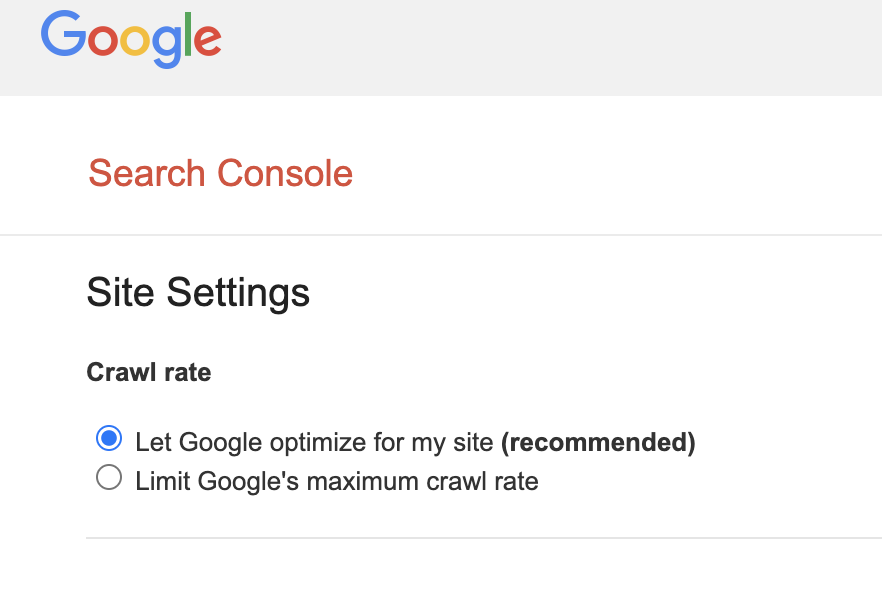
Should You Manually Adjust Google’s Crawl Rate?
For most business websites, I wouldn’t.
I prefer fixing the underlying technical issues and allowing Google’s crawling systems to do their job.
If Google is struggling to crawl a site because the server can’t handle requests, that’s a server or infrastructure problem worth investigating.
If Google is crawling millions of unnecessary parameter URLs, that’s an architecture problem.
If an important page has no internal links, that’s an internal-linking problem.
Trying to manually manipulate crawl behavior without diagnosing the underlying issue can distract from the actual SEO work that needs to be done.
Crawl Budget Isn’t a Ranking Factor to Chase
This is another distinction I want to make clear.
I wouldn’t tell a business owner:
“Optimize your crawl budget and Google will rank you higher.”
SEO doesn’t work that way.
Crawl efficiency can matter because search engines need to discover and access pages before those pages can participate meaningfully in search.
But being crawled more frequently doesn’t make a mediocre page suddenly deserve position one.
Technical SEO creates the conditions for search engines to access and understand your website.
It doesn’t replace:
Search intent.
Useful content.
Authority.
Relevance.
Local signals.
Good site architecture.
A strong business offering.
Those pieces still matter.
Crawl Budget vs. Technical SEO
This is why I consider crawl budget one small part of a much larger technical SEO picture.
When I audit a business website, I’m much more interested in questions such as:
Can Google access the important pages?
Are the right pages indexed?
Are pages competing with each other?
Are redirects clean?
Are canonical tags correct?
Is the sitemap accurate?
Are important pages internally linked?
Does the site architecture make sense?
Are there unnecessary URLs?
Are technical problems preventing strong content from performing?
Fixing those problems can make a much bigger difference than obsessing over an abstract crawl-budget number.
A Real-World Example: Why Website Cleanup Matters
Imagine a business has been publishing content for eight years.
During that time, it accumulated 400 URLs.
But after auditing the site, we discover:
80 are outdated.
30 redirect through multiple URLs.
40 substantially overlap other articles.
25 aren’t internally linked.
Several appear in the sitemap even though they’ve been redirected.
A handful have incorrect canonical tags.
The answer isn’t:
“We need to make Google crawl more.”
The better answer may be:
We need to make the website clearer.
Consolidate overlapping content.
Update internal links.
Clean the sitemap.
Fix redirects.
Correct technical signals.
Strengthen the pages that actually deserve to rank.
That’s the kind of crawl optimization I care about.
Not trying to trick Googlebot into requesting an extra hundred URLs.
Frequently Asked Questions About Crawl Budget SEO
What Is Crawl Budget in SEO?
Crawl budget generally refers to how much crawling Googlebot can and wants to perform on a website.
It becomes more important for very large or technically complex sites where search engines may encounter enormous numbers of URLs.
Does Every Website Need Crawl Budget Optimization?
No.
Most small-business websites don’t need to make crawl-budget optimization a major SEO priority.
They should focus on making important pages easy to discover, crawl and index while maintaining a clean technical structure.
Does Crawl Budget Affect SEO Rankings?
Not in the simple sense that more crawling equals higher rankings.
Search engines need to discover and crawl pages, but increasing crawl activity doesn’t automatically improve rankings.
Do 404 Errors Waste Crawl Budget?
A few normal 404 errors aren’t something I’d panic about.
On extremely large websites, huge numbers of unnecessary or broken URLs can contribute to inefficient crawling.
The scale and cause matter.
Does Noindex Stop Google From Crawling a Page?
Noindex is an indexing directive, not simply a crawling block.
Google generally needs to access the page to see its noindex directive.
Does Robots.txt Remove a Page From Google?
Robots.txt is primarily used to control crawling. It shouldn’t be treated as equivalent to a noindex directive.
Do AI Bots Use Google’s Crawl Budget?
No.
Third-party AI crawlers and Googlebot are separate crawlers. Heavy automated bot traffic could affect server resources, but an AI crawler isn’t using up a quota assigned to Googlebot.
Should Small Businesses Check Crawl Stats?
You can, especially when troubleshooting technical issues, but I wouldn’t treat Crawl Stats as a performance score.
For most small-business sites, Page Indexing, URL Inspection, sitemap health and the site’s overall architecture are often more actionable.
Can Internal Linking Help Crawling?
Yes.
Internal links help search engines discover pages and understand relationships throughout a website.
Important pages should generally be incorporated logically into the site’s internal architecture rather than left isolated.
Don’t Optimize Crawl Budget Before You Know You Have a Crawl Problem
This is the biggest takeaway I want business owners to remember.
Technical SEO can become unnecessarily complicated when we start solving problems a website doesn’t actually have.
For most small and medium-sized business websites, I wouldn’t begin with:
“How can we increase crawl budget?”
I’d begin with:
Can Google easily find the right pages?
Can Google access them?
Are the right pages being indexed?
Does each important page have a clear purpose?
Are technical signals consistent?
Is the website organized logically?
Get those fundamentals right first.
If you’re managing a website with hundreds of thousands or millions of URLs, crawl-budget management may deserve much more attention.
But if you own a typical local-business website, don’t let technical SEO jargon distract you from the things that actually need fixing.
Need Help Finding Technical SEO Problems?
I’m Jen Ruhman, founder of Jen Ruhman SEO.
As a San Diego SEO expert, I work directly with businesses to identify the technical, content and structural problems that may be holding back their search visibility.
Sometimes that means fixing crawling or indexing problems.
Sometimes it means cleaning up redirects and duplicate pages.
Sometimes it means improving internal linking.
And sometimes the biggest improvement comes from removing unnecessary SEO clutter rather than adding more of it.
If you’re not sure what Google is seeing when it crawls your website, I can take a look.
Call or text: (619) 719-1315
Thanks for reading,
Jen Ruhman
Founder, Jen Ruhman SEO