
Jan 9, 2025 | ChatGPT, SEO, SEO Tips
As someone who runs an SEO company in San Diego, I’ve seen firsthand how artificial intelligence (AI) is reshaping the SEO landscape. It’s exciting, but let’s be honest—it’s a little overwhelming too. Tools like ChatGPT and Bard (aka Gemini have revolutionized how we approach content creation, keyword research, and audience analysis. If you’re looking to stay ahead in this rapidly changing field, buckle up, and let me guide you through the strategies you need.
The Role of AI in Modern SEO
What Is AI’s Role in SEO?
AI is like having a digital assistant who never sleeps. It analyzes patterns, predicts trends, and optimizes processes that used to take hours (or even days) to do manually. Whether it’s generating topic ideas, analyzing competition, or fine-tuning technical SEO, AI is the backbone of modern strategies.
My Journey with AI Tools
I’ll admit, when I first tried AI tools like ChatGPT, I was skeptical. How could a machine truly “understand” what makes content engaging? But after using it to brainstorm keywords for a local restaurant client, I was hooked. Not only did it save time, but it also uncovered opportunities I hadn’t even considered.
AI Tools That Are Game-Changers
ChatGPT for Content Creation
ChatGPT has become my go-to for generating engaging, SEO-optimized content. It’s particularly helpful when I’m drafting blog posts or rewriting web pages. For example, I used it to help create a 2,000-word guide for a San Diego real estate client, packed with keywords and valuable insights.
Gemini (formerly known as Bard) for Keyword Research
Google’s Gemini currently as of Jan 2025 (formerly known as Google Bard) Gemini is a powerful ally for keyword research. I recently used Bard to help a local moving company identify high-volume, low-competition keywords. Within weeks, their website started climbing search engine rankings.
Surfer SEO and Other Integrations
Pairing AI with tools like Surfer SEO ensures that every piece of content aligns with search intent and current ranking factors. These integrations provide real-time recommendations, like tweaking headings or adding more authoritative links.

How AI Simplifies Keyword Research
Finding Long-Tail Keywords
AI doesn’t just find keywords—it finds the right keywords. Tools like ChatGPT can generate long-tail keywords tailored to local searches, like “best tacos in San Diego Gaslamp Quarter.”
Predicting Search Trends
AI is great at predicting emerging trends. For example, I noticed a rise in searches for “eco-friendly moving services” and used AI insights to guide my client’s content strategy. This proactive approach set them apart from competitors.
Personalized Content at Scale
Why Personalization Matters
Generic content doesn’t cut it anymore. AI helps me craft highly personalized, location-specific content that resonates with readers. When working with a San Diego medspa client, I used AI to identify the most-searched treatments in different neighborhoods, ensuring every blog felt locally relevant.
Automating Content Creation
AI tools can produce high-quality content drafts in minutes. While I always edit to maintain a personal touch, AI helps streamline the process so I can focus on strategy.
Technical SEO Made Easy
Fixing Common Website Issues
AI-powered tools like Screaming Frog and SEMrush identify broken links, slow-loading pages, and other technical issues in seconds. This saves countless hours of manual audits.
Enhancing User Experience
AI helps optimize website layouts, mobile responsiveness, and navigation. I’ve used AI insights to redesign a client’s site, cutting bounce rates by 40%.
Local SEO and AI
Optimizing for San Diego Searches
Local SEO is my bread and butter, and AI tools make it easier than ever to dominate local search results. For instance, I’ve used AI to fine-tune Google My Business profiles for San Diego-based clients, ensuring their listings rank for “near me” searches.
Geotargeted Content Strategies
AI can analyze local search data to uncover what topics resonate with your target audience. Whether it’s surf lessons in Pacific Beach or the best vegan spots in Hillcrest, AI ensures your content hits the mark.
FAQs
Q1: Can AI replace an SEO expert?
No, AI is a tool that enhances what SEO experts do. It streamlines processes but still requires human creativity and strategic thinking.
Q2: How do I choose the best AI tool for SEO?
Start with versatile options like ChatGPT for content creation and Bard / Gemini for keyword research. Experiment and see what aligns with your needs.
Q3: Does AI work for small businesses?
Absolutely. AI is perfect for small businesses looking to optimize their SEO without a huge budget.
Q4: What’s the biggest challenge with AI in SEO?
Ensuring the content feels authentic and resonates with the audience. AI-generated drafts need editing for a personal touch.
Q5: How do I start using AI for SEO?
Begin with free tools like ChatGPT or trial versions of premium software like Surfer SEO. As you get comfortable, expand your toolkit.

Staying Ahead of AI Trends
Continuous Learning
The SEO world is constantly evolving, and so are AI tools. I dedicate time each month to testing new features and updates, ensuring my strategies are cutting-edge.
Collaboration, Not Replacement
AI won’t replace human creativity—it enhances it. My most successful campaigns blend AI-driven insights with a human touch.
AI is a game-changer for SEO in San Diego. It streamlines processes, uncovers new opportunities, and keeps us ahead of the curve. But remember, the key to success is combining AI’s efficiency with your unique expertise and creativity. If you’re ready to elevate your SEO strategy, let’s connect—I’d love to help you navigate this exciting new landscape.
Schedule a free consultation today! Call or text (619) 719-1315.

Nov 2, 2023 | SEO

Understanding the Role of an SEO Project Manager
In the ever-evolving landscape of search engine optimization (SEO), the need for dedicated professionals to manage complex SEO projects has become crucial. An SEO Project Manager stands at the crossroads of technical SEO, content strategy, and team leadership. But what exactly does this role entail?
The Intersection of SEO and Project Management
An SEO Project Manager is akin to a maestro, orchestrating the various elements of SEO to create a harmonious symphony that resonates with search engines and audiences alike. They must possess a deep understanding of SEO principles while applying proven project management methodologies to execute SEO strategies effectively.
The Core Responsibilities
An SEO Project Manager wears many hats. They’re responsible for planning, executing, and monitoring SEO strategies that align with the client’s objectives. From conducting keyword research to optimizing web pages and content, their ultimate goal is to improve a website’s visibility and rankings in SERPs. They are also in charge of coordinating with content creators, web developers, and marketing professionals to ensure that all SEO efforts are cohesive and effective.
Key Responsibilities
- Strategic Planning: Crafting and overseeing the implementation of SEO strategies to meet business goals.
- Team Coordination: Leading a team of SEO specialists, content creators, and web developers.
- Performance Tracking: Monitoring and analyzing SEO metrics to gauge the success of the strategies and making data-driven decisions.
The Essential Skills
An effective SEO Project Manager must wear multiple hats. Here are some of the critical skills they need to succeed:
Analytical Mindset:
An individual with an analytical mindset possesses the capability to delve into intricate data sets and extract meaningful patterns and insights. This skill is akin to deciphering a coded language where each data point can reveal trends, predict outcomes, or suggest new strategies. It involves a keen eye for detail and the intellectual agility to understand the significance of data in the broader context of SEO performance. Such an approach allows an SEO Project Manager to make informed decisions that are backed by concrete evidence rather than conjecture.

Jen Ruhman speaking to a college class about her journey leading an SEO company in San Diego
Communication Prowess:
Communication prowess in the context of an SEO Project Manager involves being articulate both verbally and in writing. This encompasses the ability to distill complex, technical SEO concepts into clear, jargon-free language that stakeholders without technical expertise can easily grasp. Whether it’s explaining the impact of algorithm changes to a client or guiding a team through a technical SEO audit, the ability to communicate effectively is critical. It ensures that all parties, regardless of their technical background, are on the same page and can collaborate effectively towards achieving shared goals.
Technical SEO Knowledge:
Possessing technical SEO knowledge means having a deep and comprehensive understanding of both on-page elements like meta tags, header tags, and keyword usage, as well as off-page factors such as backlinks and domain authority. A robust grasp of these factors allows an SEO Project Manager to optimize websites in a way that aligns with search engine algorithms, thereby improving ranking and visibility. This expertise is not static; it requires continuous learning to keep pace with the ever-evolving standards of search engines.
Adaptability:
Adaptability is crucial in the fast-paced world of SEO, where search engine algorithms and best practices are in constant flux. An effective SEO Project Manager must demonstrate the flexibility to quickly pivot strategies in response to these changes. This might involve adopting new technologies, reevaluating keyword strategies, or altering content approaches. The ability to adapt ensures that SEO efforts remain effective and competitive, even as the digital landscape evolves. It is this trait that can often distinguish a successful SEO campaign from an unsuccessful one.

Written Communication Proficiency in Digital Marketing
In the realm of digital marketing, the ability to craft and refine text is indispensable. Regardless of team dimensions, the probability is high that one will engage in scrutinizing and refining content. Effectual communication with clientele is paramount; hence, mastering the art of composing clear and comprehensible emails is crucial.
Familiarity with Content Management Systems
It is essential for SEO project managers to be versed in the workings of prevalent content management systems (CMS) such as WordPress and Drupal. These platforms share a number of similarities, which means that proficiency in one typically translates to ease of use in the other. An adept SEO project manager should be capable of performing a variety of tasks within these systems, from generating and updating content to incorporating visual elements like images. This not only ensures that content aligns with SEO best practices but also streamlines the process, conserving valuable developer resources.
Expertise in Local SEO Strategies
For an SEO project manager, a deep understanding of local SEO is crucial. Local SEO involves optimizing a business’s online presence to attract more customers from relevant local searches. This specialization requires knowledge of various tactics, such as managing online reviews and ratings, optimizing for local keywords, and utilizing platforms like Google My Business for enhanced local visibility. Mastery in this niche allows an SEO project manager to effectively tailor a website’s content and metadata to resonate with a regional audience, ensuring that a business stands out in its local digital landscape. By focusing on the nuances of local search behavior, an SEO project manager can significantly boost a company’s local online footprint, driving targeted traffic and fostering community engagement.
Proficiency in E-commerce Platforms
An adept SEO project manager must have a solid grasp of e-commerce platforms like Shopify and WooCommerce. These systems are the backbone of online retail, and understanding their functionalities is key to driving sales through search engine optimization. A skilled manager knows how to optimize product listings, categories, and descriptions to improve visibility and rankings on search engine results pages. They should also be familiar with the technical SEO aspects of these platforms, such as site structure, mobile optimization, and page loading speed, which are critical for providing a seamless shopping experience. Moreover, the ability to analyze and interpret the rich data these platforms provide can unveil insights into shopping behaviors, enabling data-driven strategies to enhance online visibility and conversion rates.

Essential Tools for the Modern SEO Project Manager
In today’s digital age, an SEO Project Manager must be adept at using a variety of tools to streamline their workflow and enhance their strategies. Tools like Google Analytics, SEMrush, and Ahrefs provide invaluable insights into website performance, keyword rankings, and competitive analysis. Understanding how to leverage these tools can make the difference between a good SEO strategy and a great one.
Tools of the Trade
To manage projects efficiently, SEO Project Managers rely on a suite of tools:
- SEO Platforms: Tools like SEMrush or Ahrefs for in-depth SEO analysis.
- Project Management Software: Applications like Asana or Trello to keep track of tasks and deadlines.
- Analytics Software: Google Analytics for monitoring website performance.
Leading Teams to SEO Success
The best SEO Project Managers are also exceptional leaders. They know how to motivate their teams, foster a collaborative environment, and drive each member to excel in their respective roles. Whether it’s guiding the content team on SEO-friendly practices or working with developers to ensure site speed optimization, their leadership can elevate an entire SEO campaign.

Nurturing Client Relationships in SEO Project Management
Maintaining positive and productive relationships with clients is crucial. An SEO Project Manager must communicate effectively, setting realistic expectations and providing transparent reports on progress. They act as the bridge between the technical SEO team and the client, translating complex SEO jargon into understandable and actionable insights.
The Day-to-Day of an SEO Project Manager
Juggling Multiple Projects
A typical day for an SEO Project Manager involves balancing multiple projects, each at various stages of implementation. From keyword research to content audits, their tasks are as varied as they are complex.
Maintaining Collaborative Efforts
Coordination is key. SEO Project Managers must ensure that all team members are aligned with the project’s goals and timelines. Regular team meetings and strategy sessions are part of their routine.
Challenges Faced by SEO Project Managers
Staying Ahead of Algorithm Changes
SEO is notorious for its changing algorithms. SEO Project Managers must stay informed and be ready to pivot strategies at a moment’s notice.
Overcoming Technical Hurdles
Technical SEO issues, such as site speed optimization and mobile responsiveness, often require collaboration with web developers. Overcoming these hurdles is part of the job description.

Best Practices for SEO Project Managers
To excel as an SEO Project Manager, here are some best practices:
- Continuous Learning: The SEO field is dynamic. Staying updated with the latest trends and algorithm updates is critical.
- Team Empowerment: Encouraging team members to take initiative and contribute ideas can lead to innovative solutions.
- Effective Communication: Keeping all stakeholders informed helps in managing expectations and ensuring project success.
Conclusion
The role of an SEO Project Manager is multifaceted and challenging. It requires a blend of technical SEO knowledge, project management skills, and the ability to lead a team towards a common goal. As the digital landscape continues to grow, the importance of this role only becomes more pronounced.
FAQs
- What qualifications are needed to become an SEO Project Manager?
Typically, a background in digital marketing with a focus on SEO, along with project management experience, is required. - How does an SEO Project Manager measure success?
Success is measured through improved search rankings, increased organic traffic, and ultimately, a higher ROI for SEO efforts. - Can an SEO Project Manager work remotely?
Yes, with the right tools and communication channels, this role is well-suited to remote work environments. - What is the average salary for an SEO Project Manager?
Salaries vary widely based on experience, location, and the size of the company but can range from mid-level to high-level compensation. - Is certification important for an SEO Project Manager?
While not always necessary, certifications in SEO or project management can demonstrate expertise and commitment to the field.
In Conclusion
The role of an SEO Project Manager is both challenging and rewarding. It’s a career that requires a passion for SEO, a knack for leadership, and an unyielding drive for results. As the digital world continues to evolve, so will the responsibilities and strategies of SEO Project Managers. Those who can adapt, lead, and deliver will find themselves at the forefront of the digital marketing revolution.
Put this SEO project manager to work!
Thanks for reading! I’m deeply grateful for the opportunity to share my journey and insights as an SEO Project Manager. Through years of navigating the intricate world of search engine optimization, I’ve honed strategies that yield tangible results. If you’re eager to elevate your website’s ranking on Google and enhance its online presence, I’m ready to guide you every step of the way. I run this San Diego SEO company BTW. Reach out to me at (619) 719-1315 via call or text, and let’s embark on a collaborative journey to amplify your site’s visibility. Thank you for reading, and I look forward to crafting a successful SEO chapter with you.

Aug 28, 2023 | SEO, SEO Tips
Yes. Since you want the full rewrite, I’d make this the definitive “how to create SEO content” page and keep it clearly separated from /why-blog-posts-dont-rank/.
I preserved the strongest ideas already on the page—search intent, page purpose, firsthand experience, natural keyword use, internal linking, consolidation, content refreshing, Local SEO, AI search, and measurement. Pasted text
How to Create SEO Content That Actually Helps Your Rankings
Publishing more content doesn’t automatically improve SEO.
I’ve worked in SEO for more than 20 years, and one of the biggest mistakes I see businesses make is assuming every new blog post gives Google another reason to rank their website.
It doesn’t work that way.
A website can have hundreds of articles and still struggle with organic traffic if those pages target the wrong searches, overlap with existing content, don’t match search intent or have no clear role within the website.
In fact, sometimes the best SEO content strategy isn’t creating something new at all.
It’s improving a page you already have.
So instead of asking:
“How much content should I publish?”
I prefer to ask:
“What content does this website actually need?”
That’s the approach I’ll show you in this guide.
Quick Answer: What Makes Content Good for SEO?
Good SEO content should:
- Satisfy a specific search intent.
- Have a clear purpose on the website.
- Answer the searcher’s question or need.
- Provide genuinely useful information.
- Include firsthand experience or original insight when relevant.
- Use keywords naturally rather than repetitively.
- Fit logically with related pages on the website.
- Include useful internal links.
- Avoid unnecessary overlap with existing content.
- Stay accurate and current.
- Support an actual business or audience goal.
The goal isn’t to write for an algorithm.
It’s to create the right page for the right search and make that page genuinely useful.
What Is SEO Content?
SEO content is content created for people while also making its subject and purpose understandable to search engines.
It can include:
Service pages
Blog posts
Location pages
Guides
FAQs
Case studies
Comparison pages
Product or category pages
Industry resources
The important distinction is that SEO content shouldn’t exist simply because someone told you to publish four blog posts every month.
Every page should have a reason to exist.
Before I create or recommend a page, I want to know:
What does this page need to accomplish?
Who is it for?
What search or question should it satisfy?
Does another page already do that job?
And how does this page fit into the rest of the website?
If I can’t answer those questions, I’m probably not ready to create the page.
1. Start With Search Intent
Before writing, determine what the person performing the search actually wants.
This is search intent.
For example:
“What is Local SEO?”
probably indicates someone looking for information.
But:
“Local SEO company San Diego”
suggests someone may be evaluating a service provider.
Those searches shouldn’t necessarily lead to the same type of page.
The first may be best served by an educational guide.
The second is much more commercial and may be better served by a service or company page.
This is why I don’t start content planning by exporting 1,000 keywords from a tool and assigning each one a blog post.
I first want to understand:
What does the searcher want, and what type of page should satisfy that search?
If you’re working through this process, my guide to search intent in SEO goes deeper into identifying informational, commercial, transactional and navigational intent.
2. Give Every Important Page a Job
Once I understand intent, I decide which page should own it.
This is where keyword mapping becomes useful.
A keyword map connects important searches and topics to the appropriate URLs on your website.
For example, an SEO website might have separate pages for:
SEO services
Local SEO
AI SEO
SEO pricing
Locations
Industries
And then supporting articles can answer narrower questions related to those larger subjects.
The goal is to create a logical website—not hundreds of disconnected articles competing for attention.
One principle I use frequently is:
One primary search intent = one primary page.
That doesn’t mean a page only ranks for one keyword.
Quite the opposite.
One strong page can often rank for many related queries and variations when they represent essentially the same intent.
My keyword mapping guide explains how I organize this in more detail.
3. Create Something Genuinely Useful
Before I publish an article, I ask myself:
Would I be satisfied with this page if I were the person searching for this information?
If the answer is no, the page isn’t finished.
Depending on the topic, useful content might include:
A direct answer near the beginning
Clear explanations
Step-by-step instructions
Examples
Original observations
Common mistakes
Comparisons
Screenshots
Photos
Charts or visuals
Frequently asked questions
Links to useful supporting resources
The format should depend on what helps the reader.
I don’t add an infographic because someone said every SEO article needs an infographic.
I don’t add a video because an SEO checklist says pages with video rank better.
And I don’t turn a 700-word answer into 3,000 words simply to make the page longer.
If I can completely satisfy the searcher’s need in 1,000 words, I would rather publish an excellent 1,000-word page than 3,000 words padded with repetition.
4. Add Firsthand Experience When It Makes the Content Better
There’s an enormous amount of generic information online.
AI has made it even easier to produce polished articles that summarize information already available elsewhere.
One way businesses can make their content more useful is by adding something competitors can’t easily duplicate:
Actual experience.
If you’ve:
Worked with customers
Solved the problem
Performed the service
Tested the strategy
Made mistakes
Collected data
Seen recurring patterns
or learned something through experience,
include that perspective when it’s relevant.
For example, I could write:
Internal linking is important for SEO.
That’s true, but it’s not particularly useful by itself.
I’d rather explain that when I’m working on an established website, I often look for older informational articles that can naturally link to important service pages.
Or I might explain how I consolidate several overlapping articles into one stronger resource and redirect the weaker URLs when they essentially serve the same search intent.
That’s based on work I actually do.
Firsthand experience isn’t a magic ranking trick.
It simply gives you an opportunity to create content that’s more useful, specific and difficult to replicate.
5. Use Keywords Naturally
Keywords still matter.
They help identify the language people use when searching and clarify the topic a page should address.
But SEO isn’t about repeating the exact same phrase twenty times.
If I’m optimizing a page, I generally want its primary subject to be clear in places such as:
The SEO title
The H1
The introduction
Relevant headings
The body copy
Internal-link anchor text when appropriate
The meta description
From there, I write naturally.
I use related terminology because it’s necessary to explain the subject—not because I’m trying to achieve a particular “keyword density.”
There is no percentage of keyword repetition that I try to hit.
If you’re deciding which searches are most valuable to your business, read my guide to finding your money keywords.
6. Don’t Create a Separate Page for Every Keyword Variation
This is a major problem on websites that have been publishing for years.
Suppose keyword research reveals:
SEO company San Diego
San Diego SEO company
SEO companies in San Diego
best SEO company San Diego
Those are different phrases.
But that doesn’t mean you need four pages.
If the searches have substantially the same intent, one strong page may be able to address the keyword group naturally.
Creating separate articles or landing pages for every slight variation can produce unnecessary overlap.
That’s why keyword research should be followed by:
Search intent analysis
and then:
Keyword mapping.
Different keywords do not automatically require different URLs.
7. Cover the Topic Thoroughly Without Adding Fluff
Good content usually anticipates the natural questions someone may have after arriving on the page.
For example, a comprehensive guide to Local SEO might naturally discuss:
Google Business Profile
Google Maps
Reviews
Local keywords
Location pages
Citations
On-page optimization
Proximity
But that doesn’t mean every Local SEO article should explain all of those subjects.
An article specifically about proximity should concentrate on proximity.
An article about Google Maps should concentrate on Maps.
A page about local keyword research should concentrate on finding and evaluating local searches.
That’s how you create depth without making every article a duplicate of your main guide.
Cover the subject thoroughly enough to satisfy that page’s particular purpose, then link to deeper resources when appropriate.
8. Use Internal Links Strategically
Internal linking is one of the areas I pay close attention to on established websites.
When I publish or update a page, I think about links in both directions.
What useful pages should this article link to?
And:
What existing pages should link to this article?
This creates logical relationships between content.
For example, articles about:
Google Maps
Google Business Profile
Local keyword research
Proximity
and service-area businesses
might naturally support a broader Local SEO resource or commercial Local SEO page.
Supporting content can also send internal authority toward the pages most important to the business.
But I don’t force an exact-match keyword into every internal link.
Anchor text should make sense to the reader and describe where the link goes.
You can learn more in my guide to internal links for SEO.
9. Avoid Unnecessary Content Overlap
One of the first things I look for on an established website is duplication of intent.
Not duplicate wording.
Duplicate purpose.
A business may have spent years publishing articles like:
“How Long Does SEO Take?”
“Why SEO Takes Time”
“Why SEO Doesn’t Work Overnight”
“When Will SEO Start Working?”
“How Quickly Can SEO Work?”
Each article might contain different wording.
But if they’re all trying to satisfy essentially the same search intent, do they really need five URLs?
Sometimes they do.
Often they don’t.
When I find unnecessary overlap, I may:
Choose the strongest URL.
Move useful information from weaker pages into it.
Improve the surviving page.
Update its internal links.
301 redirect redundant URLs when appropriate.
The goal isn’t to have the most indexed pages.
It’s to have a website where every important page has a clear job.
10. Improve Existing Content Before Creating More
This is especially important for established websites.
Before creating another 50 articles, look at what you already own.
You may have years of content sitting in your blog archive.
Some articles may need:
Updated information
Better titles
Improved introductions
Additional firsthand examples
Better internal links
New sections
Updated screenshots
More accurate information
Stronger calls to action
Other pages may overlap and should be consolidated.
And some may already be sitting on page two of Google.
Those pages can be particularly interesting because Google is already giving them visibility.
Instead of starting over with another URL, improving the existing page may be the smarter move.
This is also why publishing frequency isn’t my primary measure of a good content strategy.
Your existing website should influence what you create next.
11. Use Google Search Console to Guide Content Decisions
Google Search Console is one of my favorite tools for content optimization because it shows you what Google already associates with your pages.
For an existing article, I look at:
Queries
Impressions
Clicks
Average positions
Changes over time
And which URL Google is showing.
Suppose an article receives impressions for a highly relevant query that wasn’t originally emphasized.
That may reveal an opportunity.
Perhaps the page needs another section.
Maybe the title could better reflect the subject.
Maybe there’s a customer question the article doesn’t answer.
Or perhaps the query actually represents a different intent and deserves another page.
Search Console helps me make those decisions using the site’s own search data instead of guessing.
12. Create Content That Supports the Business
SEO content shouldn’t exist in a vacuum.
For a business website, I want to understand how content connects with the company’s actual goals.
An informational article might:
Introduce someone to the brand.
Answer a question before they contact the business.
Support an important service page.
Earn a backlink.
Demonstrate expertise.
Address a common objection.
Attract a relevant search.
Help someone make a decision.
Not every article needs to generate a lead directly.
But I still want to know why we’re creating it.
Traffic for the sake of traffic isn’t necessarily useful.
If 10,000 people visit a page but none of them are relevant to the business, that traffic may be far less valuable than 100 highly qualified visitors.
13. Create Content That Strengthens Local SEO
For local businesses, content can also reflect the market the company actually serves.
That doesn’t mean putting the city name into every paragraph.
Good local content should feel genuinely connected to the location.
Depending on the business, that could include:
Questions local customers frequently ask
Service-area information
Local regulations
Regional considerations
Local case studies
Neighborhood information
Local projects
Events
Regional trends
I’ve spent years working on SEO for San Diego businesses, and the strongest local content usually feels like it was created by someone who actually understands the market—not like generic copy with “San Diego” inserted every few sentences.
If Local SEO is important to your business, my Local SEO guide for San Diego businesses explains the larger strategy.
14. Don’t Forget About Conversions
Ranking isn’t the final goal for most businesses.
The visitor needs to know what to do next.
Depending on the page, that might mean:
Read another resource.
View a service.
Request an analysis.
Book an appointment.
Call the business.
Download something.
Compare options.
Visit a product page.
Your call to action should match the stage of the search.
Someone reading a beginner’s informational article may not be ready for an aggressive sales pitch.
Someone searching for a service provider may be.
SEO brings people to the page.
The page still needs to help them take the appropriate next step.
15. Write Clearly for Traditional Search and AI Search
Search continues to evolve.
People now discover businesses and information through traditional Google results, AI-powered Google experiences, ChatGPT and other systems.
I don’t believe that requires abandoning traditional SEO.
Many of the fundamentals I care about remain useful:
Clear page structure
Accurate information
Specific answers
Logical headings
Original examples
Firsthand expertise when relevant
Consistent information about the business and author
Useful supporting sources
Relevant mentions and links
Strong topical organization
I don’t create pages for an imaginary “AI algorithm.”
I concentrate on making the business and its expertise easy to understand.
That’s a much more durable approach.
If AI search is an important part of your strategy, I’ve written separately about how AI search changes Local SEO.
16. Measure What the Content Actually Accomplishes
Don’t judge an article solely by whether it ranks #1 for one keyword.
Depending on the purpose of the page, I may look at:
Organic impressions
Clicks
Queries
Average ranking positions
Leads
Conversions
Traffic to important service pages
Backlinks
Engagement with the next step
Changes over time
Sometimes a page ranks for dozens or hundreds of relevant queries rather than one exact phrase.
Sometimes an article attracts few visitors but sends highly qualified people to an important service page.
Sometimes a page earns links.
Sometimes it becomes a strong entry point into the site.
And sometimes the data tells us the page isn’t accomplishing anything useful.
That’s valuable information too.
What I Would Prioritize If I Were Starting an SEO Content Strategy Today
I would not start with:
“We need four blog posts every month.”
I’d start with the business.
Step 1: Identify what makes the business money
What services or products actually matter?
Step 2: Research how people search for them
What words, questions and problems indicate someone needs those services?
Step 3: Determine search intent
What does the person actually want when making each search?
Step 4: Map important searches to pages
Which existing or future URL should own each important intent?
Step 5: Audit what’s already on the website
Do you already have pages that should be improved rather than replaced?
Step 6: Identify genuine gaps
What useful pages are actually missing?
Step 7: Create the best version you can
Answer the searcher’s need clearly and include real experience when it improves the content.
Step 8: Connect the content
Add logical internal links between related resources and important commercial pages.
Step 9: Measure it
Use Search Console, analytics and actual business results to understand what’s working.
Step 10: Improve before automatically adding more
Your content strategy should evolve based on what you learn.
That’s a content strategy.
Filling a publishing calendar isn’t.
Common SEO Content Mistakes I Avoid
After working on websites for more than two decades, these are some of the patterns I watch for most closely:
Publishing because the calendar says it’s Tuesday.
Choosing topics based only on search volume.
Creating one page for every keyword variation.
Ignoring search intent.
Writing several articles that do essentially the same job.
Stuffing exact-match keywords into headings and links.
Writing generic content with nothing useful to add.
Creating informational articles that compete with important service pages.
Never updating old content.
Ignoring pages already receiving impressions.
Measuring success only by traffic.
Most of those problems don’t require more content to solve.
They require better decisions.
Frequently Asked Questions About SEO Content
Does publishing more content improve SEO?
Not automatically. Additional useful pages can create more opportunities to appear in search, but publishing frequency by itself doesn’t guarantee better rankings. Every page should have a clear purpose and satisfy a useful search or audience need.
How often should I publish SEO content?
There isn’t one publishing schedule that’s right for every website. A business may get more value from publishing one excellent article and improving several existing pages than from publishing multiple weak articles every week.
How long should SEO content be?
There is no ideal SEO word count. A page should be long enough to satisfy its search intent and explain the subject properly without adding unnecessary material simply to reach a target length.
Should every blog post target a keyword?
Not necessarily. If organic search is one of the reasons you’re publishing the page, you should understand the topic and search intent you’re targeting. But case studies, original research, company updates and thought leadership can have value beyond ranking for a particular keyword.
Should I use AI to write SEO content?
AI can assist with parts of the content process, but the finished page still needs to be accurate, useful and appropriate for your audience. Human review, fact-checking, expertise, examples and editorial judgment remain important.
Can AI-generated content rank on Google?
The fact that AI was involved doesn’t automatically determine whether a page can rank. I focus on whether the final content is useful, accurate, relevant and appropriate for its purpose rather than treating AI as either an automatic advantage or automatic penalty.
Should I update old blog posts?
Yes, when the topic is still useful and the existing URL is worth preserving. Updating an established page can sometimes make more sense than publishing another article covering essentially the same subject.
What is keyword cannibalization?
Keyword cannibalization is commonly used to describe situations where multiple pages compete for substantially similar keywords or search intent. Having multiple pages rank for related searches isn’t automatically bad; the problem is when pages unnecessarily overlap and don’t have clearly differentiated purposes.
How do internal links help SEO content?
Internal links help visitors discover related information and help search engines understand relationships between pages. They can also connect supporting informational content with important service, product, category or location pages.
Is SEO content just blog content?
No. Service pages, location pages, product pages, comparison pages, guides, case studies and other resources can all be part of an SEO content strategy. In many businesses, commercial pages are far more important than the blog.
You Don’t Necessarily Need More Content
Sometimes you do.
But before publishing another article, I’d ask:
What does this page need to accomplish?
Does my website already have a page for this intent?
Will this make the website more useful?
How does it connect to the rest of my site?
Does it support something important to the business?
Those questions can prevent years of unnecessary content from accumulating.
I’ve worked in SEO for more than 20 years, and one of the biggest lessons I’ve learned is that a larger website isn’t automatically a stronger website.
I’d rather build a useful, organized library where every page earns its place.
If you’d like help determining what your website should create, improve, consolidate or optimize next, learn more about working directly with my San Diego SEO company or request a free SEO analysis.
Get found. Get trusted. Get chosen.
— Jen Ruhman
SEO Expert & Founder, Jen Ruhman SEO
Jun 20, 2023 | SEO
screenshot from a Squarespace login interface
As someone that works on optimizing both Squarespace websites and WordPress, I’m sharing how you can quickly rank higher using Squarespace today,
Are you struggling to get your Squarespace website the visibility it deserves?
In today’s digital age, having a strong online presence is crucial for businesses and individuals alike. But with so many websites competing for attention, how do you ensure that your Squarespace site stands out from the crowd?
The answer lies in mastering the art of search engine optimization (SEO). By implementing proven strategies and techniques, you can supercharge your Squarespace website’s SEO and increase its visibility in search engine results. In this guide, we will take you through step-by-step strategies that will help you climb the ranks and attract more organic traffic to your site.
From optimizing your website’s metadata to creating high-quality content that resonates with your target audience, we will cover all the essentials you need to know to achieve higher visibility and ultimately, drive more conversions. So, get ready to take your Squarespace website to new heights with our expert SEO strategies.
Importance of SEO for Squarespace websites
In today’s highly competitive online landscape, SEO is more important than ever for Squarespace websites. When done right, SEO can help improve your website’s visibility, drive organic traffic, and increase conversions. Squarespace is a popular website builder that offers great design templates and user-friendly features. However, simply creating a beautiful website is not enough to attract visitors. You need to optimize your Squarespace site for search engines so that it appears higher in search results when users are looking for products or services related to your business.
SEO involves a combination of on-page and off-page optimization techniques that aim to improve your website’s rankings in search engine results pages (SERPs). By implementing SEO strategies specific to Squarespace websites, you can ensure that your site is easily discoverable by search engines and attracts the right audience. Whether you’re running an e-commerce store, a blog, or a portfolio website, investing time and effort into SEO can have a significant impact on your online success. Let’s explore some of the key strategies you can implement to boost your Squarespace website’s SEO.
Understanding Squarespace’s built-in SEO features
 Squarespace provides a range of built-in SEO features that make it easier for you to optimize your website. These features include customizable page titles, meta descriptions, URLs, alt tags for images, and more. It’s important to understand how these features work and how to optimize them for better SEO performance.
1. Page Titles: The page title is one of the most important on-page SEO factors. It appears as the clickable headline in search engine results and should accurately describe the content of the page. Squarespace allows you to edit the page title for each page on your website. Make sure to include relevant keywords in your page titles to improve their visibility in search results.
2. Meta Descriptions: The meta description is a short summary of the page’s content that appears below the page title in search results. While meta descriptions don’t directly impact search engine rankings, they play a crucial role in attracting users to click on your website. Craft compelling meta descriptions that accurately represent the page’s content and entice users to visit your site.
3. URLs: Squarespace automatically generates URLs for your website’s pages based on the page title. However, you have the option to customize the URL for each page. When optimizing your URLs, use descriptive words and separate them with hyphens to make them more readable and search engine-friendly.
By utilizing these built-in SEO features, you can optimize your Squarespace website’s individual pages and increase their chances of ranking higher in search engine results. Now that we’ve covered the basics, let’s dive deeper into the specific strategies you can implement to supercharge your Squarespace website’s SEO.
Head on over to your https://account.squarespace.com/
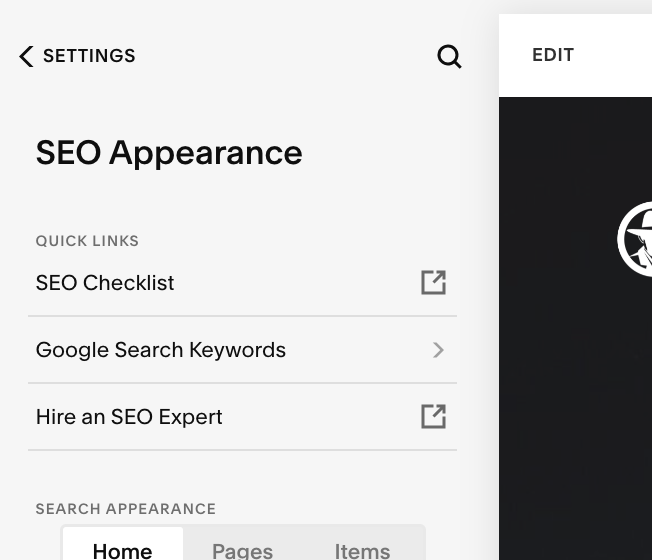
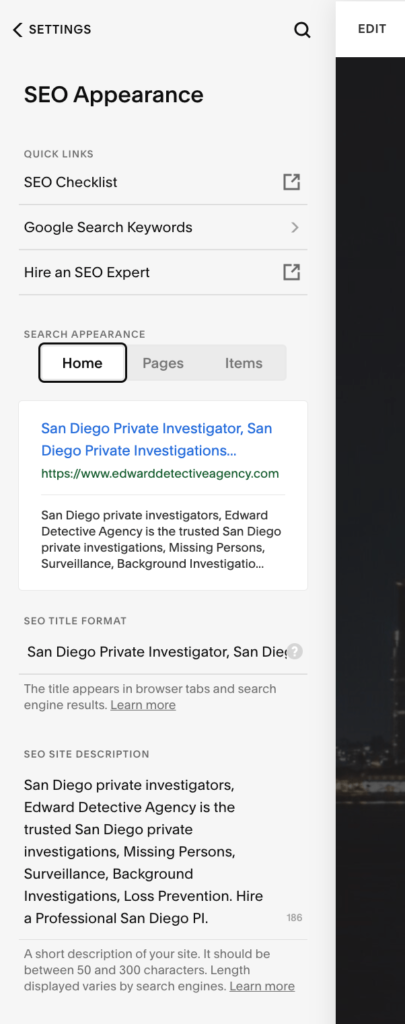
home > settings > SEO Appearance > ( get editing the meta titles and descriptions as shown below:)
Click the editable text below on the SEO TITLE FORMAT
Keyword research for Squarespace websites
Before you start optimizing your Squarespace website, it’s crucial to conduct thorough keyword research. Keywords are the search terms that users enter into search engines when looking for information or products related to your business. By targeting the right keywords, you can attract highly relevant traffic to your website and increase your chances of conversion.
1. Identify your target audience: Start by understanding who your target audience is and what they’re searching for. Consider their demographics, interests, and pain points. This will help you identify the keywords that are most relevant to your business.
2. Brainstorm seed keywords: Seed keywords are the basic terms related to your business. Think about the products, services, or topics that are central to your website. Brainstorm a list of seed keywords that you can later expand upon.
3. Use keyword research tools: There are several keyword research tools available that can help you find relevant keywords with high search volumes and low competition. Some popular tools include Google Keyword Planner, SEMrush, and Ahrefs. Enter your seed keywords into these tools to generate a list of related keywords.
4. Analyze keyword metrics: When conducting keyword research, pay attention to metrics such as search volume, competition level, and keyword difficulty. Search volume indicates how many people are searching for a particular keyword, while competition level and keyword difficulty determine how difficult it is to rank for that keyword. Choose keywords that have a decent search volume but relatively low competition.
By conducting thorough keyword research, you can identify the most relevant keywords for your Squarespace website and optimize your content accordingly. Remember to target a mix of short-tail and long-tail keywords to capture a wide range of search queries. With your keywords in hand, it’s time to optimize your Squarespace website’s on-page elements.
On-page optimization for Squarespace websites
On-page optimization refers to the process of optimizing individual web pages to improve their visibility in search engine results. By optimizing your Squarespace website’s on-page elements, you can make it easier for search engines to understand your content and rank it higher for relevant search queries. Here are some key on-page optimization strategies for Squarespace websites:
1. Optimize page titles and meta descriptions: As mentioned earlier, page titles and meta descriptions play a crucial role in SEO. Make sure to include your target keywords in page titles and craft compelling meta descriptions that encourage users to click on your website.
2. Optimize URL structures: Squarespace automatically generates URLs based on the page title. However, you can customize the URL to make it more search engine-friendly. Use descriptive words, separate them with hyphens, and keep the URL concise and readable.
3. Optimize heading tags: Heading tags (H1, H2, H3, etc.) help search engines understand the structure and hierarchy of your content. Use your target keywords in heading tags to indicate the relevance of the content to search queries.
4. Optimize image alt tags: Alt tags are used to describe the content of images to search engines. Use descriptive alt tags that include your target keywords to improve the visibility of your images in image search results.
5. Optimize content for target keywords: When creating content for your Squarespace website, ensure that it is optimized for your target keywords. Include your keywords naturally in the content, but avoid keyword stuffing, which can negatively impact your SEO.
6. Improve page loading speed: Page loading speed is an important ranking factor for search engines. Optimize your Squarespace website’s performance by compressing images, minifying CSS and JavaScript files, and enabling browser caching.
By implementing these on-page optimization strategies, you can improve your Squarespace website’s visibility in search engine results and increase its chances of attracting organic traffic. However, on-page optimization is just one piece of the puzzle. To truly supercharge your Squarespace website’s SEO, you need to optimize its structure and navigation.
Optimizing Squarespace website structure and navigation
The structure and navigation of your Squarespace website play a crucial role in both user experience and SEO. A well-organized website structure makes it easier for search engines to crawl and index your site, while user-friendly navigation ensures that visitors can find the information they need quickly and easily. Here’s how you can optimize your Squarespace website’s structure and navigation for better SEO performance:
1. Create a logical site structure: Start by organizing your website into logical categories and subcategories. This will help search engines understand the hierarchy of your content and index it more efficiently. Use descriptive names for each category and subcategory to make it clear what content they contain.
2. Use breadcrumbs: Breadcrumbs are navigational aids that show users the path they have taken to arrive at a particular page. They also provide additional context to search engines, helping them understand the structure of your website. Enable breadcrumbs on your Squarespace website to improve both user experience and SEO.
3. Optimize internal linking: Internal linking refers to linking to other pages within your own website. It helps establish a hierarchical structure and distributes authority and ranking power throughout your website. When creating new content, look for opportunities to link to relevant existing pages on your Squarespace website.
4. Create a user-friendly navigation menu: Your Squarespace website’s navigation menu should be intuitive and easy to use. Ensure that it is easy for visitors to find the information they are looking for. Use clear and descriptive labels for each menu item and consider adding a search bar to make it even easier for users to find what they need.
By optimizing your Squarespace website’s structure and navigation, you can improve its crawlability, indexability, and user experience. This, in turn, can have a positive impact on your website’s SEO performance. Now that we’ve covered the foundational aspects of Squarespace website optimization, let’s move on to creating high-quality and SEO-friendly content.
Creating high-quality and SEO-friendly content for Squarespace websites
Content is king when it comes to SEO. Creating high-quality and SEO-friendly content is essential for attracting organic traffic and keeping visitors engaged on your Squarespace website. Here are some strategies to ensure that your content resonates with your target audience and ranks well in search engine results:
1. Understand your target audience: Before creating content, it’s important to understand who your target audience is and what they’re looking for. Conduct audience research to identify their needs, interests, and pain points. This will help you create content that is relevant and valuable to them.
2. Conduct keyword research: We’ve discussed keyword research earlier, but it’s worth repeating. Conduct thorough keyword research to identify the keywords that are most relevant to your content. Incorporate these keywords naturally into your content to optimize it for search engines.
3. Create unique and valuable content: Your Squarespace website’s content should be unique, valuable, and informative. Avoid duplicating content from other websites, as this can negatively impact your SEO. Instead, focus on creating original content that provides value to your target audience.
4. Use engaging headings and subheadings: Headings and subheadings not only make your content more scannable for users but also help search engines understand the structure of your content. Use your target keywords naturally in headings and subheadings to indicate the relevance of your content to search queries.
5. Write for humans, not just search engines: While it’s important to optimize your content for search engines, it’s equally important to write for humans. Focus on creating content that is engaging, informative, and easy to read. Use a conversational tone and avoid keyword stuffing or other black hat SEO techniques.
6. Incorporate multimedia elements: Including images, videos, infographics, and other multimedia elements in your content can make it more engaging and shareable. Optimize these elements for SEO by using descriptive file names, alt tags, and captions that include your target keywords.
By creating high-quality and SEO-friendly content, you can attract organic traffic, keep visitors engaged, and establish your Squarespace website as an authoritative source in your niche. However, content creation is just one part of the equation. To maximize your Squarespace website’s SEO potential, it’s important to leverage social media and build backlinks.
Leveraging social media for Squarespace website SEO
Social media can be a powerful tool for driving traffic to your Squarespace website and improving its SEO performance. By leveraging social media platforms effectively, you can increase your website’s visibility, attract more visitors, and boost your search engine rankings. Here are some strategies to help you leverage social media for Squarespace website SEO:
1. Choose the right social media platforms: Not all social media platforms are created equal. Identify the platforms that are most popular among your target audience and focus your efforts on those platforms. For example, if you’re targeting a younger audience, platforms like Instagram and TikTok may be more effective.
2. Optimize your social media profiles: Optimize your social media profiles by including relevant keywords and a link to your Squarespace website. Use consistent branding across all your social media profiles to maintain a cohesive online presence.
3. Share your Squarespace website content: Regularly share your Squarespace website’s content on social media to drive traffic and increase its visibility. Craft engaging captions that encourage users to click on your links and share your content with their followers.
4. Engage with your audience: Social media is not just about broadcasting your content; it’s also about engaging with your audience. Respond to comments, answer questions, and participate in relevant conversations. This will help you build relationships with your followers and establish your authority in your niche.
5. Collaborate with influencers: Influencer marketing can be a powerful way to increase your Squarespace website’s visibility and attract new visitors. Identify influencers in your niche who have a significant following and collaborate with them to promote your website and content.
6. Monitor social media analytics: Keep track of your social media performance using analytics tools provided by each platform. Monitor metrics such as reach, engagement, and referral traffic to understand what content resonates with your audience and adjust your social media strategy accordingly.
By leveraging social media effectively, you can drive more traffic to your Squarespace website, increase its visibility, and improve its search engine rankings. However, social media alone is not enough to boost your website’s SEO. Building backlinks and improving domain authority are equally important.
Building backlinks and improving domain authority for Squarespace websites
Backlinks are links from other websites that point to your Squarespace website. They are an important ranking factor for search engines and can significantly impact your website’s visibility and authority. By building high-quality backlinks, you can improve your Squarespace website’s search engine rankings and attract more organic traffic. Here are some strategies to help you build backlinks and improve domain authority for your Squarespace website:
- Create High-Quality Content: Develop compelling, informative, and shareable content that naturally attracts backlinks. The better your content, the more likely others will link to it.
- Guest Blogging: Write high-quality articles for reputable websites in your niche and include a link back to your Squarespace website in your author bio or within the content itself. Ensure the guest blogging opportunities are relevant and authoritative.
- Broken Link Building: Identify broken links on other websites in your niche and reach out to the site owners to suggest replacing the broken link with a link to relevant content on your Squarespace website. Tools like Check My Links or Broken Link Checker can help you find broken links.
- Resource Link Building: Create valuable resources, such as guides, tutorials, or infographics, and promote them to relevant websites, blogs, or forums. If your resources are valuable and relevant, they may link to them as a helpful reference.
- Outreach and Relationship Building: Identify influential bloggers, journalists, or website owners in your industry and reach out to them. Introduce yourself, provide value, and suggest potential collaboration opportunities or content they might find useful to link to.
- Social Media Promotion: Share your content on social media platforms to increase its visibility and encourage others to link to it. Engage with your audience and build relationships with influencers who may amplify your content.
- Directory and Local Listings: Submit your Squarespace website to relevant directories and local business listings. Ensure you choose reputable directories that are specific to your industry or location.
- Internal Linking: Enhance the internal linking structure of your Squarespace website by linking relevant pages to each other. This helps search engines understand the hierarchy and importance of your content, boosting overall domain authority.
- Monitor Backlinks: Regularly monitor your backlink profile using tools like Ahrefs, Moz, or SEMrush. Identify toxic or low-quality backlinks and disavow them to maintain a healthy backlink profile.
- Consistency and Patience: Building backlinks and improving domain authority is a long-term process. Be consistent in your efforts, create quality content consistently, and be patient as it takes time to see results.
Remember, it’s crucial to focus on building natural and high-quality backlinks rather than resorting to spammy or black-hat techniques. Building a strong backlink profile and improving domain authority for your Squarespace website requires a combination of effective content creation, relationship building, and ongoing optimization efforts.
Do I prefer Squarespace websites over WordPress? No way. Do I understand how to optimize a Squarespace website? Yes, absolutely. Overall, I prefer working on WordPress Websites, but I don’t mind the simplicity and “cookie-cutter” vibes of a Squarespace site. They’re perfect for non technical people that want to design a simple website. It lets you easily and gracefully add content without it looking to cluttered and crazy.
If you need help with Squarespace SEO services, I’m your gal here in San Diego that can help.
If you’re looking for a local SEO San Diego loves. 👋 Hello, I’m Jen and I’m very nice. (did I make you chuckle?)
I love to help my fellow San Diego business owners rank higher in Google and conquer the world on click at a time.

Jun 15, 2023 | SEO, SEO Tips
If you’ve been researching SEO for a while, you’ve probably come across the term “LSI keywords.”
For years, SEO articles — including an older version of this very article — recommended finding LSI keywords and adding them throughout your content to help Google understand what your page was about.
Today, I would give you different advice.
LSI keywords are not something you need to optimize for.
Google has specifically stated that it does not have a concept of “LSI keywords.” The idea became popular in the SEO industry as a way of explaining how search engines understand related words and topics, but it oversimplifies how modern search actually works.
That doesn’t mean related words, context or comprehensive content don’t matter.
They absolutely do.
But instead of trying to find a list of “LSI keywords” to sprinkle throughout a page, I recommend focusing on search intent, topical relevance, entities, context and genuinely useful information.
Here’s what that means.
What Does LSI Mean?
LSI stands for Latent Semantic Indexing.
It is an information-retrieval technique developed decades ago to identify relationships between words and concepts within collections of documents.
Somewhere along the way, the SEO industry turned this into the idea of “LSI keywords.”
The theory was that Google could better understand your primary keyword if you also included semantically related words throughout your content.
For example, if your main keyword were:
roofing company
An SEO tool might suggest related terms such as:
- roof repair
- roofing contractor
- shingles
- roof inspection
- roof replacement
- roof leaks
- metal roofing
- residential roofing
Those terms certainly make sense on a roofing website.
But they’re not valuable because they’re some special category of LSI keywords.
They’re valuable because they’re naturally related to the subject.
That’s an important distinction.
Does Google Use LSI Keywords?
No — not in the way the SEO industry traditionally described them.
Google has publicly stated that it does not have a concept called LSI keywords.
So you don’t need an LSI keyword tool.
You don’t need to calculate LSI keyword density.
And you don’t need to add specific related phrases to your page simply because an SEO tool tells you they’re semantically connected to your primary keyword.
Modern search engines have become considerably more sophisticated at understanding language, context and what a page is actually about.
That’s why my approach to content today is much different than it was years ago.
Why Did LSI Keywords Become So Popular in SEO?
Because there was a real SEO concept hiding underneath the bad terminology.
Context matters.
Imagine I publish a page containing the word:
Apple
Am I talking about the fruit?
Apple Inc.?
Apple computers?
Apple stock?
An apple orchard?
The surrounding content helps clarify the subject.
If the page discusses iPhones, MacBooks, iOS and technology, its meaning becomes fairly obvious.
If it discusses orchards, varieties, harvesting and fruit trees, we’re talking about something completely different.
That’s essentially what SEOs were trying to describe when they talked about LSI keywords.
The mistake was assuming there was a specific Google SEO mechanism called LSI keywords that website owners needed to optimize for.
There isn’t.
What Should You Focus on Instead of LSI Keywords?
This is where things get much more useful for a business owner.
Rather than asking:
“Which related keywords should I add to this page?”
I prefer asking:
“Have I created the best page I reasonably can about this subject for the person searching for it?”
That changes the entire content strategy.
1. Search Intent
First, understand why someone is searching.
Someone searching:
“roof replacement cost San Diego”
probably wants very different information from someone searching:
“emergency roof leak repair near me.”
The words may relate to the same general industry, but the intent is different.
Understanding search intent helps you create the right page for the right query instead of simply trying to make one page rank for every variation imaginable.
2. Topical Relevance
If you’re creating a page about roof replacement, you naturally might discuss materials, lifespan, costs, warning signs, installation, permits and what homeowners should expect.
You’re not including these topics because they’re LSI keywords.
You’re including them because they help answer the reader’s questions about roof replacement.
That’s also part of building topical authority across a website.
The more clearly your website demonstrates genuine expertise around the subjects relevant to your business, the easier it becomes for both users and search engines to understand what your business is actually known for.
3. Entities and Context
Modern search is about more than matching individual words.
Search engines need to understand things and their relationships.
For a local business, that could include:
- your business
- your services
- the owner or providers
- your industry
- your location
- your service areas
- relevant organizations
- products or services associated with the business
This is one reason I put so much emphasis on clearly communicating who you are, what you do and where you do it throughout a business website.
For local businesses, those relationships can also reinforce geographic relevance.
4. Natural Language
Write like a knowledgeable human being.
You don’t need to force ten variations of the same keyword into an article.
If you’re genuinely knowledgeable about a subject and explain it thoroughly, many relevant terms and concepts will appear naturally.
That doesn’t mean keywords have disappeared from SEO.
It means we’re using them to understand what people want instead of trying to hit an arbitrary number of repetitions.
Here’s How I Would Optimize the Roofing Example Today
Let’s go back to our roofing company.
Years ago, an SEO might create a list like:
roofing company, roofing contractor, roof repair, roof installation, roofing services, residential roofing…
And then try to make sure those phrases appeared throughout the page.
I wouldn’t approach it that way today.
Instead, I’d ask:
What does a potential roofing customer actually need to know?
Maybe the page should explain:
What types of roofs does the company repair?
What areas does it serve?
Does it handle residential and commercial roofing?
What are the signs that a roof needs replacement?
What roofing materials does it work with?
What happens during an inspection?
Who performs the work?
How much experience does the company have?
What should someone do if their roof is leaking?
Answer those questions well and you’ll naturally use terminology associated with roofing.
More importantly, you’ll have created something useful to the potential customer.
That’s the goal.
Don’t Replace LSI Keywords With Another SEO Checklist
This is another mistake I see.
SEO changes, an old tactic disappears, and marketers immediately look for a new checklist:
“Use X number of entities.”
“Mention these 25 semantic terms.”
“Add exactly this many related keywords.”
“Write 2,000 words because the competitors did.”
That’s not how I approach SEO.
There’s nothing wrong with using keyword research and competitive analysis to discover topics you’ve overlooked.
I do it all the time.
In fact, finding the right keywords is still an important part of my SEO process. The difference is that I use keyword data to understand what people are searching for and what they actually want — not as a checklist of phrases that need to be stuffed into a page.
SEO tools provide data.
They shouldn’t write your strategy for you.
Are Keywords Still Important for SEO?
Yes.
I don’t want the takeaway from this article to be that keywords don’t matter anymore.
They do.
Keywords can tell us a tremendous amount about what people are searching for, the language customers use, the questions they have and what kind of content we may need to create.
I still perform keyword research.
I still map important keywords to pages.
I still pay attention to titles, headings, page topics and search intent.
What I don’t do is treat content like a mathematical formula where mentioning a certain combination of words automatically earns better rankings.
Modern SEO requires much more context than that.
LSI Keywords vs. Topical Authority
This is probably the biggest evolution in how I think about this subject.
Instead of trying to make one page contain every related keyword, think about whether your website demonstrates genuine depth around the subjects that matter to your business.
For example, an SEO website might have separate useful resources covering:
- keyword research
- search intent
- internal linking
- local SEO
- Google Business Profile optimization
- technical SEO
- content strategy
- AI search
Each resource serves a specific purpose.
Together, they help users explore the subject in greater depth.
That’s much closer to how I think about topical authority today.
If you’re unfamiliar with the concept, I recommend reading my guide, What Is Topical Authority? A Simple Guide for Business Owners, next.
SEO Changes — And Good SEO Advice Should Change With It
There’s another reason I wanted to update this article.
SEO doesn’t stand still.
I’ve worked in this industry for more than a decade, and some of the tactics that were commonly recommended years ago aren’t tactics I would recommend to a client today.
That’s normal.
Google changes.
Search behavior changes.
Technology changes.
And now AI-powered search is changing the way people discover information and businesses again.
Being good at SEO isn’t about finding one formula and using it forever.
It’s about understanding what’s changing while continuing to focus on the fundamentals that actually matter.
This is also how I approach San Diego SEO for my own clients. I’m much more interested in building a website that clearly demonstrates what a business does, who it serves and why it deserves visibility than chasing outdated SEO tricks.
The Bottom Line: You Don’t Need LSI Keywords
If someone tells you that you need to add LSI keywords to your website to rank on Google, you can safely cross that task off your SEO checklist.
LSI keywords aren’t an SEO strategy.
Instead, focus on:
Search intent.
Topical relevance.
Context.
Clear language.
Useful information.
Genuine expertise.
Keywords still have an important role in SEO, but they should help you understand your customers and organize your website — not dictate every word you write.
SEO has evolved considerably since I first started doing this work, and that’s one of the reasons I periodically revisit older advice on my own website.
Sometimes the best SEO improvement isn’t publishing another article.
It’s making sure the information you’ve already published still deserves to be trusted.
Want to Know What’s Actually Holding Your Website Back?
I help businesses throughout San Diego improve their visibility in Google and adapt their SEO strategies as search continues to evolve.
If you’re wondering whether outdated SEO tactics, weak content, technical problems or your overall website strategy are limiting your rankings, I’ll take a look.
Get a Free SEO Analysis