
AI-powered search has created a whole new collection of SEO terms, tools and proposed standards.
One of them is llms.txt.
I recently enabled the llms.txt feature through Yoast SEO on my own WordPress website, and it’s surprisingly simple to set up.
But there’s an important distinction I want to make before showing you how:
Enabling llms.txt is not a proven way to rank in ChatGPT, Google AI Overviews or other AI search experiences.
I wouldn’t sell it that way.
Instead, I view llms.txt as an emerging method of providing AI systems and agents with a cleaner guide to important information on a website.
Here’s what it is, what Yoast actually does and how I set it up.
What Is llms.txt?
llms.txt is a proposed standard for publishing an LLM-friendly file on a website.
The concept was introduced as a way to provide language models and AI agents with concise information about a site and links to useful resources.
It’s typically placed at:
yourwebsite.com/llms.txt
The file uses Markdown, which provides a relatively clean, text-based format.
I wouldn’t describe llms.txt as an AI sitemap, because that can imply it has the same established role that XML sitemaps have with search engines.
It doesn’t.
A better way to think about it is as a suggested guide to useful website content for systems that choose to use it.
The llms.txt proposal itself describes the file as a way to provide LLM-friendly information and links to more detailed resources. llms-txt
Is llms.txt an Official AI Search Standard?
Not in the same sense that robots.txt or XML sitemaps are established web standards used by major search engines.
That’s an important limitation.
The llms.txt format has gained adoption, and the proposal was updated in 2026 as more websites and tools began using it. llms-txt
However, Yoast has also noted that major LLM providers have not officially adopted llms.txt as a standard part of their crawler behavior. Yoast
So when a client asks me:
“Will llms.txt make ChatGPT recommend my business?”
My answer is:
No one should promise you that.
That’s not what this file does.
Why Did I Enable llms.txt Anyway?
Because it’s easy to implement through Yoast, it doesn’t require me to restructure my website, and I can review what the file contains.
I see it as an experimental and low-effort addition, not a major SEO strategy.
That’s a very different mindset from:
“Turn this on and your AI rankings will improve.”
I don’t have evidence to make that claim.
My core SEO work still goes into things such as:
quality content
clear services
technical SEO
internal linking
site architecture
original experience
local SEO
brand authority
and making the business easy to understand across the web.
Those are far more important to me than whether a site has an llms.txt file.
How to Enable llms.txt in Yoast SEO
This is the part that’s genuinely easy.
I enabled the feature directly inside WordPress using Yoast SEO.
Step 1: Open Yoast SEO
Log into your WordPress dashboard.
Go to:
Yoast SEO → Settings
Step 2: Go to Site Features
Inside Yoast SEO Settings, open Site Features.
Yoast currently places its llms.txt option within the AI tools section. Yoast
Step 3: Find llms.txt
Scroll to the AI tools area until you see the llms.txt setting.
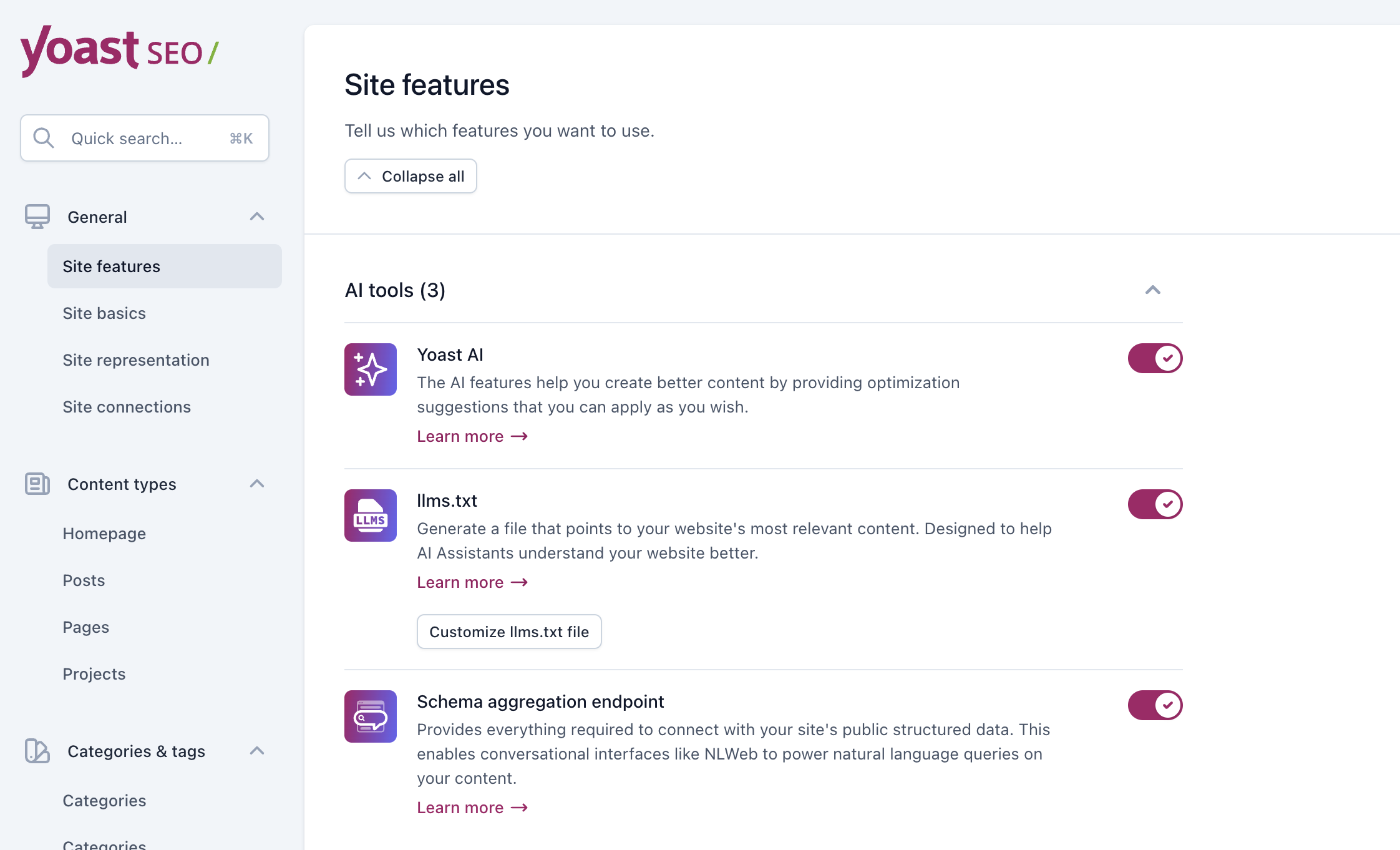
This is what the llms.txt setting looks like inside my own Yoast SEO dashboard.
That screenshot is useful because readers can see exactly what they’re looking for.
Step 4: Enable llms.txt
Toggle the llms.txt option on.
Then click:
Save changes
Yoast will generate the llms.txt file for the website. Yoast
Step 5: Review Your llms.txt File
I wouldn’t simply turn it on and forget about it.
Look at the generated file.
Ask:
Does this accurately represent my website?
Are the pages useful?
Are important pages missing?
Is outdated or low-value content being highlighted?
Yoast’s current implementation can automatically select content, and it also offers manual page selection for more control. Yoast
That’s particularly useful on a large site.
How Does Yoast Choose Pages for llms.txt?
This is one of the most useful details to understand.
According to Yoast’s current technical documentation, its automatic system considers recently updated content and gives priority to cornerstone content. Yoast also allows manual page selection. Yoast developer portal
The generated file is updated weekly. Yoast developer portal
For a website with hundreds of URLs, I would definitely inspect what Yoast selected rather than assuming automatic selection perfectly represents the business.
That’s especially relevant to my own site because I’ve spent a lot of time consolidating older SEO articles and giving important topics clearer homes.
I don’t want an experimental AI-discovery file emphasizing pages I no longer consider important.
Automatic vs. Manual Selection
Yoast now gives website owners more control over the pages included in llms.txt.
You can allow Yoast to select content automatically or choose pages manually. Yoast
For a small website with a very clean structure, automatic selection may be perfectly reasonable.
For a larger website, I’d at least review the manual option.
If I were choosing pages myself, I’d prioritize resources that accurately explain:
who the business is
what it provides
important services
important expertise
and genuinely useful cornerstone information.
I wouldn’t fill the file with every article I’ve ever published.
llms.txt vs. robots.txt
These files have very different purposes.
robots.txt provides crawler directives about access to parts of a website.
llms.txt is intended to provide useful information and references to systems that choose to consume it.
So I would not think of llms.txt as a replacement for robots.txt.
It isn’t.
And turning on llms.txt doesn’t mean you’ve granted or blocked AI crawlers from accessing your website.
Those are separate issues.
llms.txt vs. XML Sitemaps
They’re also not the same thing.
An XML sitemap is an established search-engine discovery mechanism that provides information about URLs on a website.
llms.txt is an emerging proposal intended to provide a more curated, LLM-friendly representation of important content.
That’s why I avoid calling llms.txt an “AI sitemap.”
The analogy is convenient, but technically it gives the file more authority than it currently has.
Does llms.txt Improve Google Rankings?
There is no evidence I would rely on to claim that enabling llms.txt improves traditional Google rankings.
I wouldn’t expect a business to jump from position #8 to position #2 because someone flipped this Yoast toggle.
That’s not how I approach SEO.
Does llms.txt Improve AI Visibility?
This is more complicated.
The purpose of llms.txt is to make useful website information easier for compatible systems to find and consume.
But that doesn’t mean enabling the file guarantees that ChatGPT, Gemini, Claude, Perplexity or Google will use it when answering a particular query.
And it certainly doesn’t guarantee that those systems will recommend your business.
That’s why I consider llms.txt an experimental supporting feature, not an AI SEO strategy by itself.
If you’re interested in the much bigger picture, read my guide on how to get your business recommended by ChatGPT and AI search.
llms.txt Doesn’t Replace Good Website Structure
This is especially important.
You can’t take a confusing website with thin content, overlapping pages and unclear services, enable llms.txt and suddenly make everything understandable.
The underlying website still matters.
I would first focus on:
clear page intent
logical architecture
strong service pages
useful content
internal linking
technical accessibility
and removing unnecessary duplication.
I explain this approach in more detail in Why Structured Content Matters for SEO.
llms.txt should sit on top of a well-organized website, not compensate for a poorly organized one.
What About Entities and Semantic SEO?
The same principle applies to entities.
A business should clearly communicate:
who it is
what it does
who is associated with it
where it operates
what services it provides
and how those concepts relate.
That’s a broader semantic SEO issue—not something llms.txt magically creates.
I explain that distinction in my guide to semantic entities in SEO.
Should You Enable llms.txt in Yoast?
For most WordPress websites already using Yoast SEO, I think it’s reasonable to enable it as long as you understand what it is and what it isn’t.
The feature is easy to implement.
You can review the output.
You can turn it off.
And Yoast now provides more control over which pages are included.
But I wouldn’t spend hours obsessing over it.
And I definitely wouldn’t prioritize llms.txt over fixing important SEO problems on the actual website.
If I had to choose between:
fixing weak service pages
or
perfecting an llms.txt file
I’m fixing the service pages.
If I had to choose between:
cleaning up hundreds of overlapping URLs
or
adding llms.txt
I’m cleaning up the URLs.
That’s where the larger SEO opportunity usually is.
What I Recommend After Enabling It
Once you’ve turned it on:
Check the file.
Make sure it exists and loads properly.
Review the selected pages.
Make sure they represent content you actually want emphasized.
Consider manual selection.
Especially if you have a large or older website.
Keep your website itself organized.
Don’t expect llms.txt to solve content architecture problems.
Continue normal SEO.
Don’t abandon traditional search optimization because a new AI-related feature appeared.
Watch how the standard develops.
The technology and adoption around AI discovery are still evolving.
That’s exactly why I think it’s worth understanding—but not overhyping.
AI Search Requires More Than a Text File
AI search visibility is much bigger than llms.txt.
If I want a business to become easier to find, understand and potentially reference across AI-powered search experiences, I’m looking at the entire digital presence.
That includes:
website content
technical SEO
brand information
entities
third-party mentions
local search presence
original expertise
content structure
and traditional search visibility.
That’s why I treat llms.txt as one tiny technical component rather than the strategy itself.
If you’re working on the broader picture, learn more about my AI SEO services in San Diego.
And if you’re looking for a San Diego SEO company to review both your traditional and AI search visibility, that’s exactly the kind of work I do.
Final Thoughts
I enabled llms.txt on my own website because I want to understand emerging search technology by actually using it—not just writing about it.
But experimentation and evidence are two different things.
Right now, I see llms.txt as an interesting emerging standard and an easy feature for Yoast users to test.
I don’t see it as a ranking factor.
I don’t see it as a shortcut to ChatGPT recommendations.
And I wouldn’t build an AI SEO strategy around it.
Enable it if it makes sense for your site.
Review what it contains.
Then get back to the SEO work that matters most.
Get found. Get trusted. Get chosen.
— Jen Ruhman
San Diego SEO Expert
Frequently Asked Questions
What is llms.txt?
llms.txt is a proposed Markdown-based format designed to provide language models and AI agents with concise information about a website and links to useful resources.
Is llms.txt the same as robots.txt?
No. robots.txt provides crawler-access directives. llms.txt is intended to provide useful information and content references for compatible AI systems. It doesn’t replace robots.txt.
Is llms.txt an AI sitemap?
I wouldn’t technically call it an AI sitemap. XML sitemaps are established discovery mechanisms for search engines. llms.txt is an emerging proposal for providing AI-friendly information and curated content references.
Does llms.txt improve Google rankings?
There is no evidence that enabling llms.txt directly improves traditional Google rankings.
Will llms.txt make ChatGPT recommend my business?
There is no guarantee that ChatGPT or another AI system will use your llms.txt file or recommend your business because you have one.
How do I enable llms.txt in Yoast SEO?
In WordPress, go to Yoast SEO → Settings → Site Features → AI tools → llms.txt, enable the feature and save your changes. Yoast will generate the file automatically. Yoast
Can I choose which pages Yoast includes?
Yes. Yoast currently offers automatic selection as well as manual page selection so you can have more control over which pages appear in the file. Yoast
Should I enable llms.txt?
If you’re already using Yoast SEO, I think it’s a reasonable low-effort experiment. Just don’t treat it as a replacement for good content, technical SEO, internal linking, site architecture or traditional search optimization.